Analog current output
The analog current output is a dynamic current flow used to indicate to a remote device the displayed
oxygen concentration during normal analyzer operation and system maintenance. The analog current
output follows the oxygen readout displayed on the 7-segment LED display during all system and user
modes except for user setup. For a complete listing of output levels by analyzer range, refer to Appendix
E – range/output chart.
The minimum scale deflection may be set to either 0 mA or 4 mA. Full-scale is fixed at 20 mA. The
analog current output is scaled according to the analyzer’s selected range, and must be used in
conjunction with the range ID voltage when the analyzer is configured for auto-ranging (section 1.4.8).
Range ID output
The Model 7100E can be configured by the user to automatically switch its measurement range, based on
the concentration of oxygen measured while in-service, to provide the most accurate, and highest
resolution outputs at all times. For a complete listing of analyzer ranges, refer to Appendix E –
range/output chart.
Remote auxiliary devices designed to interpret the Model 7100E analog outputs over multiple output
range scales require an indication of the analyzer’s selected range at all times for accurate scaling. The
Model 7100E features a 0-10 VDC Auto-Range Identification output. The range ID output is used in
conjunction with the analog voltage and analog current outputs when auto-ranging is used. It provides an
indication of the Analog outputs’ selected full-scale. There are four range ID voltage levels used in the
7100E to correspond with its four output ranges (Appendix E – range / output chart).
Service port
The service port provides a user-friendly means of digital communications with the Model 7100E
analyzer. Through this port, the unit may be configured, calibrated, and queried for most functions. The
RS-232 port may also be programmed to send out information on a timed basis for users who prefer to
use digital instead of analog interfacing with the analyzer. In addition, the service port may be used with a
PC based computer (such as a portable notebook computer) over a standard bi-directional RS-232 serial
interface.
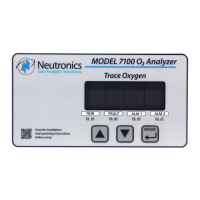
2.5 Control panel user interface
The “UP” pushbutton
The “UP” pushbutton can be used to program the Model 7100E via the control panel. This momentary
push-button soft key is used to enter increasing values. Its function is menu-driven.
The “DOWN” pushbutton
The “DOWN” pushbutton can be used to program the Model 7100E via the control panel. This
momentary push-button soft key is used to enter decreasing values. Its function is menu-driven.
The “MODE” pushbutton
The “MODE” pushbutton can be used to program the Model 7100E via the control panel. This momentary
push-button soft key is used to navigate the operational modes available through the control panel. Its
function is menu-driven.


 To Next Page