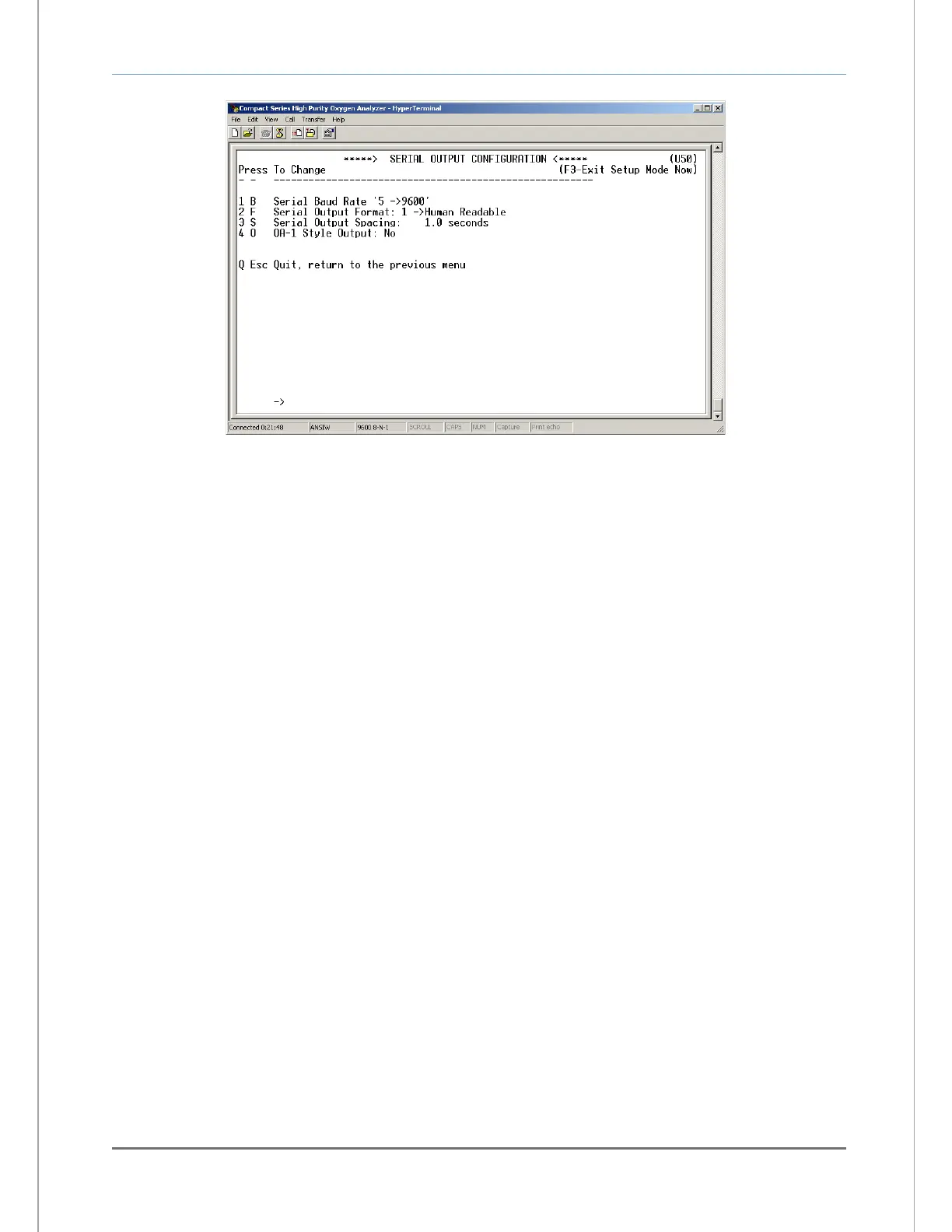
5.1.2.12.1 Baud rate
This menu sets the RS-232 baud rate. The baud rate can be set to 1 (300BPS), 2 (1200BPS), 3
(2400BPS), 4 (4800BPS), 5 (9600BPS), 6 (19200BPS) or 7 (38400BPS). This menu is accessed
from the RS-232 Serial Setup menu by typing “1” or “B” on the RS-232 terminal.
5.1.2.12.2 Automatic serial output format
This menu sets the format of the automatic timed RS-232 serial output (section 4.1.2.4). The timed
serial output format may be set to 0 (Output on Request), 1 (Human Readable), 2 (Machine Code),
3 (Machine Code with Checksum), 4 (Tab delimited) 5 (OA1 style; not used). This menu is
accessed from the RS-232 Serial Setup menu by typing “2” or “F” on the RS-232 terminal.
5.1.2.12.3 Serial output spacing
This menu sets the rate at which the RS-232 sends complete ASCII data packets to the Service
Port. The send rate can be set anywhere from 1 to 86,400 seconds (24-hours). This menu is
accessed from the RS-232 Serial Setup menu by typing “3” or “S” on the RS-232 terminal.
5.1.2.12.4 OA1 style output – NOT USED
5.1.2.13 Alarm setpoint lockout
If the Alarm Setpoint Lockout is enabled, the user may not change, but only view the Alarm-1 and Alarm-2
level settings. The Alarm Lockout setting is accessed from the Setup Main Menu by typing “6” on the RS-
232 terminal. To navigate backwards, use the <Esc> or “Q” key on the RS-232 terminal.
5.1.2.14 Gas calibration lockout
If the Gas Calibration Lockout is enabled, the user may not change, but only view the Gas Calibration
value. The Gas Calibration Lockout setting is accessed from the Setup Main Menu by typing “7” on the
RS-232 terminal. To navigate backwards, use the <Esc> or “Q” key on the RS-232 terminal.


 To Next Page