Mill Functions
Newall Measurement Systems
32
POLAR- XY
P 22.360
A
-15.000
Pressing the [ POLAR] key converts the display from
Cartesian into Polar mode.
EXAMPLE:
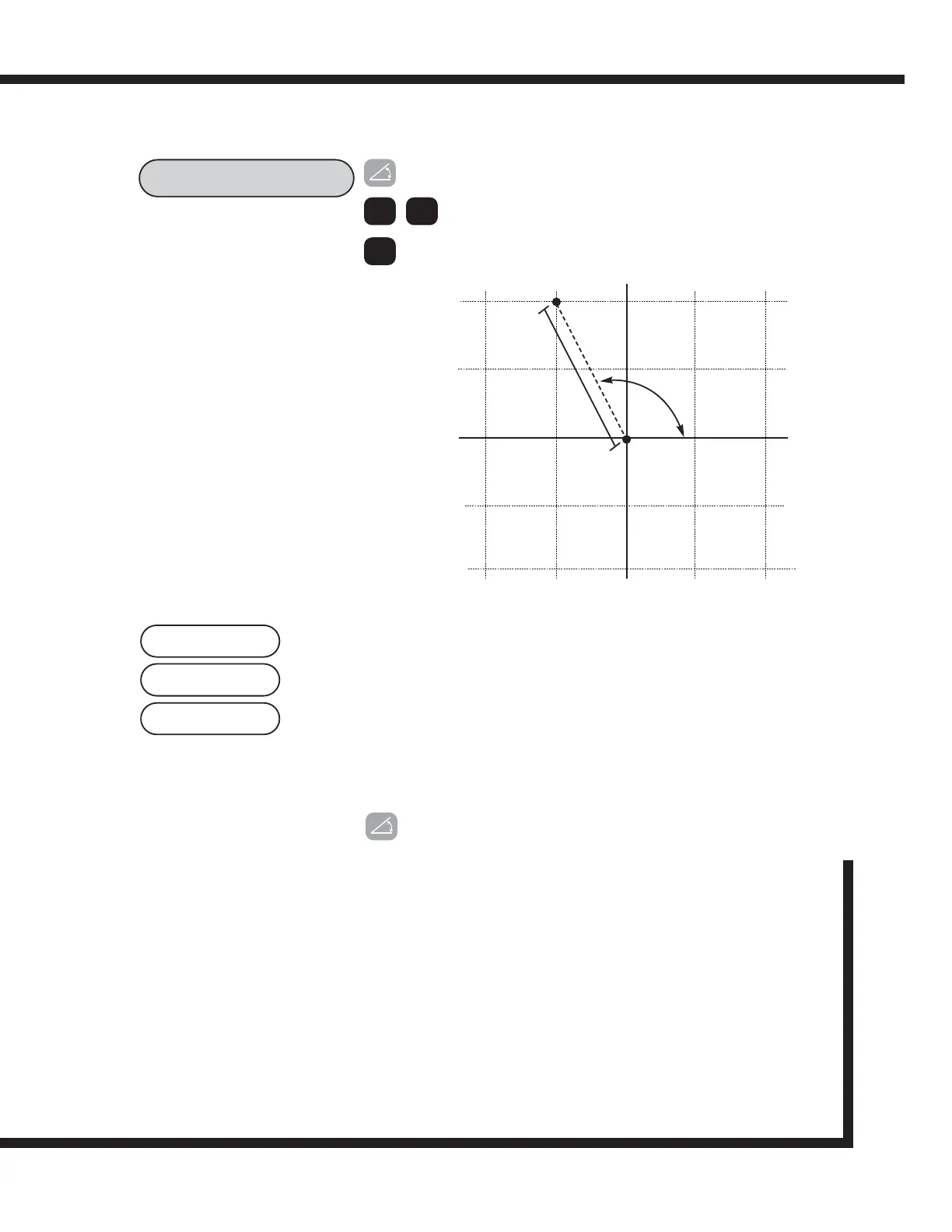
Diagram showing both Cartesian and Polar Plot
Press the polar key to switch to Polar mode.
Use the arrow keys to scroll between the
available planes.
Note: Only (X,Y) is available on the 2 axis
version.
< >
ent
The letter P appears in the left most display segment. This
is the argument or length of the vector. See the diagram
for clarification.
The letter A appears in the second axis display. This refers
to the angle of the co-ordinates. The angle is displayed to
three decimal places.
As the plane X,Y was selected the Z display remains
unchanged.
Pressing the Polar key again returns the display to
Cartesian co-ordinates.
NOTE: Pressing the [ Xo ] key in Polar mode will
reset the argument to zero, i.e. X and Y both
zero in cartesian co-ordinates.
Options: POLAR-XY
POLAR-XZ
POLAR-YZ
(0,0)
-10
-20
20
10
10
20
-10
-20
90
O
180
O
270
O
360
O
22.360
(-10,20)
116.565
O



 To Next Page