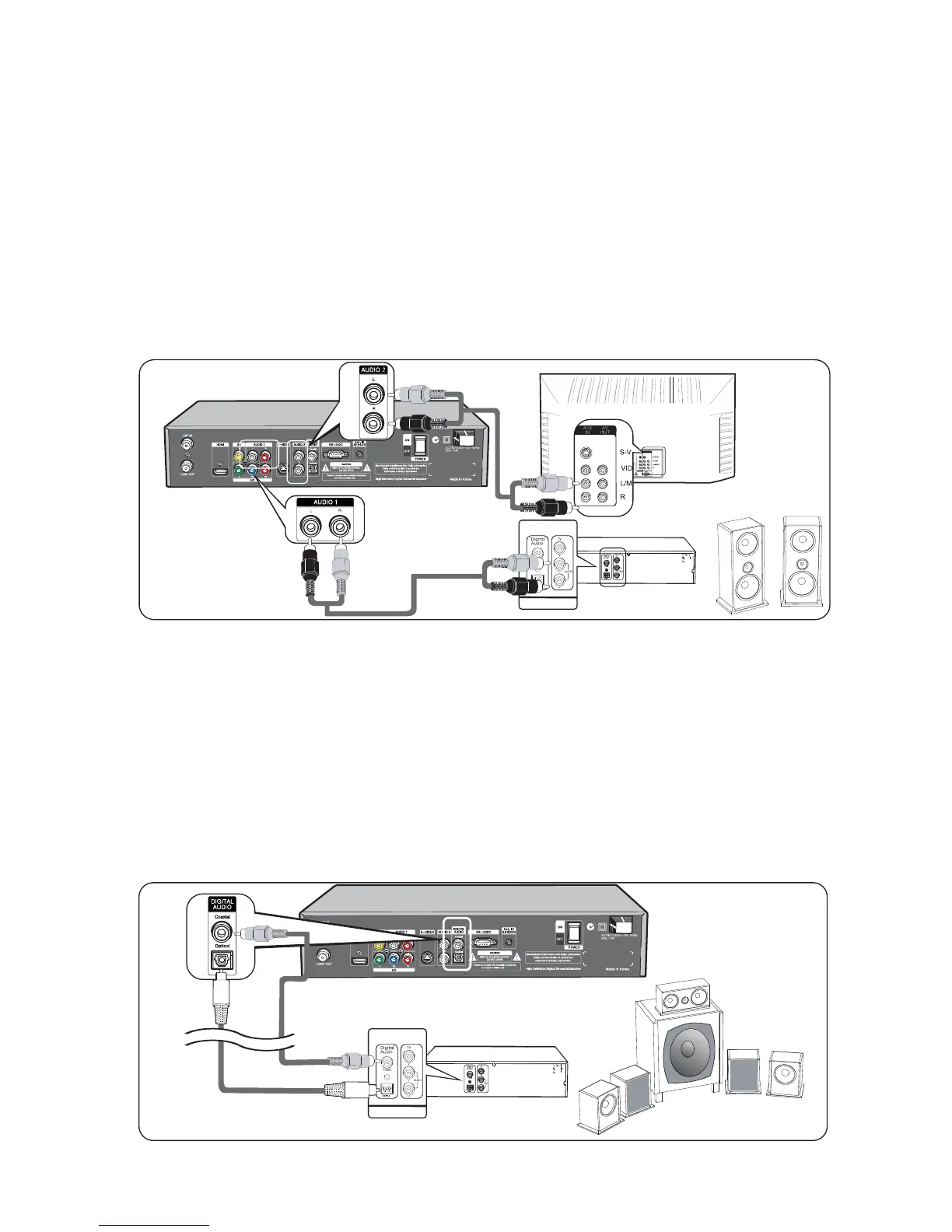
3. Audio Connection
This HD-STB can support four different options for connecting audio signals. Each of
the audio connections delivers the same audio sound. You can select desired audio
connection by following the Audio connection Diagrams below.
Please make sure, if you are using HDMI connection, you do not need this Audio
Connection. The HDMI connection is already included Digital Audio internally.
Stereo Audio Connection
Audio L/R deliver analog stereo sound or Dolby Digital 2-channel downmix
analog stereo sounds. Connect Audio Cable to Audio L/R terminal on the rear of the
HD-STB.
Connect the other end of the Audio Cable to the conventional TV Audio Input or
Stereo Amplifier Audio Input. (Refer to Fig. 8)
Digital Audio Connection
Optical Digital Audio and Coaxial Digital Audio deliver Dolby Digital 5.1-channel
digital sound or PCM digital sound.
If you have a Home Theater system and it can receive Digital Audio, then you can
connect Digital Audio.
For the Optical Digital Audio connection, connect the Optical Digital Audio Cable
(Available in Local Store) to the Optical Audio terminal on the rear of the HD-STB.
Connect the other end of the Optical Digital Audio Cable to the Optical Audio Input
terminal on the Home Theater System.
For the Coaxial Digital Audio connection, connect the RCA Cable to the Coaxial
Audio terminal on the rear of the HD-STB. Connect the other end of the RCA Cable
to the Coaxial Audio Input terminal on the Home Theater System. (Refer to Fig. 9)
15
Connecting your HD-STB
INPUT
AMP
INPUT
AMP
Fig.8 Stereo Audio Connection
INPUT
INPUT
Fig. 9 Digital Audio Connection
Home
Theater
System



 To Next Page