Playback: Click into the Playback interface.(Detailed operation as
5.3.1)
Remote Device: Click and enter the remote device configuration
menu.(Detailed operation as 3.5.1.1)
Main Menu: Click and enter the main menu.
3.1.1 PTZ Setup
In the preview channel, right click mouse, select "PTZ", the preview will
switch to the corresponding channel single-screen display, and the
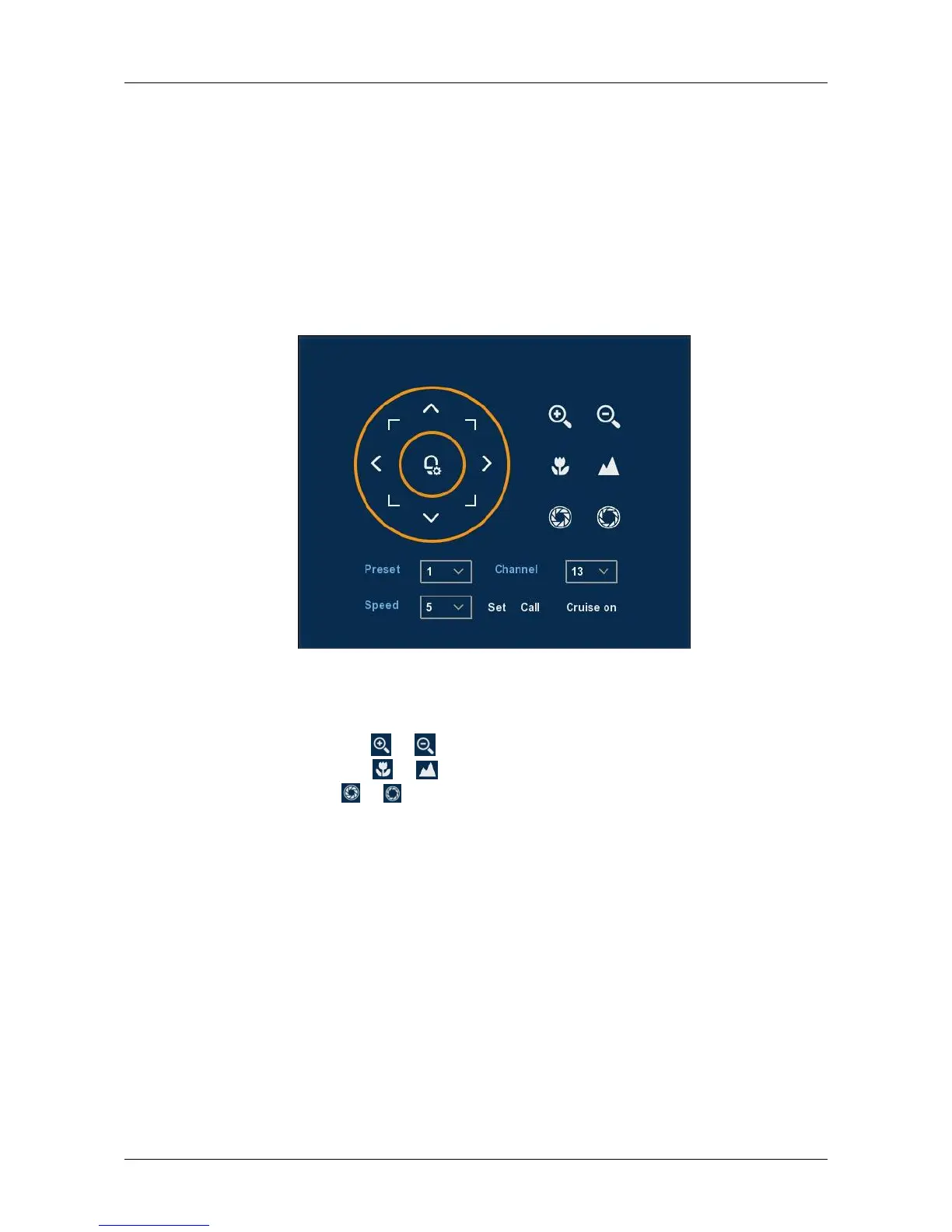
emergence of PTZ control interface, shown in Figure 3-2:
Figure 3-2
Adjusts the movement speed of the PTZ, Directional Buttons controls the
movements and directions of the PTZ.
Zoom: You can click / to adjust camera zoom in/out.
Focus: You can click / to adjust camera focusing.
Iris: You can click / to adjust camera brightness.
Presets point: The presets box choose a certain preset point need go to,
After clink on the swith icon, PTZ will jump to that location.
Speed: Speed is to control PTZ movement speed. The value ranges
from 1 to 8.The speed 8 is faster than speed 1.
Patrol Setup: Set the function of cruise, and related presets setting of
cruise, including dwelling time and cruising speed. Shown in Figure 3-3
and Figure 3-4;



 To Next Page