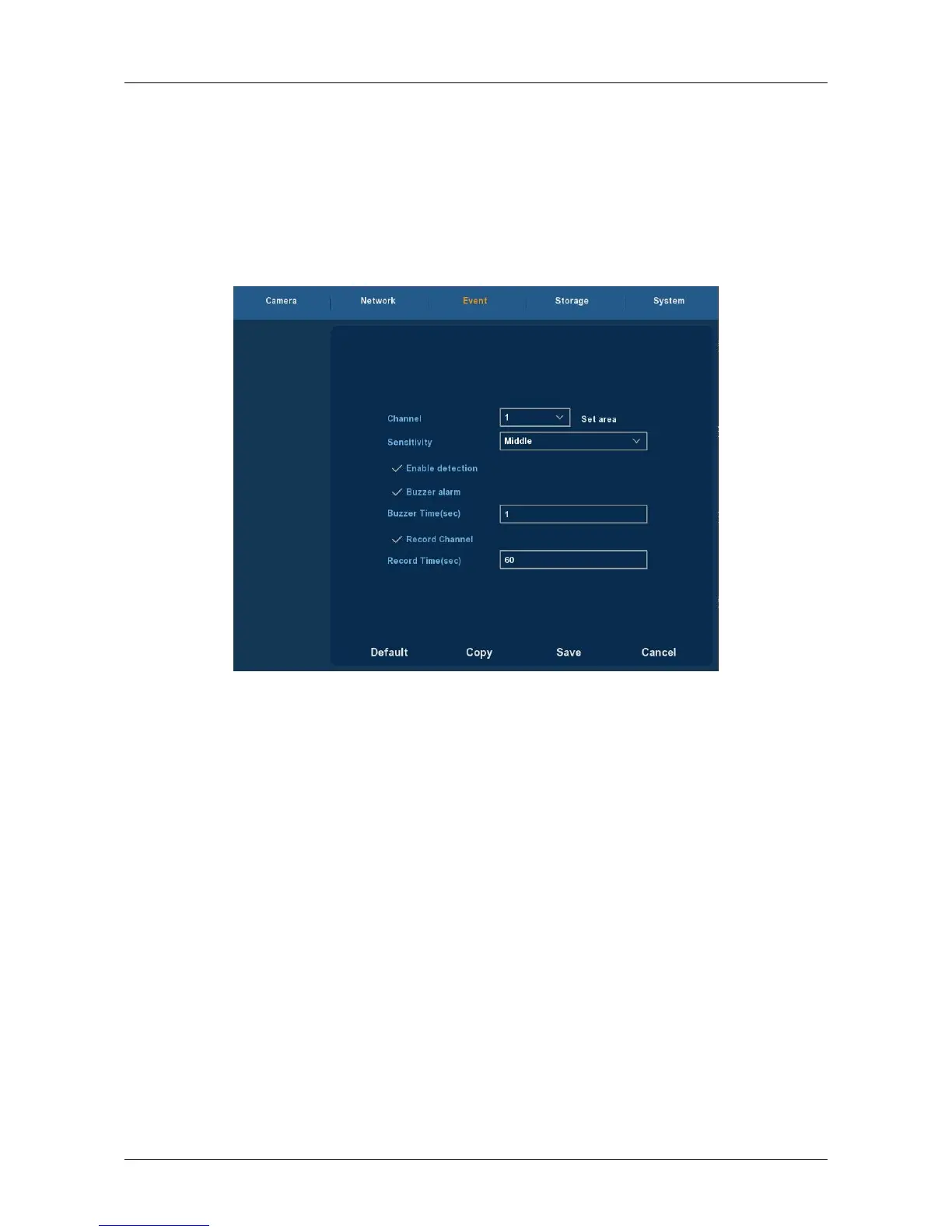
3.5.3 Event
3.5.3.1 Motion Detection
Choose ”Menu→ Setup→ Event” in the Menu interface, the Motion
Detection interface is displayed, as Figure 3-22 shows. When the system
detects a mobile signal reaches a preset sensitivity occurs, motion
detection alarm and the linkage function will be initiated by analyzing the
video image.
Figure 3-22
Channel: Select the motion detection channel. 2 option: Single and
All), for the Single channel, you need to choose the particular channel.
Set Area: The video is blocked by the detection area, and an alarm
according to the configuration
Sensitivity: Six values can be set for the sensitivity.
Enable detection: Click “√”, turn on the motion detection function.
Buzzer alarm: Select the check box, The system will trigger the buzzer
alarm when motion detect.
Buzzer Time: Set the buzzer alarm duration.
Record Channel: Click “√”, Select the wanted video channel, and the
system will trigger the video signal of the selected channel.
Record Time: Set the trigger recording duration.
Default: Recover all the detect setting parameters to the default
values.
Copy: After you complete the setup, you can click Copy button to
copy current setup to other channel(s).
Save: Save the set parameters of current menu.
Cancel: Don’t save the set parameters of current menu.



 To Next Page