Cancel: Return to last menu.
Remark: Click on the title bar icon “√”, select all the available IPC
device, click again to cancel all selected. Click the “×” icon can quickly
delete the device at the “Device Added” list.
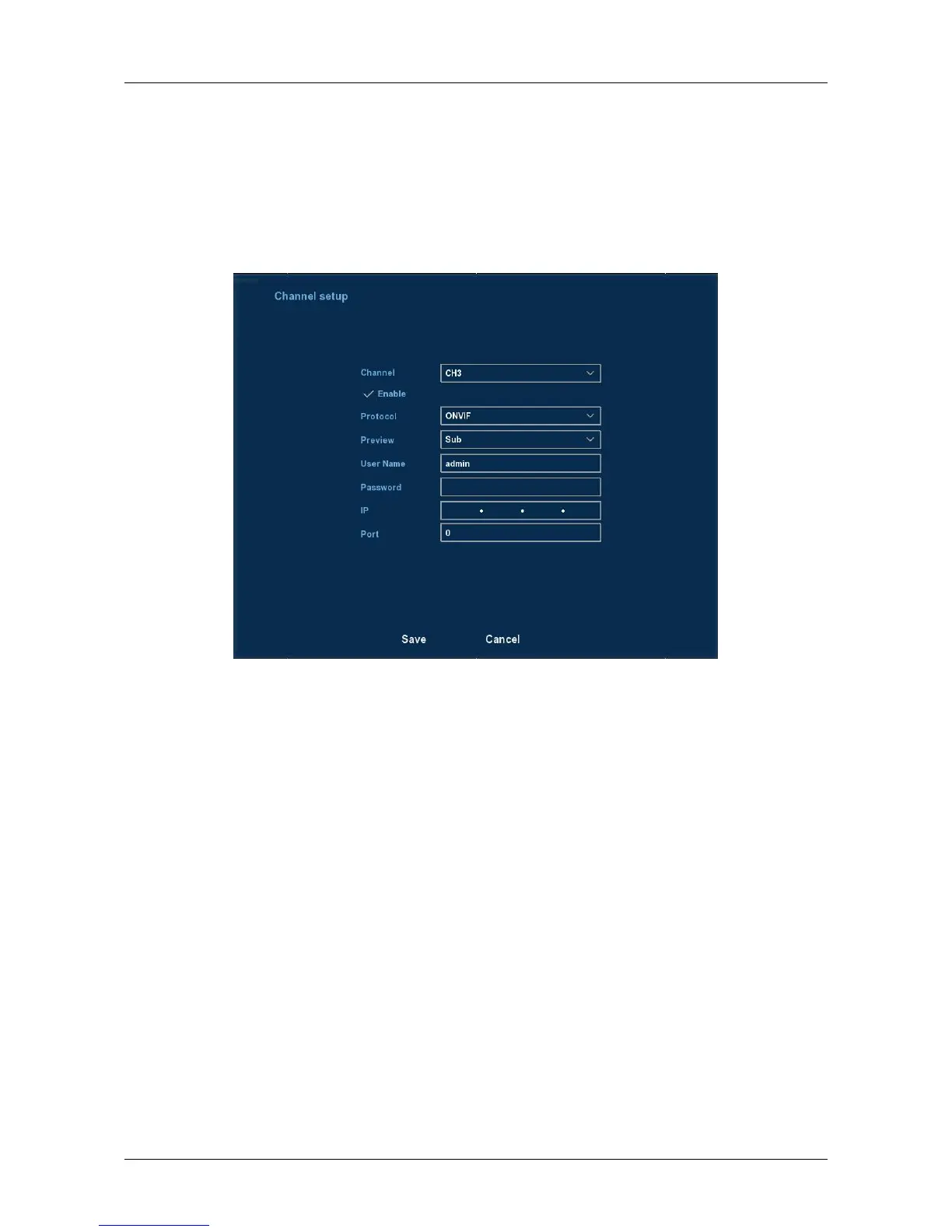
Click the“Manual Add” button to add the IPC manually, you can go to
the following interface. See Figure 3-14.
Figure 3-14
Channel: Users can type in the channel number that needs to be
connected to the remote device according to their needs.
Enable: The channel enable on/off, defaulting to be off. Tick “Enable”
then the related channels can be previewed and recorded normally.
Protocol: Onvif agreement.
Preview: Sub-stream preview is defaulted and IPC port should be
dual-stream. Both should be in the format of H264 code to be
previewed normally and the resolution of the sub-stream can be D1 or
CIF format.
User name: The login user name of IPC (if the defaulted user name is
not admin, please change it to be valid user name).
Password: Login password of IPC (if the defaulted login password is not
admin, please change it to be valid password).
IP: IP address of IPC added to NVR.
Port: Defaulting the IPC port to be 8999.
Save: Saving the setup parameters of current channels
Cancel: Going back to the former management interface.



 To Next Page