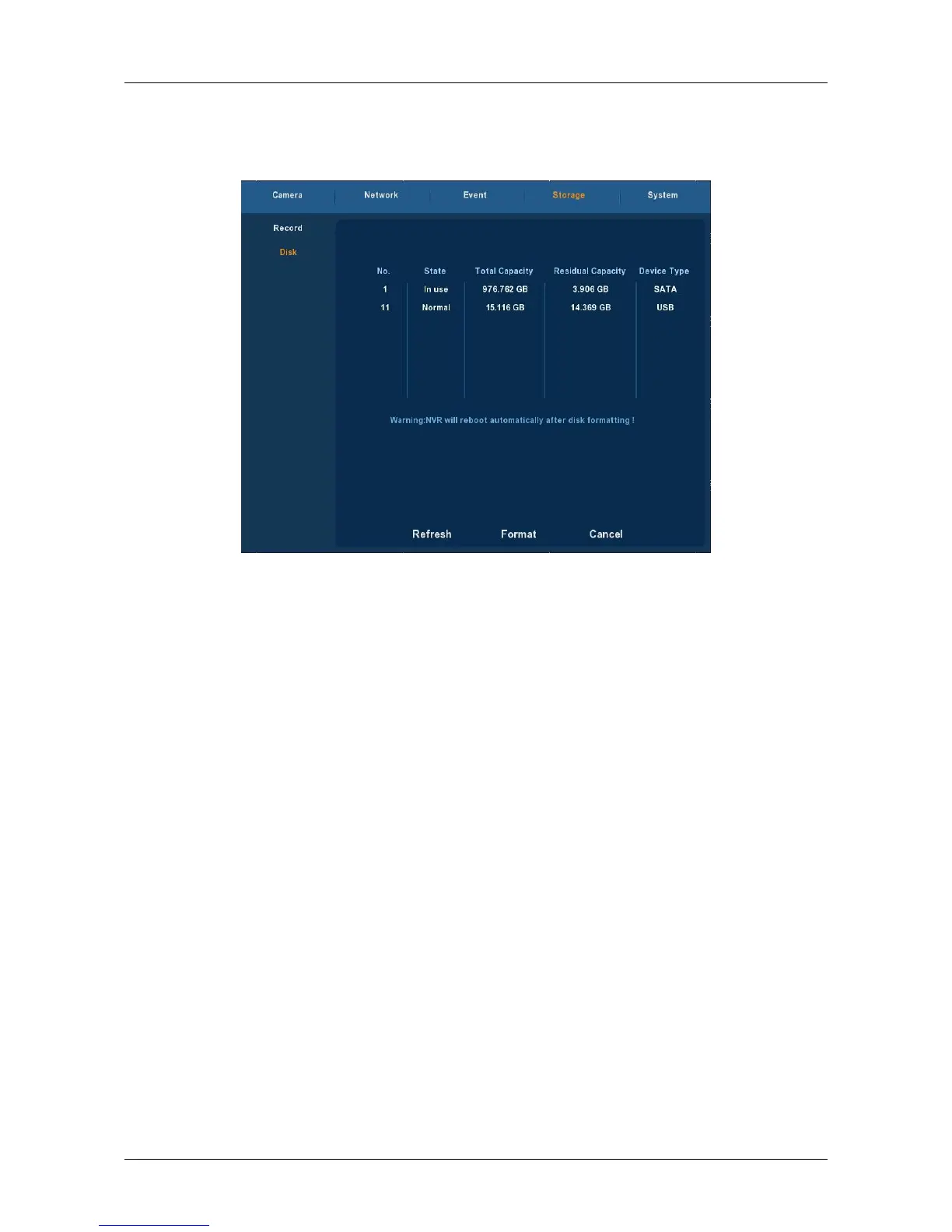
3.5.4.2 Disk
Choose ”Menu→Setup→Storage→Disk” in the Menu interface, the Disk
interface is displayed, as Figure 3-26 shows.
Figure 3-26
If the devices have connected the HDD successfully, the HDD manage
list will show the information of HDD.You have to format the HDD if the HDD is
the first time to connect; If the system detects that do not need to format
the hard disk, the HDD status will displays “normal”; If do not connect
successfully or could not detect hard disk, will displays the warning “Not
connected the HDD”.
HDD No.: The number of HDD that connect the system.
State: Detect the current working status of HDD, you could use only
that displays “normal”; After formatting is completed, you need to
restart NVR, the status displays "in use".
Total Capacity: The total available HDD capacity, the single HDD
capacity can not exceed the maximum capacity: 4TB.
Residual Capacity: Display the residual capacity of the current HDD;
Device Type: SATA.
Refresh: Refresh HDD information in the list;
Format: Formatting the HDD, select the HDD that needs to be
formatted firstly, and then click the "Format" button, pop-up warning
dialog "formatting will result in the selected HDD recording data loss,
confirm that you want to continue?", If confirm to format then click on
the "OK" button, otherwise click "Cancel".
Cancel: Return to the former management interface.
Note: After formatting the HDD, you need to restart the device.



 To Next Page