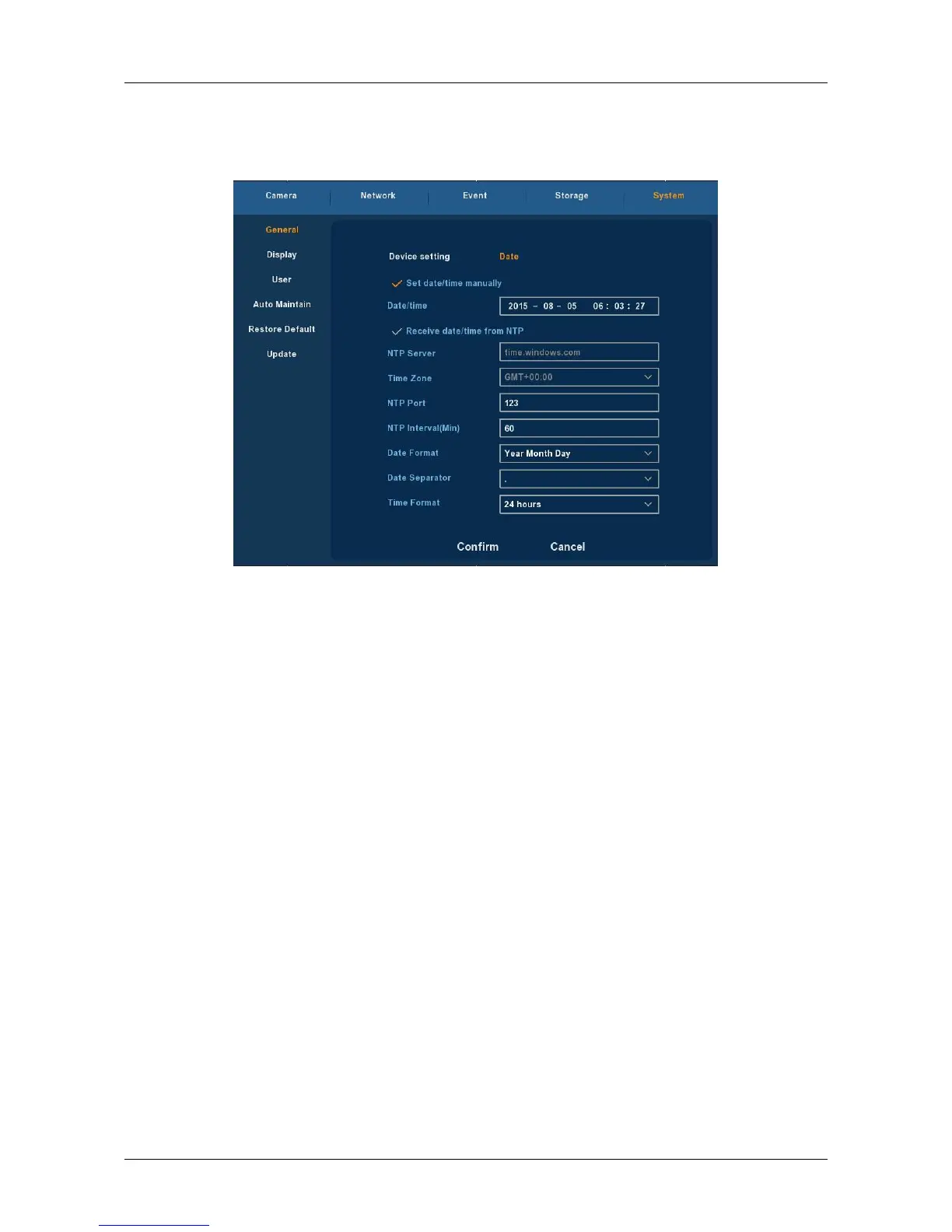
3.5.5.1.2 Date
Choose ”Menu → Setup → System → General → Date” in the Menu
interface, the Date setting interface is displayed, as Figure 3-28 shows.
Figure 3-28
Set date/time manually: When checked, manually set the machine
time.
Receive date/time from NTP : When checked, open the update time
when NTP function of the school.
NTP Server: IP address of NTP server.
Time Zone: Select the Time Zone of your location from the drop-down
menu.
NTP Port: Port of NTP server.
NTP Interval: The time interval between the two synchronizing
actions with NTP server.
Date Format: There are three types: YYYYY- MM-DD: MM-DD-YYYYY or D
D- MM-YYYY.
Date Separator: There are three denotations to separate date: dot,
beeline and solidus.
Time Format: 24-hour and 12-hour clock.
Confirm: Save parameters of current interface.
Cancel: Return to the former interface.



 To Next Page