https://reference.digilentinc.com/reference/programmable-logic/nexys-a7/reference-manual 29/30
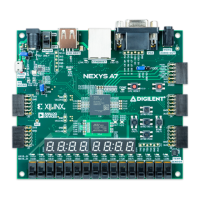
A demonstration configuration is loaded into the Quad-SPI flash device on the Nexys A7 board during manufacturing. The source code and
prebuilt bitstream for this design are available for download from the Digilent website. If the demo configuration is present in the flash and
the Nexys A7 board is powered on in SPI mode, the demo project will allow basic hardware verification. Here is an overview of how this
demo drives the different onboard components:
The user LEDs are illuminated when the corresponding user switch is placed in the on position.
The tri-color LEDs are controlled by some of the user buttons. Pressing BTNL, BTNC, or BTNR causes them to illuminate either
red, green, or blue, respectively. Pressing BTND causes them to begin cycling through many colors. Repeatedly pressing BTND will
turn the two LEDs on or off.
Pressing BTNU will trigger a 5 second recording from the onboard PDM microphone. This recording is then immediately played
back on the mono audio out port. The status of the recording and playback is displayed on the user LEDs. The recording is saved in
the DDR2 memory.
The VGA port displays feedback from the onboard microphone, temperature sensors, accelerometer, RGB LEDs, and USB Mouse.
Connecting a mouse to the USB-HID Mouse port will allow the pointer on the VGA display to be controlled. Only mice compatible
with the Boot Mouse HID interface are supported.
The seven-segment display will display a moving snake pattern.
All Nexys A7 boards are 100% tested during the manufacturing process. If any device on the Nexys A7 board fails test or is not responding
properly, it is likely that damage occurred during transport or during use. Typical damage includes stressed solder joints and contaminants in
switches and buttons resulting in intermittent failures. Stressed solder joints can be repaired by reheating and reflowing solder and
contaminants can be cleaned with off-the-shelf electronics cleaning products. If a board fails test within the warranty period, it will be
replaced at no cost. Contact Digilent for more details.
rm (https://reference.digilentinc.com/tag/rm?do=showtag&tag=rm), doc (https://reference.digilentinc.com/tag/doc?do=showtag&tag=doc), nexys-a7
(https://reference.digilentinc.com/tag/nexys-a7?do=showtag&tag=nexys-a7)
16 Built-In Self-Test
Subscribe to our Newsletter
Xilinx University
Program
(https://store.digilentinc.com/partners/xilinx-
university-program/)
Technology Partners
(https://store.digilentinc.com/technology-
partners/)
Distributors
(https://store.digilentinc.com/our-
distributors/)
Our Partners
Technical Support
Forum
(https://forum.digilentinc.com)
Reference Wiki
(https://reference.digilentinc.com)
Contact Us
(https://store.digilentinc.com/contact-
us/)
Help
Videos
(https://youtube.com/user/digilentinc)
FAQ
(https://resource.digilentinc.com/verify/faq)
Store Info
(https://store.digilentinc.com/store-
info/)
Customer Info
About Us
(https://store.digilentinc.com/p
pageid=26)
Shipping & Returns
(https://store.digilentinc.com/
returns/)
Legal
(https://store.digilentinc.com/l
Jobs
(https://store.digilentinc.com/j
Internships
(https://store.digilentinc.com/i
Company Info
Connect With Us


 To Next Page
 Loading...