16
12
10
9
2
11
WHAT TO DO AT THE END OF EACH GROWING CYCLE
Perform the pH probe cleaning cycle
(p.18).
1� Turn off NIDO ONE V2. Empty and thoroughly
clean the tank ll it halfway with fresh tap water free
of impurities.
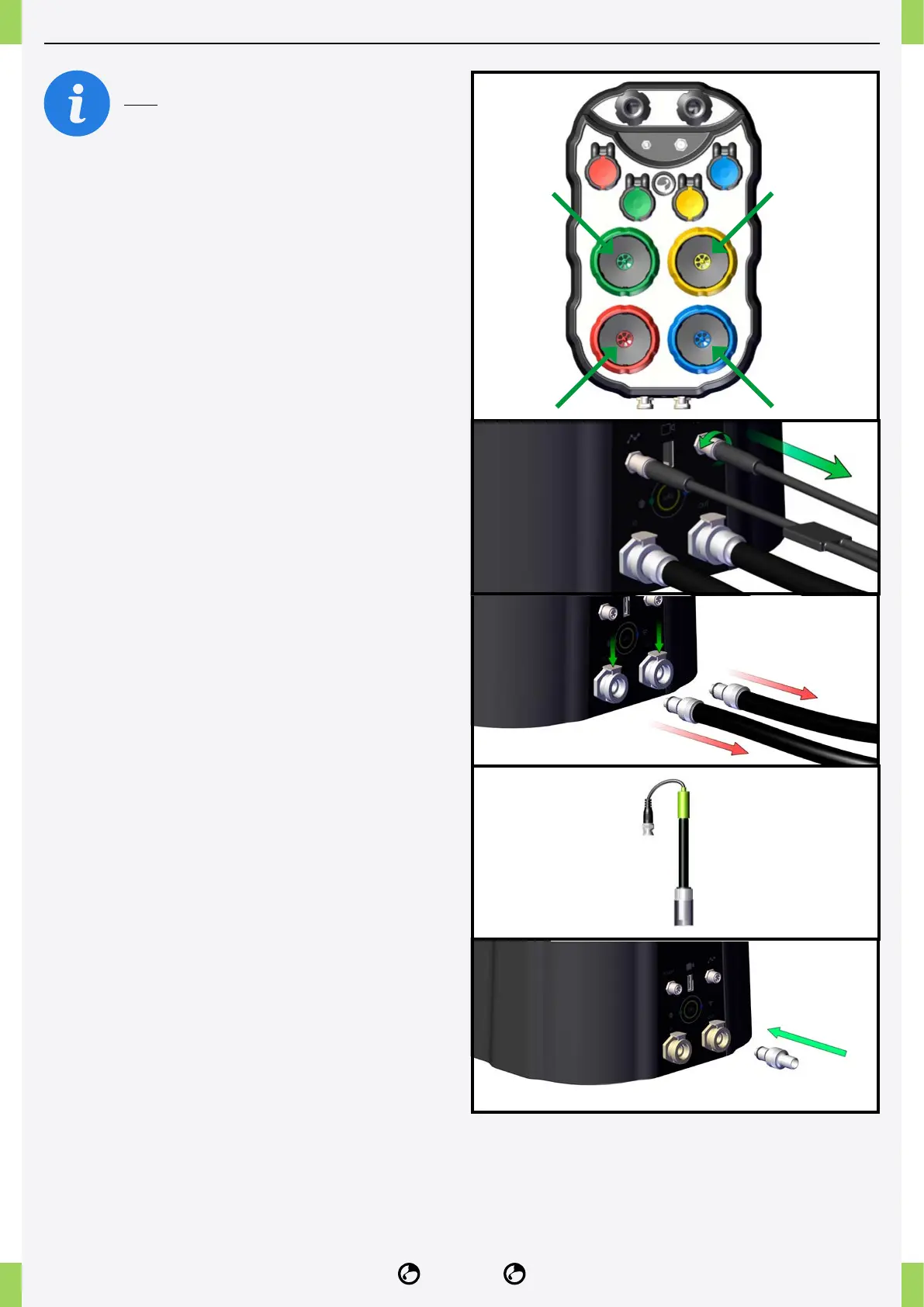
2� Remove the fertiliser and pH cans and
thoroughly clean the can stoppers.
3� Unscrew the top and bottom caps of the
cans and clean off any remaining fertiliser.
4� Screw the caps on the cans, paying attention
to the top and bottom direction of the label on
the can, do not turn the caps upside down.
5� Fill the 4 cartridges halfway with osmotic water.
6� Open the NidoPro app, click on
Settings > Device Cleaning.
7� Wait for the process to nish.
8� Remove and empty the cartridges.
9� Disconnect the electrical connections.
10� Disconnect the water IN and OUT hoses.
11� Remove the pH probe and place it in the
storage cap with KCI storage liquid until next use.
12� Drain the water inside the NIDO ONE V2
by turning it upside down in a sink or by using the
valve provided on the OUT port for 1 minute and
then on the IN port.



 To Next Page