31
6
5
4
3
2
CONFIGURING NIDO ONE V2 WITH SIM CARD
To congure the NIDO ONE V2 with a SIM card, you
need to purchase the D-LINK DWR-932 4G modem
separately.
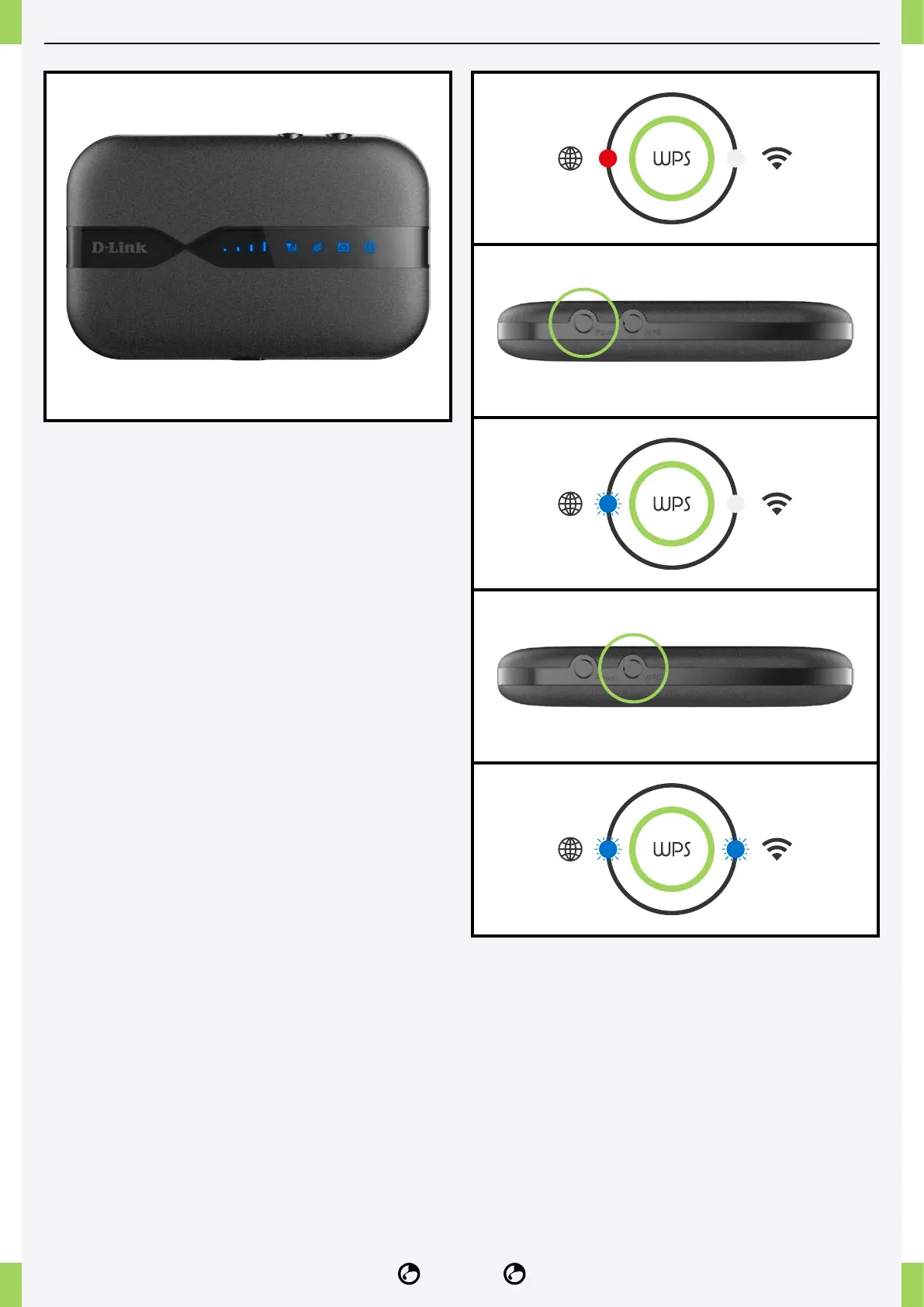
Pairing procedure with NIDO ONE V2:
Before you start, make sure to turn off the NIDO
ACCESSPOINT. Then place the NIDO ONE V2 and
the DWR-932 no more than 1 meter apart.
1� Turn on the NIDO ONE V2.
2� Wait approximately one minute for the NIDO ONE
V2 to start up.
3� Turn on the DWR-932.
4� Press the WPS button on the NIDO ONE V2 for
12-15 seconds, or until the blue light on the left side
starts ashing.
5� Press the “WPS” button on the DWR-932.
6� Wait approximately 30 seconds for the pairing to
complete. This is indicated by both blue lights on the
side panel of the NIDO ONE V2 ashing intermittently.
7� If the procedure is unsuccessful, turn both the
NIDO ONE V2 and DWR-932 off and on again, and
repeat the procedure.
Follow these steps carefully to ensure proper
conguration of your NIDO ONE V2 with the SIM
card.



 To Next Page