S
81
S
ISO Sensitivity
The higher the ISO sensitivity, the less light needed to make an
exposure, allowing higher shutter speeds or smaller apertures, but
the more likely the image is to be affected by noise (randomly-
spaced bright pixels, fog, or lines). Noise is particularly likely at
settings between Hi 0.3 (equivalent to ISO 8000) and Hi 2
(equivalent to ISO 25600).
Choosing Auto allows the camera to set
ISO sensitivity automatically in the range ISO 100 to 3200 in
response to lighting conditions.
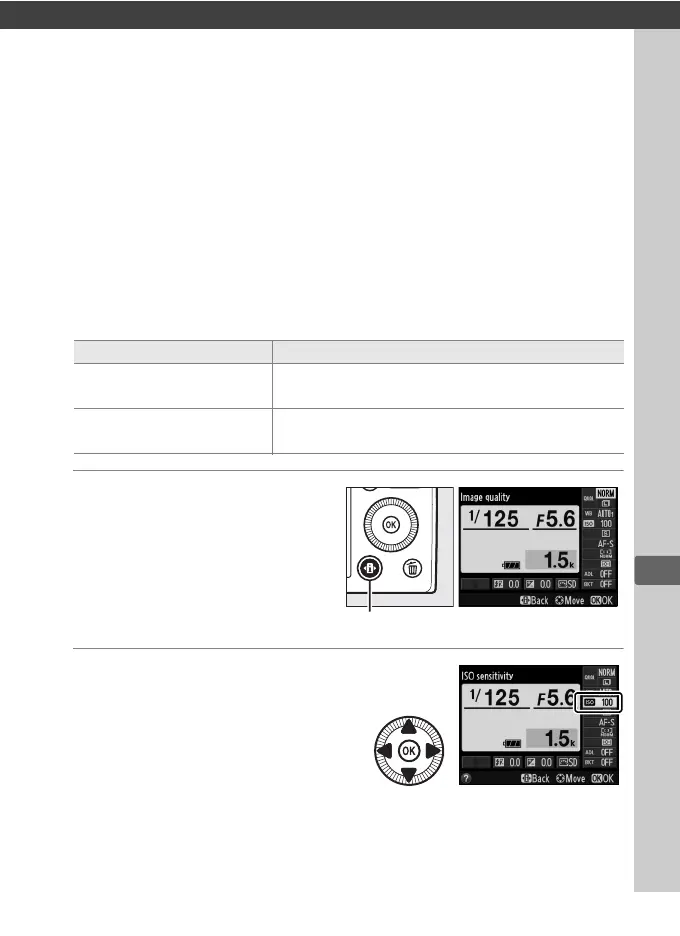
1 Press the P button.
Shooting information will
be displayed in the
monitor.
2 Display ISO sensitivity
options.
Highlight the current ISO
sensitivity in the
information display and
press J.
Mode ISO sensitivity
i, h
Auto; 100–6400 in steps of
1
/3 EV; Hi 0.3, Hi 0.7,
Hi 1, Hi 2
P, S, A, M
100–6400 in steps of
1
/3 EV; Hi 0.3, Hi 0.7, Hi 1,
Hi 2
P button Information display



 To Next Page