83
S
Auto ISO Sensitivity
Control
If On is selected for ISO sensitivity settings > Auto ISO
sensitivity control in the shooting menu, ISO sensitivity will
automatically be adjusted if optimal exposure can not be achieved
at the value selected by the user (ISO sensitivity is adjusted
appropriately when the flash is used).
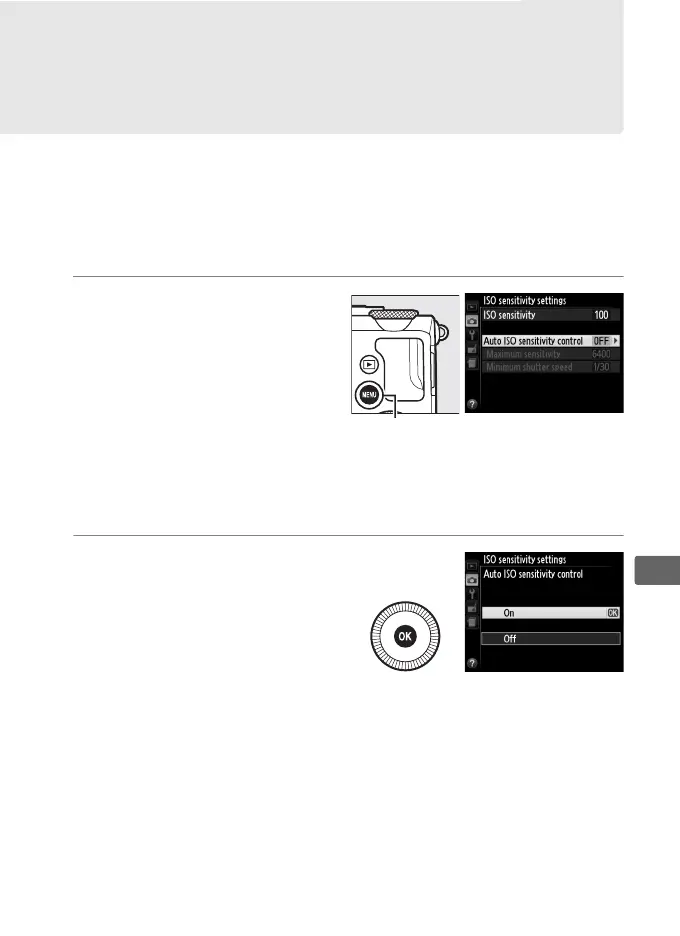
1 Select Auto ISO
sensitivity control for
ISO sensitivity
settings in the
shooting menu.
To display the menus,
press the G button.
Select ISO sensitivity settings in the shooting menu,
highlight Auto ISO sensitivity control and press 2.
2 Select On.
Highlight On and press J
(if Off is selected, ISO
sensitivity will remain
fixed at the value selected
by the user).
(P, S, A, and M Modes Only)
G button



 To Next Page