100
J
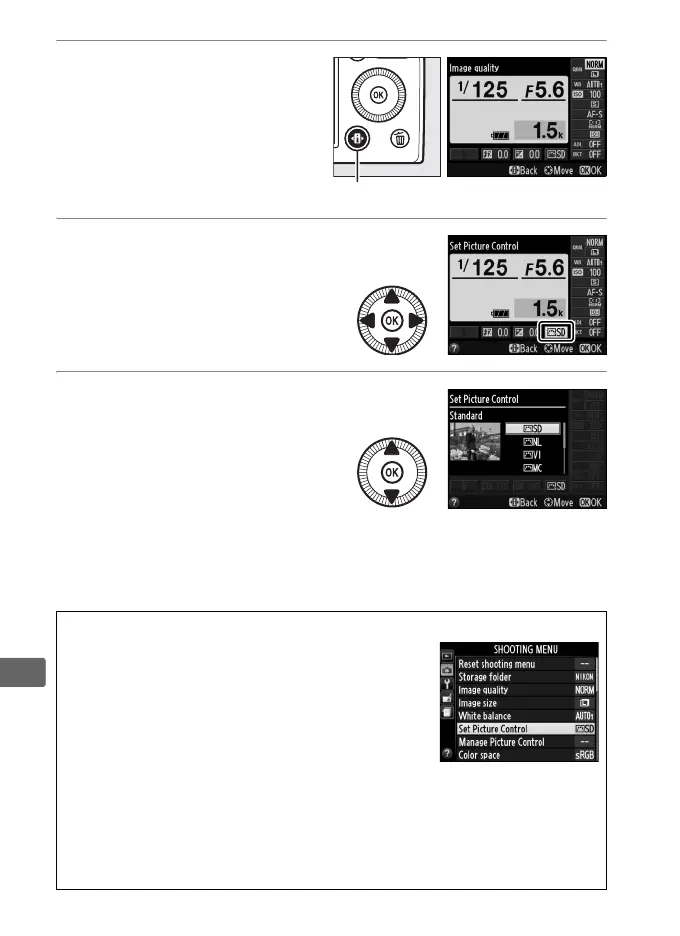
1 Press the P button.
Shooting information will
be displayed in the
monitor.
2 Display Picture Control
options.
Highlight the current
Picture Control and press
J.
3 Select a Picture
Control.
Highlight a Picture Control
and press J.
To return to
shooting mode, press the
shutter-release button
halfway.
A The Shooting Menu
Picture Controls can also be selected using the
Set Picture Control option in the shooting
menu (0 176).
A Custom Picture Controls
Custom Picture Controls are created through modifications to existing
Picture Controls using the Manage Picture Control option in the
shooting menu (0 106).
Custom Picture Controls can be saved to a
memory card and shared with other cameras and software that support
the base Picture Control (0 109).
P button Information display



 To Next Page
 Loading...









