111
J
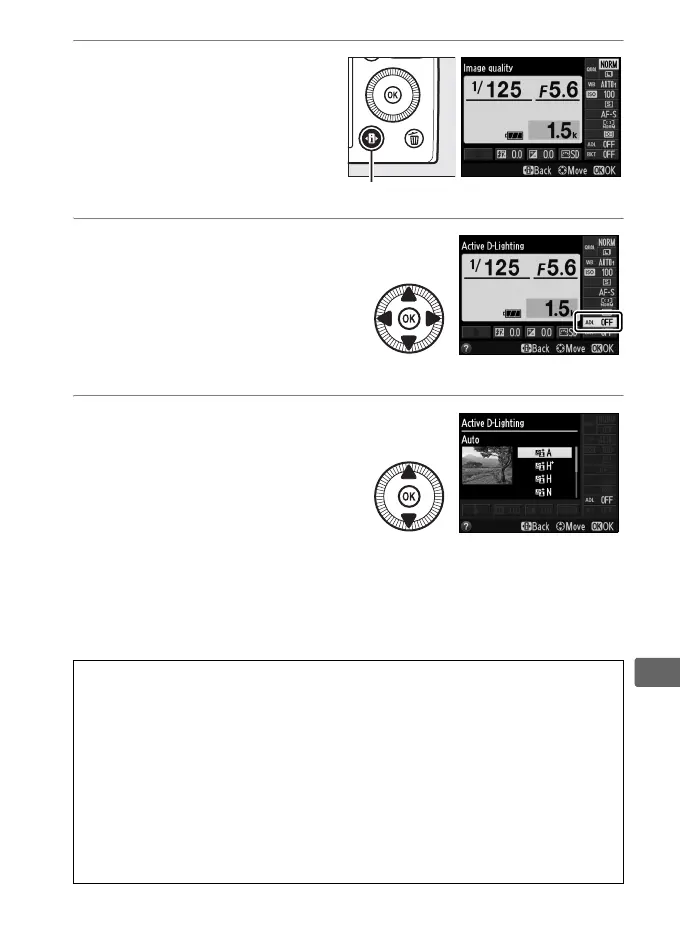
1 Press the P button.
Shooting information will
be displayed in the
monitor.
2 Display Active
D-Lighting options.
Highlight Active
D-Lighting in the
information display and
press J.
3 Choose an option.
Highlight Y Auto,
Z Extra high, P High,
Q Normal, R Low, or
X Off and press J.
If
Y Auto is selected, the
camera will automatically adjust Active D-Lighting according
to shooting conditions.
To return to shooting mode, press
the shutter-release button halfway.
.
D Active D-Lighting
Active D-Lighting can not be used with movies. Noise (randomly-spaced
bright pixels, fog, or lines) may appear in photographs taken with Active
D-Lighting.
Uneven shading may be visible with some subjects.
Active
D-Lighting can not be used at ISO sensitivities of Hi 0.3 or above.
A See Also
For information on automatically varying Active D-Lighting over a series
of shots, see page 123.
For information on using the S (g) button
and command dial to select an Active D-Lighting option, see page 194.
P button Information display



 To Next Page