157
Q
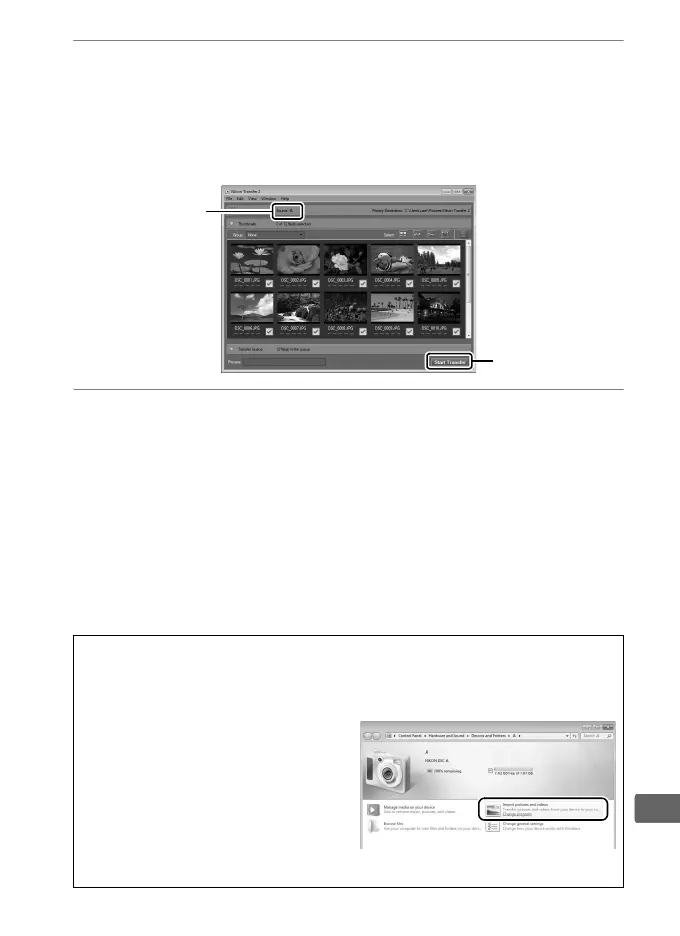
2 Copy pictures.
After confirming that the desired camera or memory card is
displayed in the “Options” panel “Source” tab (q), click Start
Transfer (w). At default settings, all pictures on the memory
card will be copied to the computer.
3 Terminate the connection.
If the camera is connected to the computer, turn the camera
off and disconnect the USB cable.
If you are using a card
reader or card slot, choose the appropriate option in the
computer operating system to eject the removable disk
corresponding to the memory card and then remove the card
from the card reader or card slot.
A Windows 7
If the following dialog is displayed, select Nikon Transfer 2 as described
below.
1 Under Import pictures and
videos, click Change program.
A
program selection dialog will be
displayed; select Import File
using Nikon Transfer 2 and click
OK.
2 Double-click Import File.
w
q



 To Next Page