Check point
In playback there is a SET-UP page and one further Playback menu. When you press the
MENU
button, page one of
the Playback menu is displayed. To get to the SET-UP page, press
LEFT
on the Multi selector to turn the white "Page 1" tab
orange, then press
UP
/
DOWN
on the Multi selector to highlight the "S" SET-UP tab. Press
RIGHT
once to enable selection of
the SET-UP items.
Playback Menu
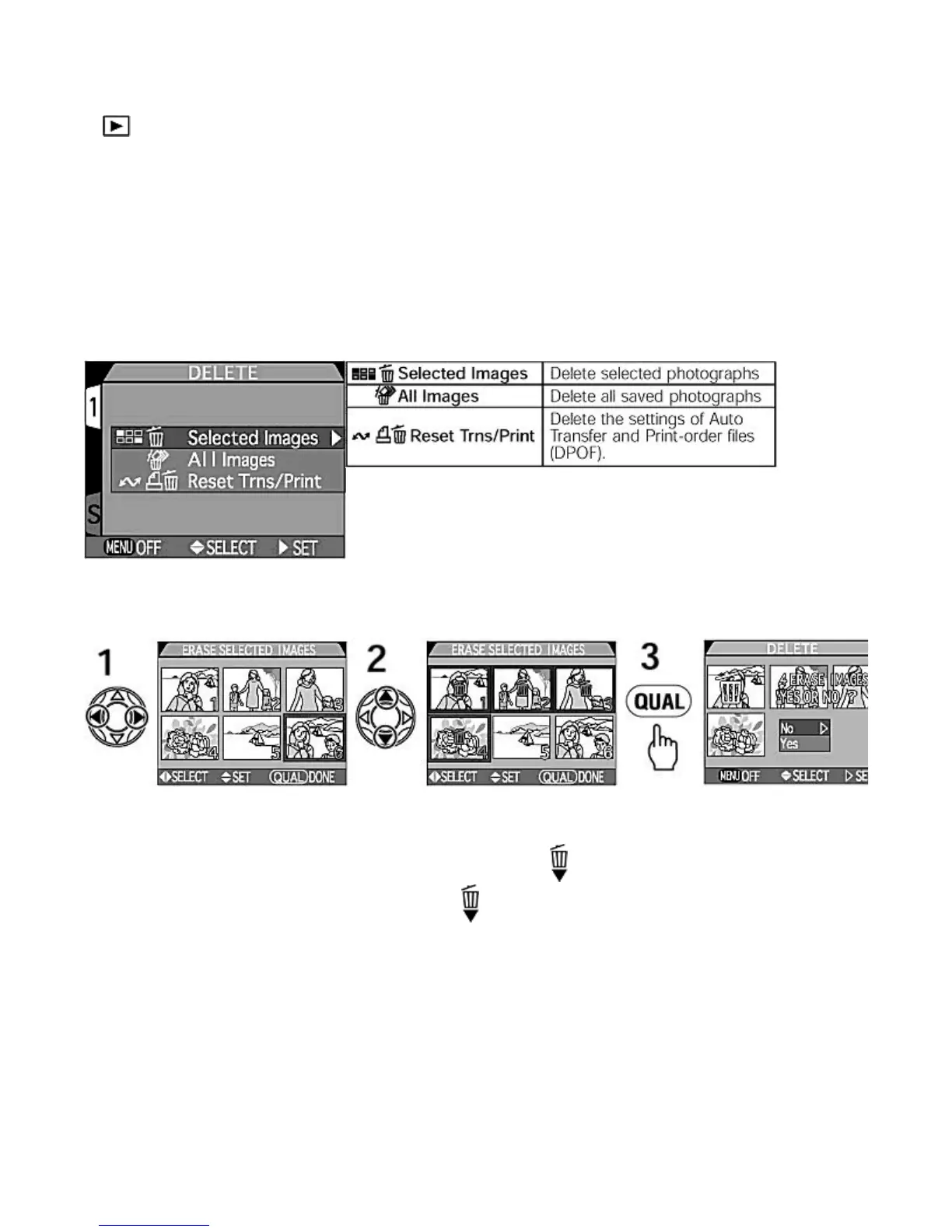
Delete
Saved photographs, the settings of
Auto Transfer
and Print-order files can be deleted. With the
Delete
option in the
Playback
menu
, it is possible to delete either selected photographs from the thumbnail pages or alternatively all the photographs on the
CF memory card (except Hidden and Protected).
- Deleting selected photographs -
To delete selected photographs, choose Selected Images from the
Delete
sub-menu.
1.
Press LEFT
/
RIGHT
on the Multi selector to highlight (with the orange frame) the desired images to be deleted.
2.
Press UP
/
DOWN
to select the images to be deleted (the delete
icon appears).
{
To cancel the selection and make the Delete icon disappear, press
UP
/
DOWN
on the selected image
again.
{
Continue selecting images and then confirm your selection by pressing the
QUAL
button.
3.
Press the QUAL
button. The Delete confirmation dialog appears. Press LEFT
/
RIGHT
to select Yes
, (
or No
to
abort)
then press RIGHT
to delete all selected images.
NOTE :
Images with Protect or Hide Image setting
z
The protected image(s) are displayed in the thumbnail menu but cannot be selected.
z
Images with
Hide Image
settings are not displayed in the thumbnail menu.
-- Deletin
All Ima
es --
Pa
e 113 of 136
ikon COOLPIX995 Di
ital Camera
3/15/2002htt
://www.livemanuals.com/
acka
es/
roducts/NK002/2136/manual/fullmanual.html



 To Next Page