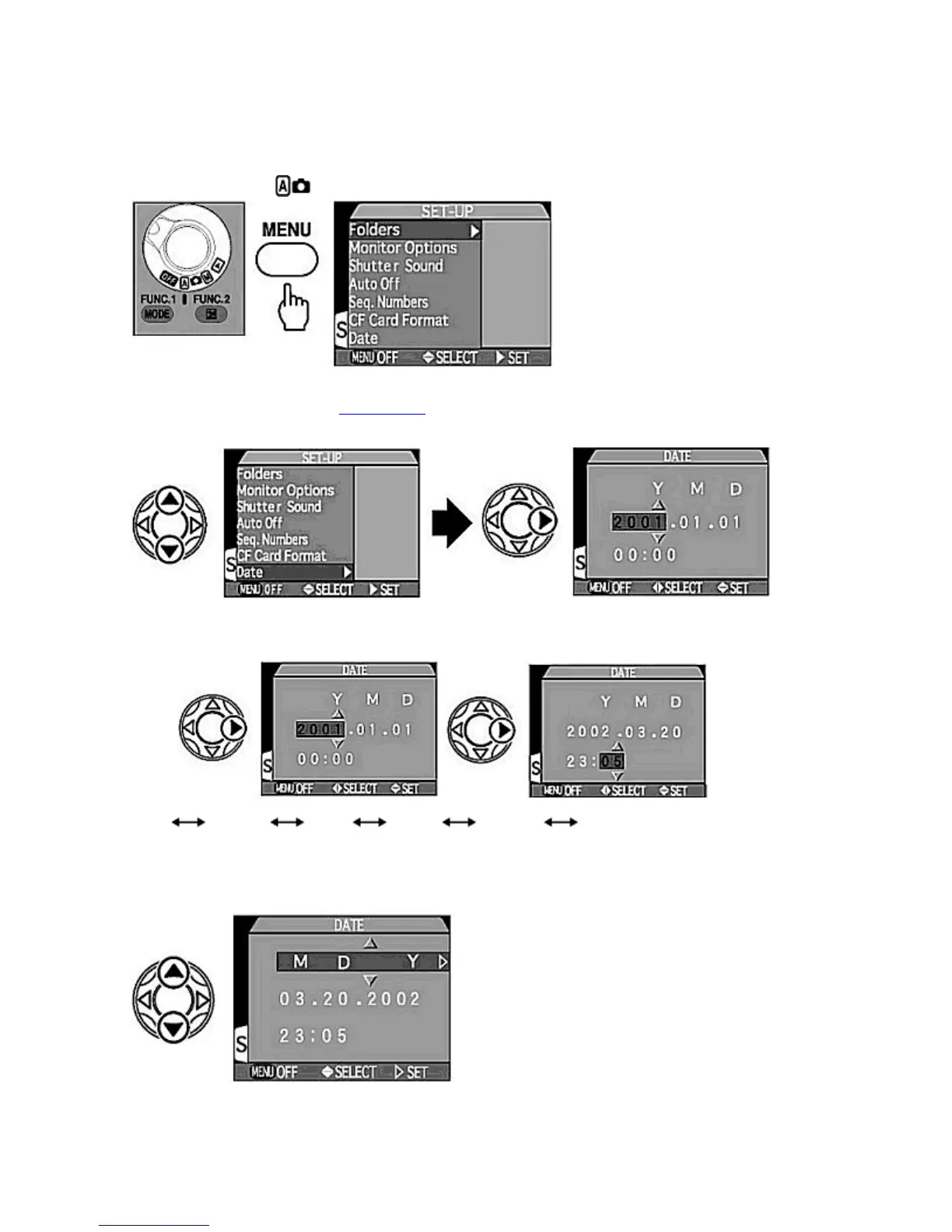
Setting Date/Time
The date and time for your country or location should be set before use.
1.
Set the MODE
dial to
and press the MENU
button to display the SET-UP menu.
2.
Select "Date" in the SET-UP menu.
{
Press
UP
/
DOWN
on the Multi selector to highlight
Date
and press
RIGHT
to display date/time setting. The
year display flashes.
3.
Set year, month, day, hour and minute.
{
Pressing
UP
on the Multi selector increases the number and pressing
DOWN
decreases the number. After
setting a number, pressing
RIGHT
moves the selection on.
Year
Month
Day
Hour
Minute
Date display sequence
{
The year display can be set between 1970 to 2037.
4.
Set the date display order.
{
Press
UP
/
DOWN
on the Multi selector to change the date display order as followings.
Pa
e 28 of 136
ikon COOLPIX995 Di
ital Camera
3/15/2002htt
://www.livemanuals.com/
acka
es/
roducts/NK002/2136/manual/fullmanual.html



 To Next Page