1.
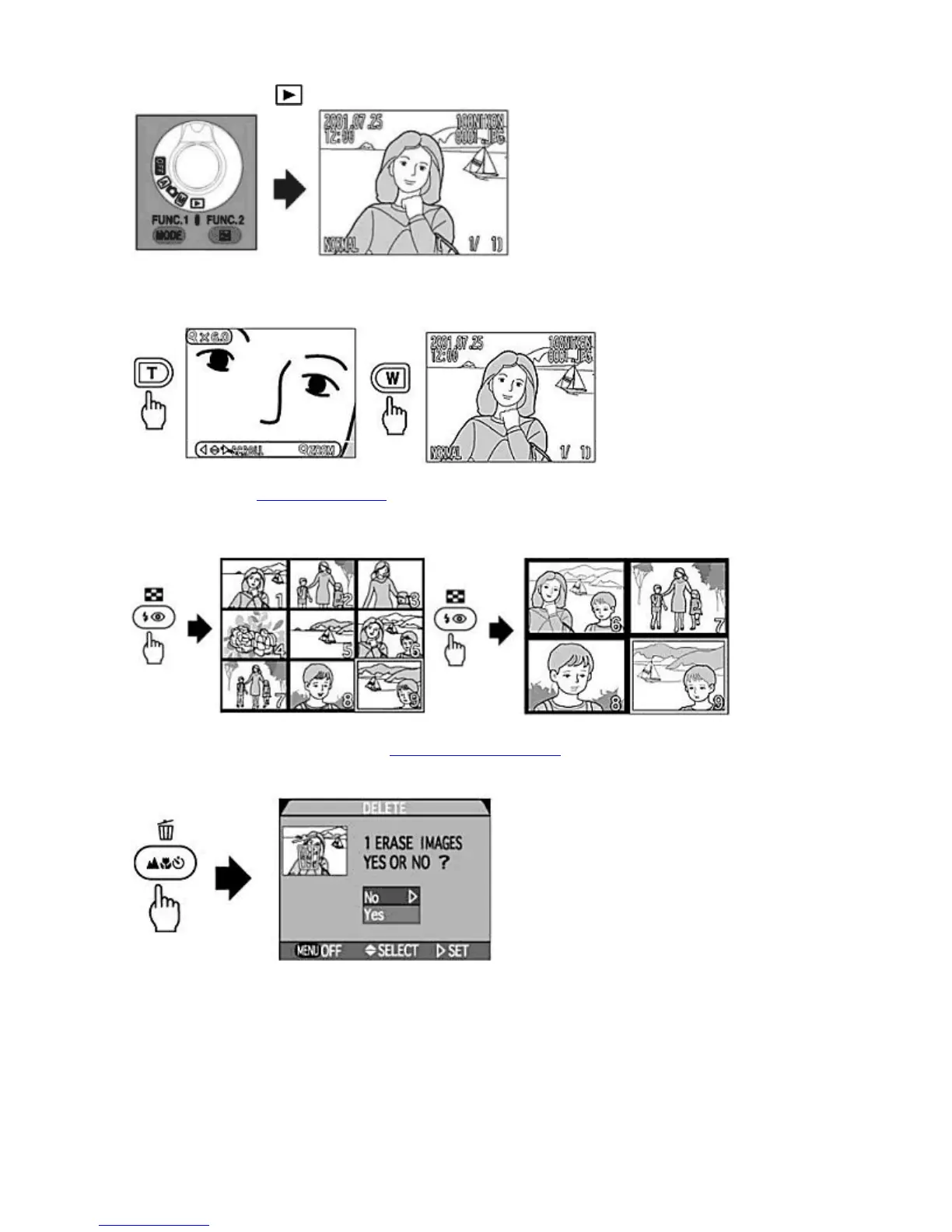
Set the MODE
dial to
.
{
The most recent photograph is displayed in the Monitor. Press the Multi selector to select the image to display.
2.
Press and hold the T
Zoom button to see the image in closer detail. Press the W
button to return to the original
view. Use the Multi selector to see the hidden parts of the zoomed image.
Thumbnail Playback
(See Thumbnail Playback
)
1.
Press the THUMBNAIL
button once to display nine Thumbnail images, or twice to display four Thumbnail
images. The Thumbnail image can be selected with the Multi selector and displayed Full-frame.
Deleting Photographs in Full-Frame Playback
(See Deleting photographs)
1.
Press the DELETE
button in Full-frame playback.
{
The delete confirmation dialog is displayed. You can delete an image after confirming with the confirmation
dialog.
Other Functions
By connecting the camera to your TV set or a personal computer, you can view, edit or print out images taken with the
COOLPIX995.
Connect COOLPIX995 to a TV Set
Pa
e 43 of 136
ikon COOLPIX995 Di
ital Camera
3/15/2002htt
://www.livemanuals.com/
acka
es/
roducts/NK002/2136/manual/fullmanual.html



 To Next Page