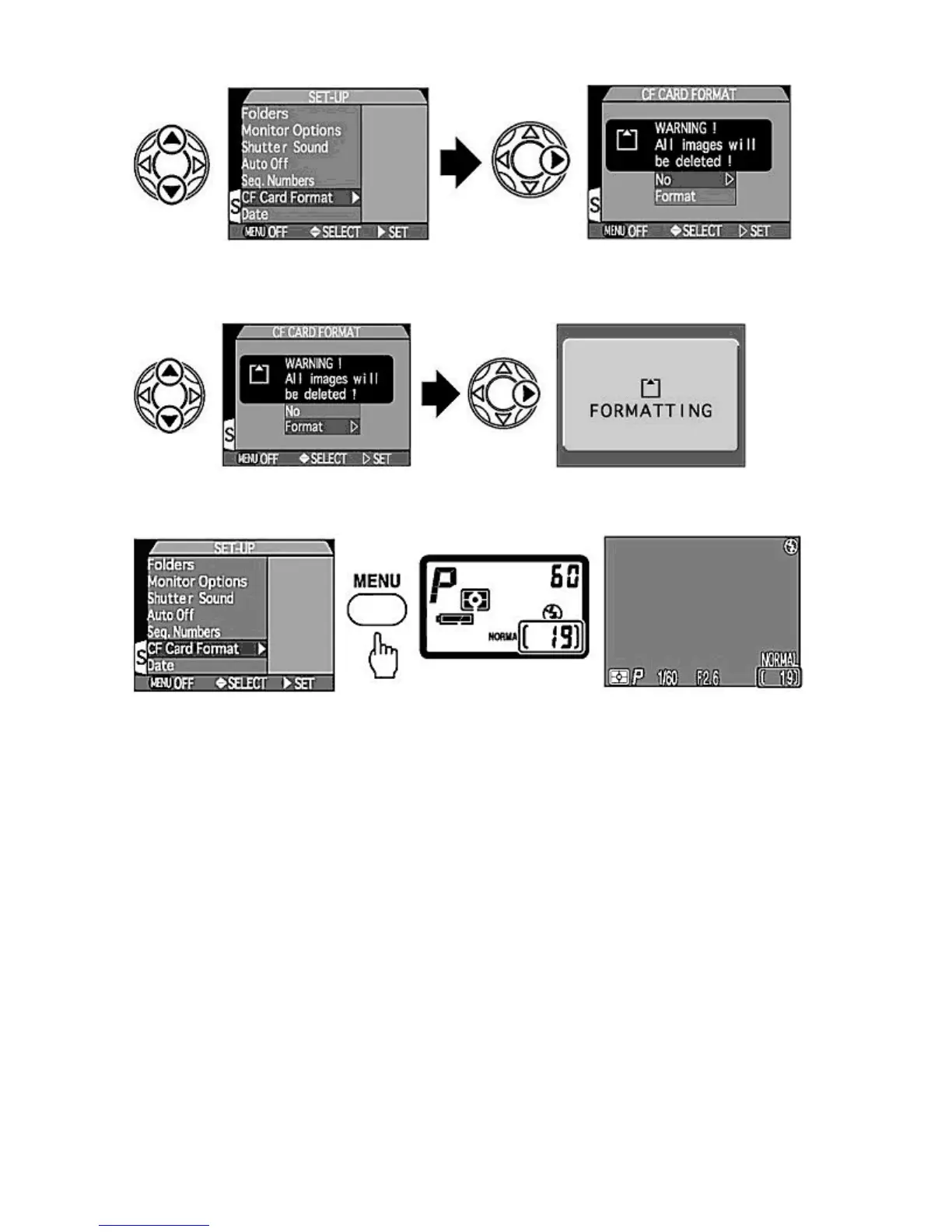
5.
Select "Format".
{
Press
UP
/
DOWN
on the Multi selector to highlight Format and select it by pressing
RIGHT
. Formatting is
started,
FORMATTING
is displayed and then the Monitor returns to the SET-UP menu.
6.
Press MENU
button to complete the operation.
{
After formatting, confirm the available number of frames in the Control panel or Monitor.
Aborting format
It is possible to abort the Format selection by pressing the
MENU
button to immediately exit the menu. Alternatively, select No
with
UP
/
DOWN
on the Multi selector and return to the SET-UP menu by pressing
LEFT
/
RIGHT
.
NOTE:
Formatting
Selecting Format by pressing
RIGHT
on the Multi selector starts formatting immediately. At this point formatting cannot be
stopped. Formatting permanently deletes all the data recorded on the CF memory card. Do not remove the CF memory card
during formatting.
Strap and Lens Cap
ttaching strap
Pa
e 33 of 136
ikon COOLPIX995 Di
ital Camera
3/15/2002htt
://www.livemanuals.com/
acka
es/
roducts/NK002/2136/manual/fullmanual.html



 To Next Page