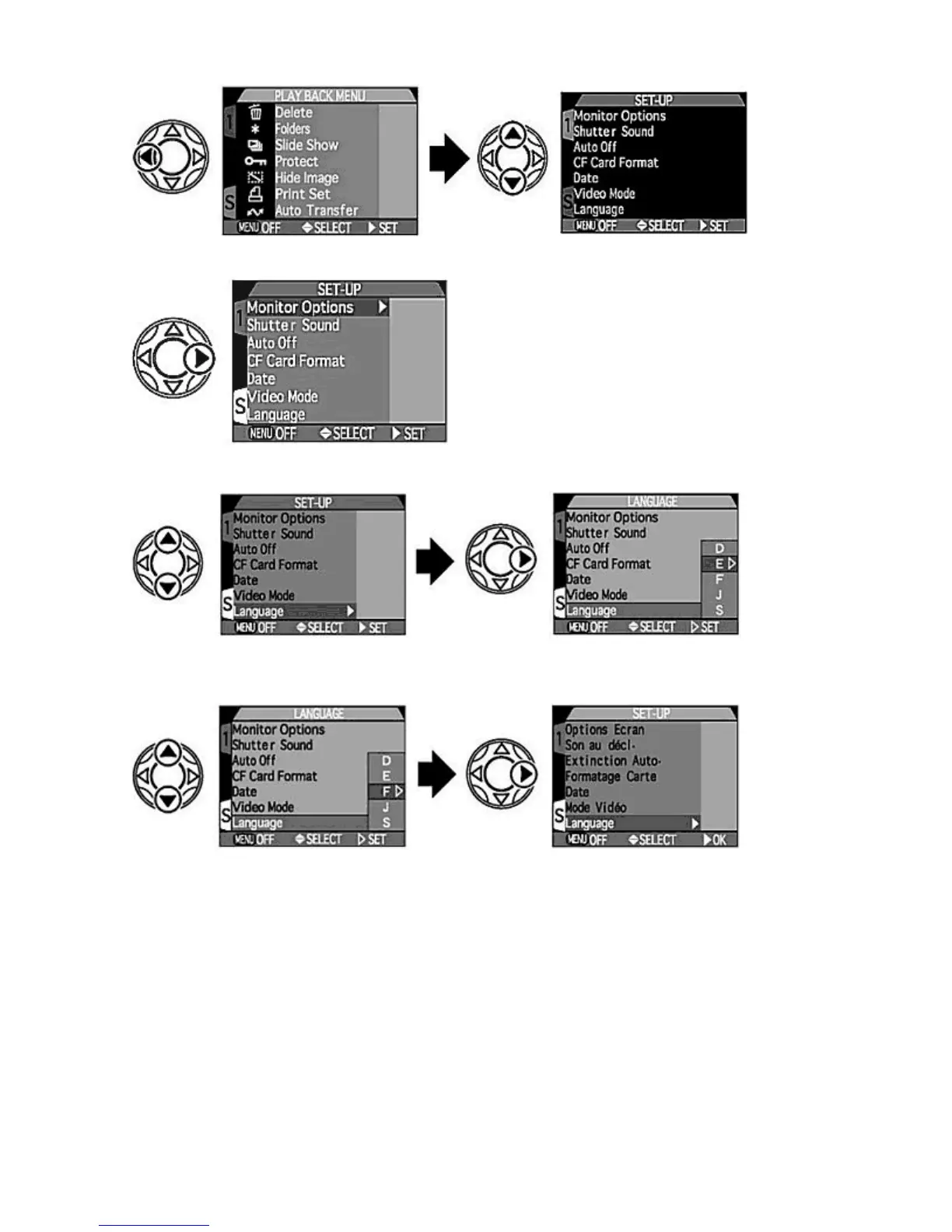
4.
Press RIGHT
on the Multi selector to display the SET-UP menu.
5.
Press UP/DOWN
on the Multi selector to highlight the "Language" sub-menu and press RIGHT
to select
"Language".
6.
Press UP/DOWN
on the Multi selector to highlight "D", "E", "F", "J" or "S" and press RIGHT
to select.
{
When the Language is set, the display returns to the SET-UP menu.
The languages available in the "Language" sub-menu are:
D:
German (Deutsch)
E:
English
F:
French (Francais)
J:
Japanese
S:
Spanish (Espanol)
Inserting CF Memory Card
The COOLPIX995 uses a CompactFlash ™ (CF) memory card to store images and movies.
Pa
e 30 of 136
ikon COOLPIX995 Di
ital Camera
3/15/2002htt
://www.livemanuals.com/
acka
es/
roducts/NK002/2136/manual/fullmanual.html



 To Next Page