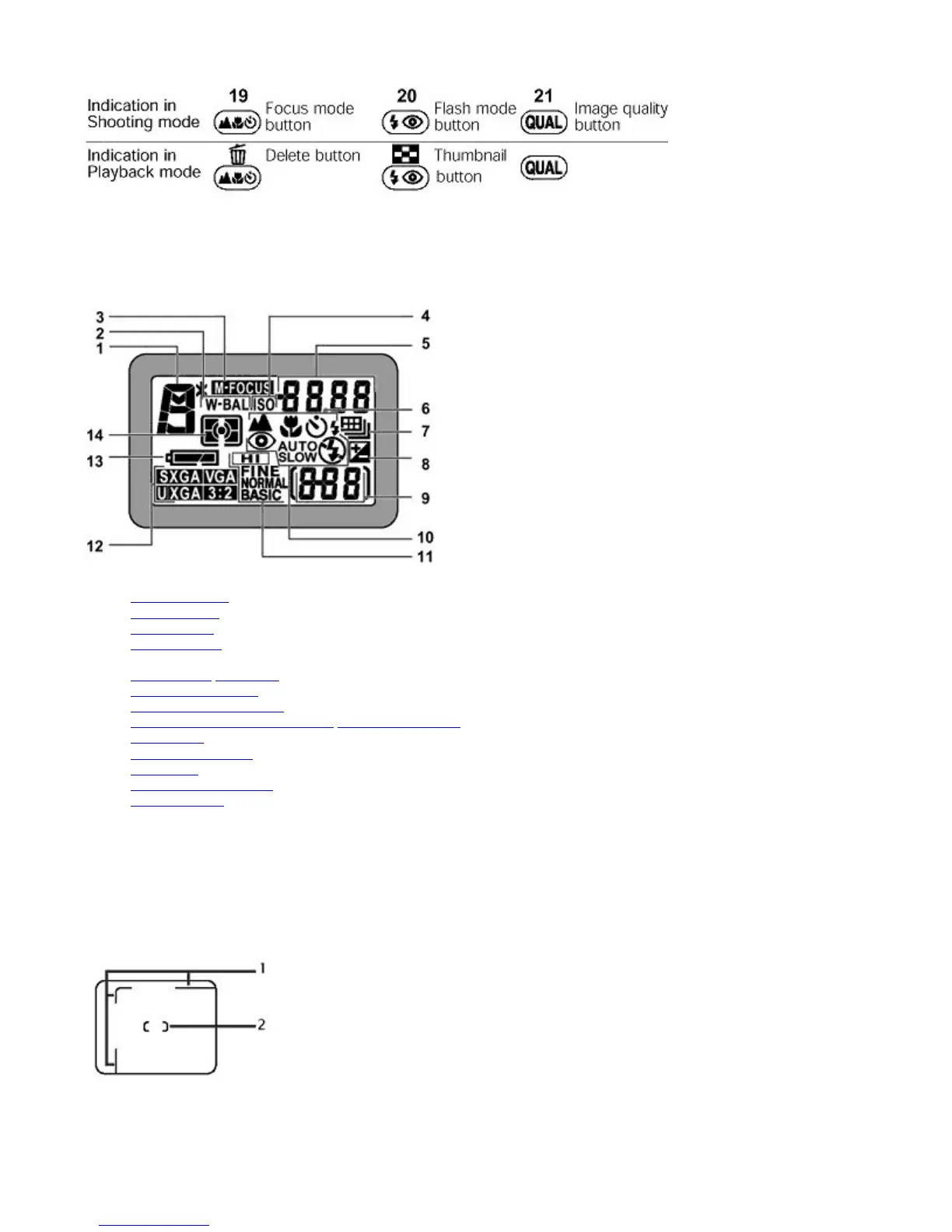
Control panel
(All indications are displayed in the illustration for easy reference.)
1. Exposure mode
2. White balance
3. Manual focus
4. ISO/Sensitivity
5. Aperture/Shutter speed/Various numerical values*
6. Focus mode
/ Self-timer
7. Continuous shooting
8. Exposure Compensation
9. Number of exposures remaining / Exposure condition/Image transfer indication
10. Flash mode
11. Image quality mode
12. Image size
13. Battery status indicator
14. Metering mode
z
Displays numerical values such as shutter speed in Shutter-Priority Auto/Manual Exposure mode, aperture in Aperture-
Priority Auto/Manual Exposure mode, Exposure Compensation value when Exposure Compensation is enabled, focus
distance when using Manual focus or sensitivity depending upon the functions used.
Viewfinder/LED
1. Parallax compensation marks for close-ups (macro)
2. Autofocus brackets
Pa
e 10 of 136
ikon COOLPIX995 Di
ital Camera
3/15/2002htt
://www.livemanuals.com/
acka
es/
roducts/NK002/2136/manual/fullmanual.html



 To Next Page