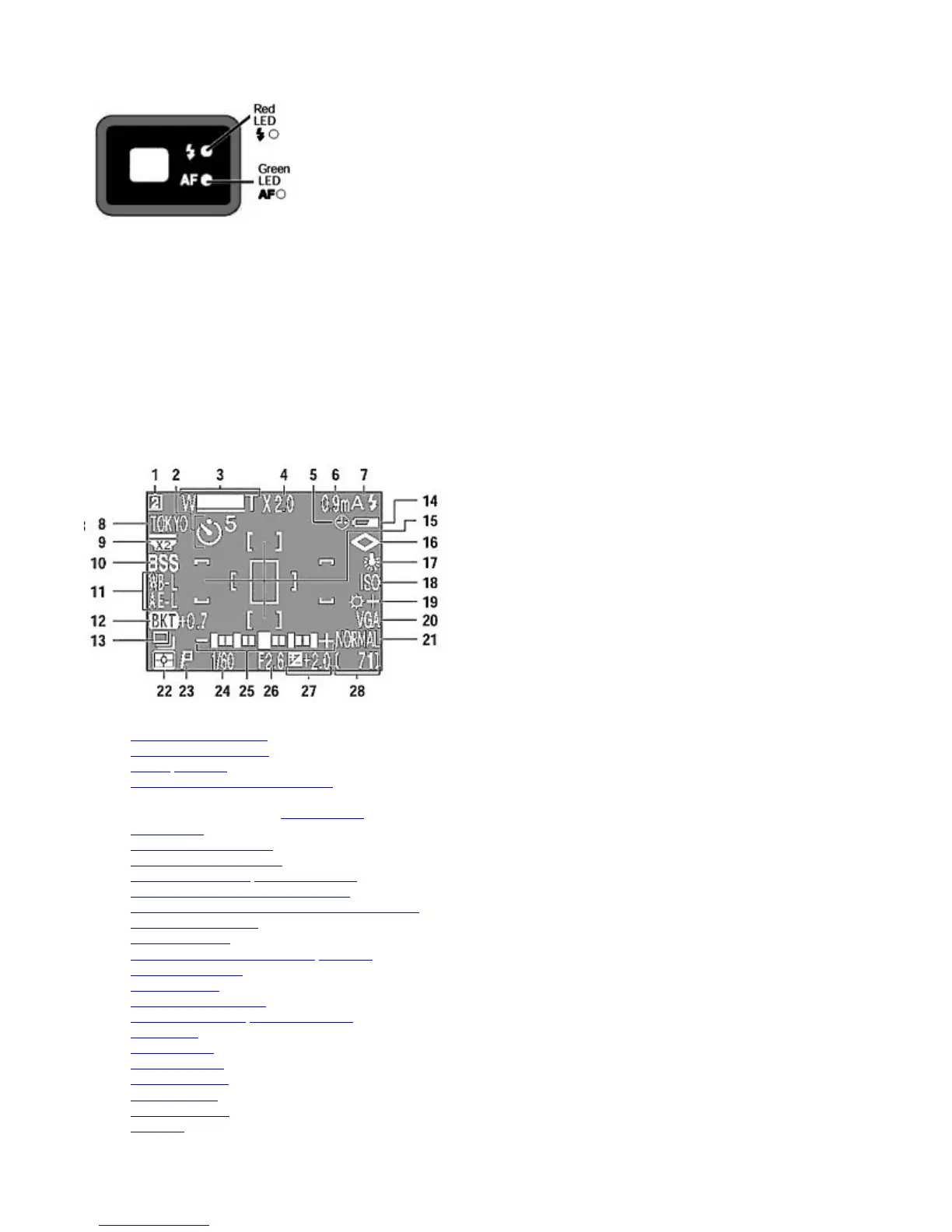
Monitor (in Shooting mode)
1. User Setup Number*1
2. Self
-timer/Count down
3. Zoom
/Ultra HS
4. Digital zoom magnification factor
5. Clock*2
6. Focus distance when in Manual focus
7. Flash mode
8. Current Folder name*3
9. Lens converter selection
10. Best Shot Selector /Noise Reduction
11. Exposure lock (Auto exposure lock /White balance lock)
12. Exposure bracketing/White balance bracketing
13. Continuous shooting
14. Battery power*4
15. Spot exposure metering area / AF area
16. Image sharpening
17. White balance
18. Sensitivity adjustment
19. Image adjustment
/ Black-and-white
20. Image size
21. Image quality
22. Metering mode
23. Exposure mode
24. Shutter speed
25. Exposure meter
26. Aperture
On:
Flashing (rapid):
Flashing (slow):
Flash ready
Flash recommended
Flash charging
On:
Flashing (rapid):
In-focus (ready for shooting)
Focus cannot be achieved in
autofocus operation
(intermediate):
(slow):
(slow):
Shooting photo
Digital Zoom
3 : 2 recording size
Pa
e 11 of 136
ikon COOLPIX995 Di
ital Camera
3/15/2002htt
://www.livemanuals.com/
acka
es/
roducts/NK002/2136/manual/fullmanual.html



 To Next Page