27. Exposure Compensation/Exposure Compensation values
28. Number of exposures remaining /Movie duration
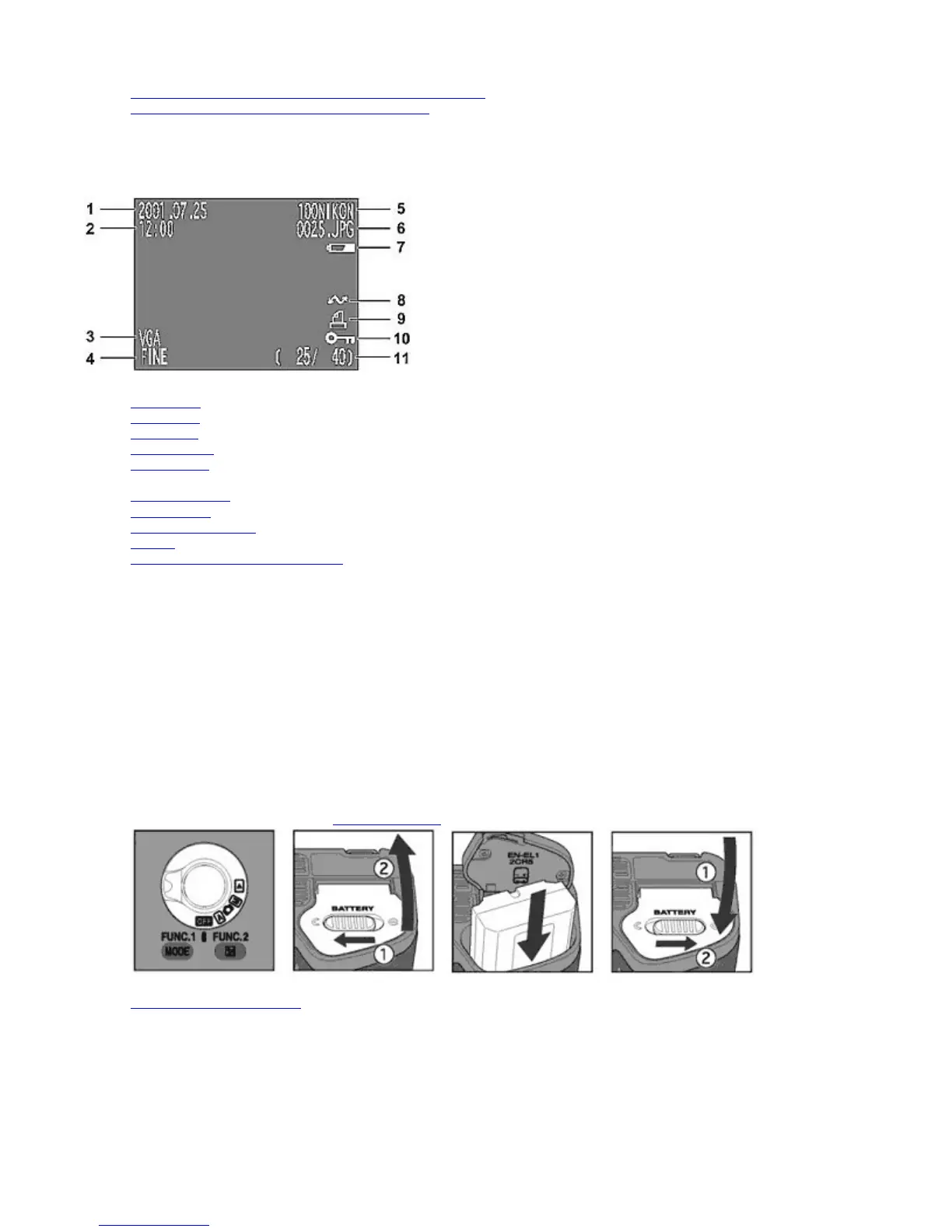
Monitor (in Playback mode)
1. Image date
2. Image time
3. Image size
4. Image quality
5. Folder name
6. File number
7. Battery power*4
8. Auto transfer
9. Print
-order selection
10. Protect
11. Frame number of displayed image
*1 Not displayed when User Setting Number 1 is set.
*2 Flashes when date/time setting is not set.
*3 Not displayed when folder name is set to NIKON.
*4 Not displayed when battery power is sufficient.
Quick Guide
This section will rapidly guide you through the first steps, from setting up the camera to taking your first picture.
1.
Set the MODE
dial to OFF and
insert the battery
.
2. Insert the CF memory card
.
Pa
e 12 of 136
ikon COOLPIX995 Di
ital Camera
3/15/2002htt
://www.livemanuals.com/
acka
es/
roducts/NK002/2136/manual/fullmanual.html



 To Next Page