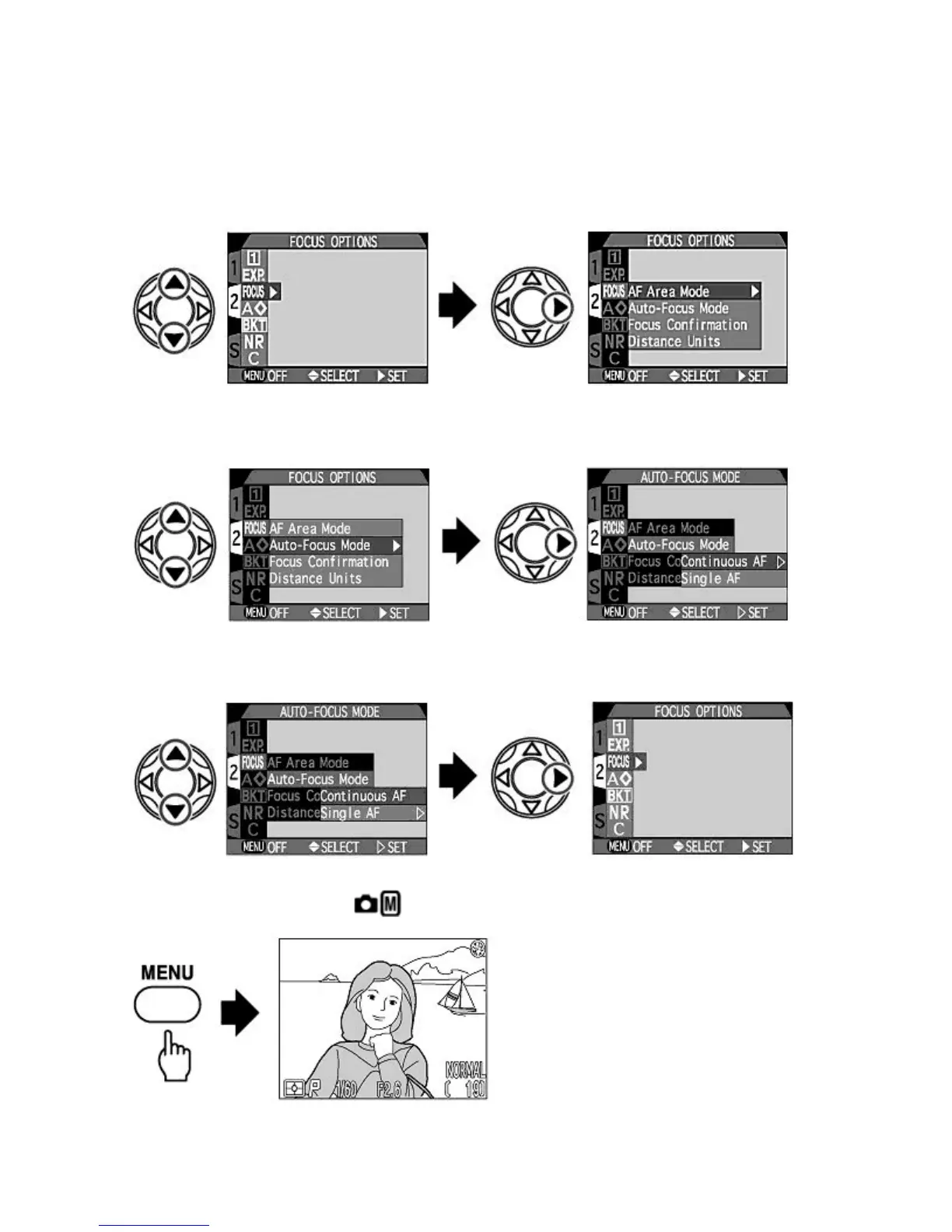
Choosing from the shooting menu
(example: Focus Mode)
1.
Select the Shooting menu item.
{
Press
UP
/
DOWN
on the Multi selector to highlight the desired menu item, then press
RIGHT
to display the
options for the selected item.
2.
Select the option for the selected item.
{
Press
UP
/
DOWN
to highlight the desired option, then press
RIGHT
to display further options for the selected
option.
3.
Set the option.
{
Press
UP
/
DOWN
to highlight the option, then press
RIGHT
to confirm. The Monitor then returns to the Shooting
menu.
4.
Complete the setting by pressing the MENU
button.
{
The Monitor then returns to Shooting mode.
Check
oints: Movin
from
a
e to
a
e
Pa
e 71 of 136
ikon COOLPIX995 Di
ital Camera
3/15/2002htt
://www.livemanuals.com/
acka
es/
roducts/NK002/2136/manual/fullmanual.html



 To Next Page