223m Recent Settings/O My Menu
O My Menu
Selecting O MY MENU for Choose tab lets you access a customized menu of up to
20 options selected from the playback, shooting, Custom Settings, setup, and
retouch menus.
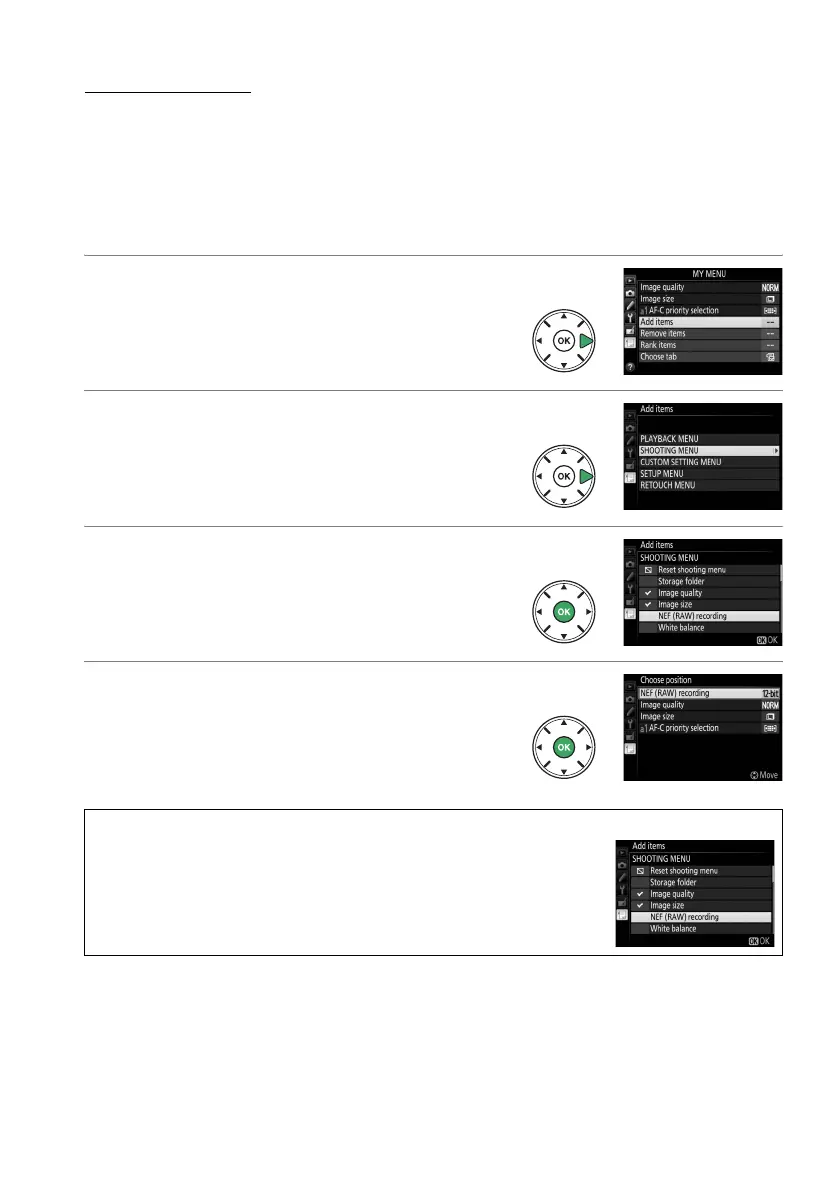
Follow the steps below to add items to, delete items from, and
reorder items in My Menu.
❚❚ Adding Options to My Menu
1 Select Add items.
Highlight Add items and press 2.
2 Select a menu.
Highlight the name of the menu containing
the option you wish to add and press 2.
3 Select an item.
Highlight the desired menu item and press
J.
4 Position the new item.
Press 1 or 3 to move the new item up or
down in My Menu.
Press J to add the new
item.
Repeat steps 1–4 to select additional
items.
A Adding Options to My Menu
The items currently displayed in My Menu are indicated by a check
mark.
Items indicated by a V icon can not be selected.



 To Next Page
 Loading...













