78 More on Photography
Deleting Logs
Follow the steps below to delete all or selected logs.
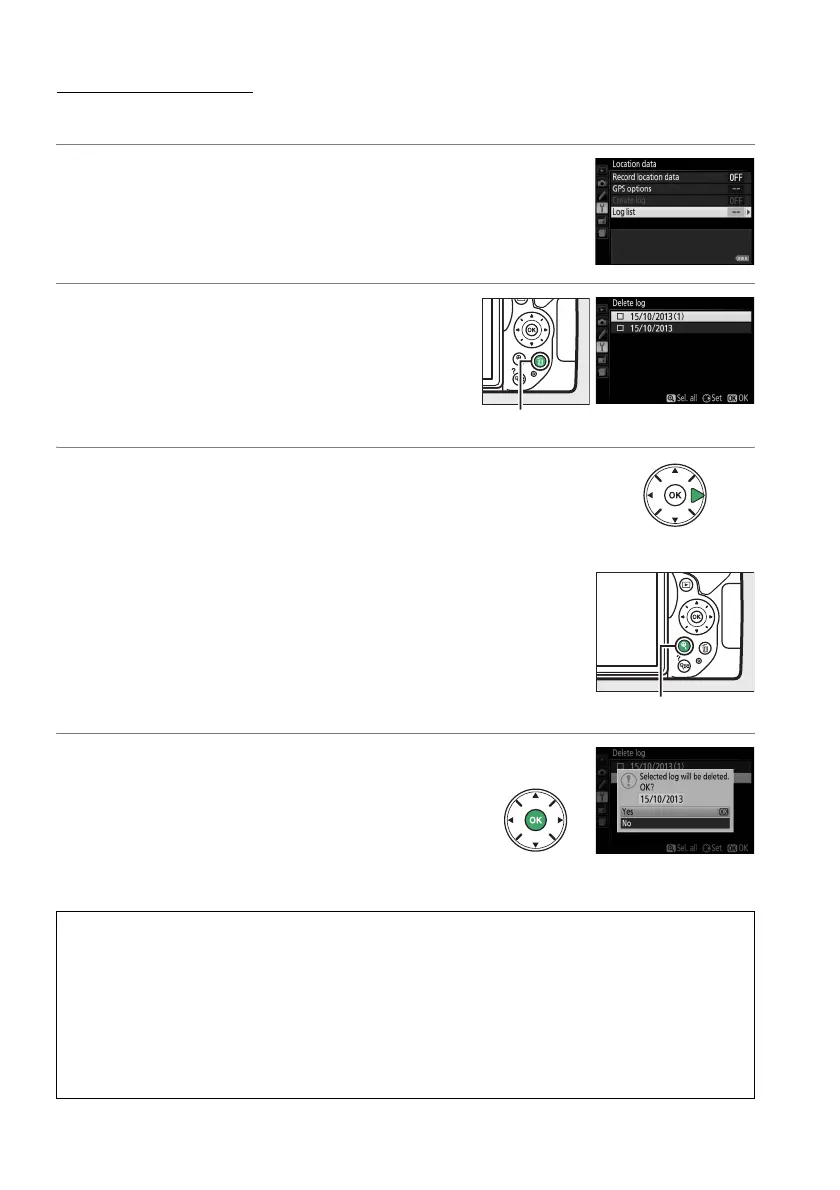
1 Select Log list.
Select Location data in the setup menu,
then highlight Log list and press J.
2 Press O.
The dialog shown at right will be displayed.
3 Select logs.
To delete selected logs, highlight items in the list
and press 2 to select or deselect, and then
press J to proceed.
To delete all logs, press X and then press J.
4 Select Ye s .
A confirmation dialog will be displayed;
highlight Ye s and press J to delete the logs.
A Copying Logs to a Computer
Logs are stored in the “NIKON” > “GNSS” folder on the memory card and have names
consisting of “N” followed by the log date (yymmdd), a single-character identifier from 0 to
Z assigned in ascending order by the camera, and the extension “.log” (thus the first log
recorded on October 1 2013 will be named “N1310010.log”).
Logs can be copied to a
computer by inserting the memory card in a card reader or card slot and transferring the files
using Nikon Transfer 2.
Logs are in NMEA format but may not display correctly in some
applications or on some devices.
O button
X button



 To Next Page
 Loading...













