103P, S, A, and M Modes
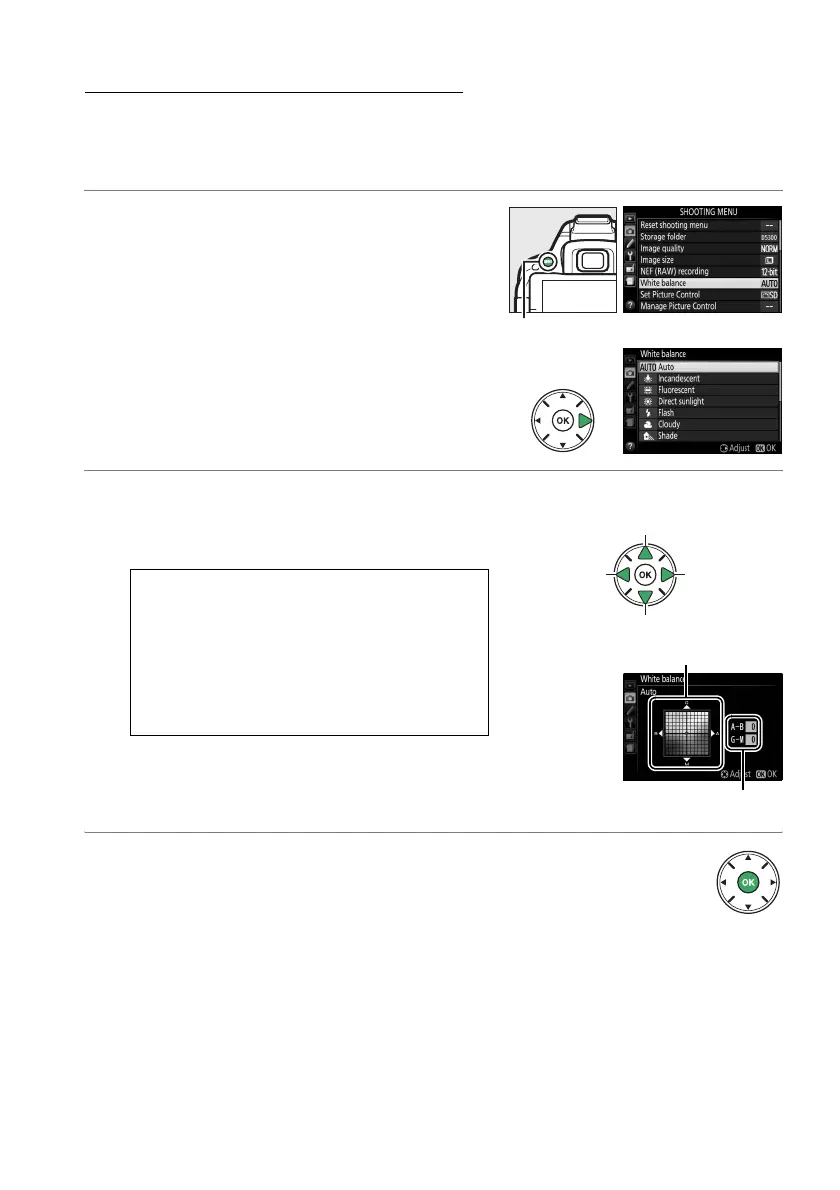
Fine-Tuning White Balance
White balance can be “fine-tuned” to compensate for variations in the color of the
light source or to introduce a deliberate color cast into an image.
White balance is
fine-tuned using the White balance option in the shooting menu.
1 Select a white balance option.
Press G to display the menus, then
highlight White balance in the shooting
menu and press 2.
Highlight the desired
white balance option and press 2 (if
Fluorescent is selected, highlight the
desired lighting type and press 2; note that
fine-tuning is not available with Preset
manual).
2 Fine-tune white balance.
Use the multi selector to fine-tune white
balance.
3 Save changes and exit.
Press J.
A White Balance Fine-Tuning
The colors on the fine-tuning axes are relative,
not absolute.
For example, moving the cursor
to B (blue) when a “warm” setting such as J
(incandescent) is selected will make
photographs slightly “colder” but will not
actually make them blue.
G button
Increase green
Increase
blue
Increase
amber
Increase magenta
Coordinates
Adjustmen



 To Next Page
 Loading...













