EasyManua.ls Logo

Nikon D700 - Connections

Nikon D700
533 pages
Print Icon
To Next Page IconTo Next Page
To Previous Page IconTo Previous Page
Loading...
OFF
ON
No
1 I
Non-CPU
lens
data
c
_._..._S.~Tl!.fl
..
~.~~~.
_
Image
authentication
4'
Copyright
information
;,
Save/load
settings
GPS
ti.lIl
Virtual
horizon
'IE.
:
AF
fine
tune
:6
Firmware
version
Highlight
Non-CPU lens data
in
the
setup menu (pg. 331)
and
press~.
II
The
Non-CPU
Lens
Data
Menu
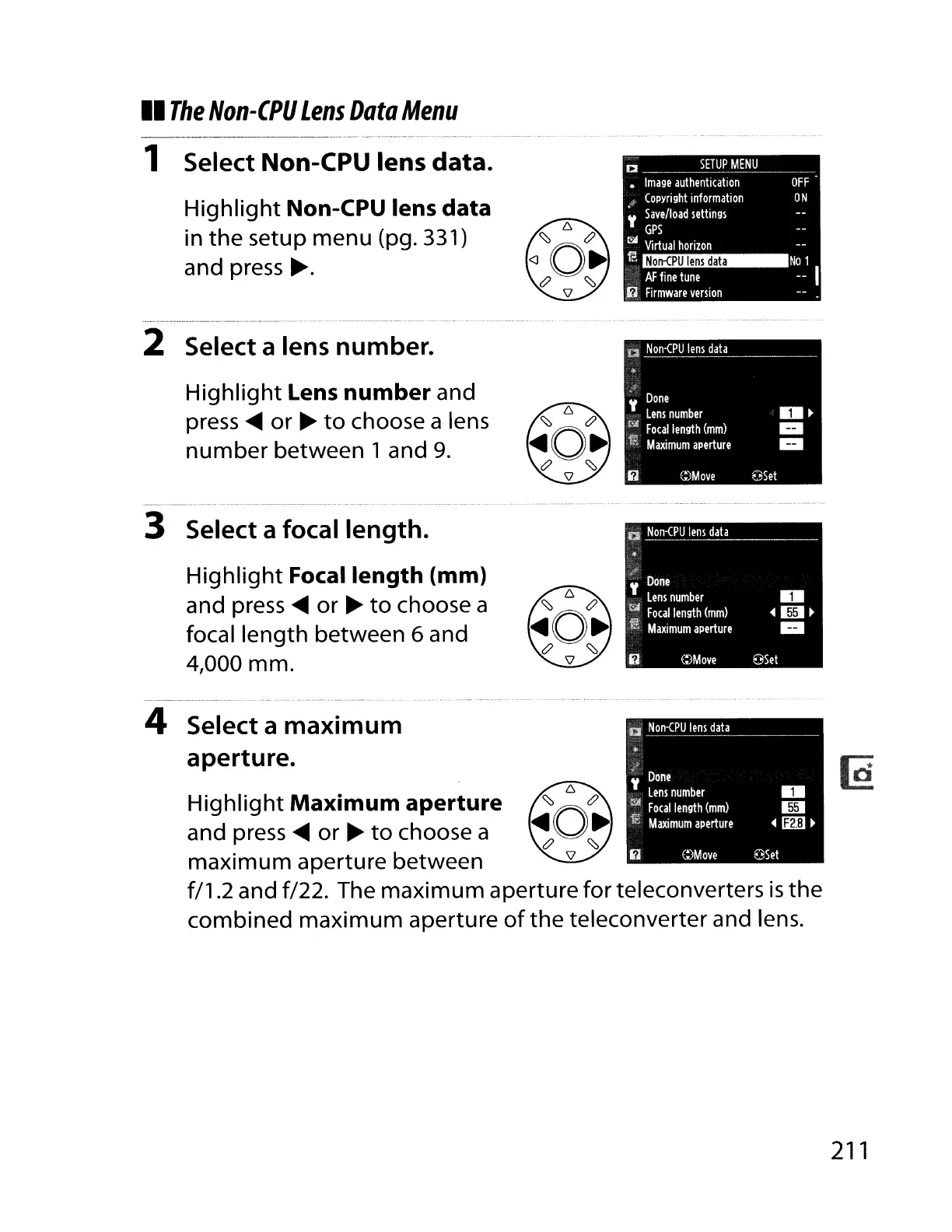
1 Select Non-CPU lens data.
2 Select a lens number.
Highlight
lens
number and
press
~
or
~
to
choose a lens
number
between 1 and 9.
3 Select a focal length.
Highlight
Focal
length
(mm)
and press
~
or
~
to
choose a
focal length between
6 and
4,000 mm.
4 Select a maximum
aperture.
Highlight
Maximum aperture
and press
~
or
~
to
choose a
maximum
aperture between
f/1.2 and f/22. The
maximum
aperture for teleconverters
is
the
combined
maximum
aperture
of
the
teleconverter and lens.
211

Table of Contents

Other manuals for Nikon D700

Related product manuals