EasyManua.ls Logo

Nikon D700 - Page 248

Nikon D700
533 pages
Print Icon
To Next Page IconTo Next Page
To Previous Page IconTo Previous Page
Loading...
II
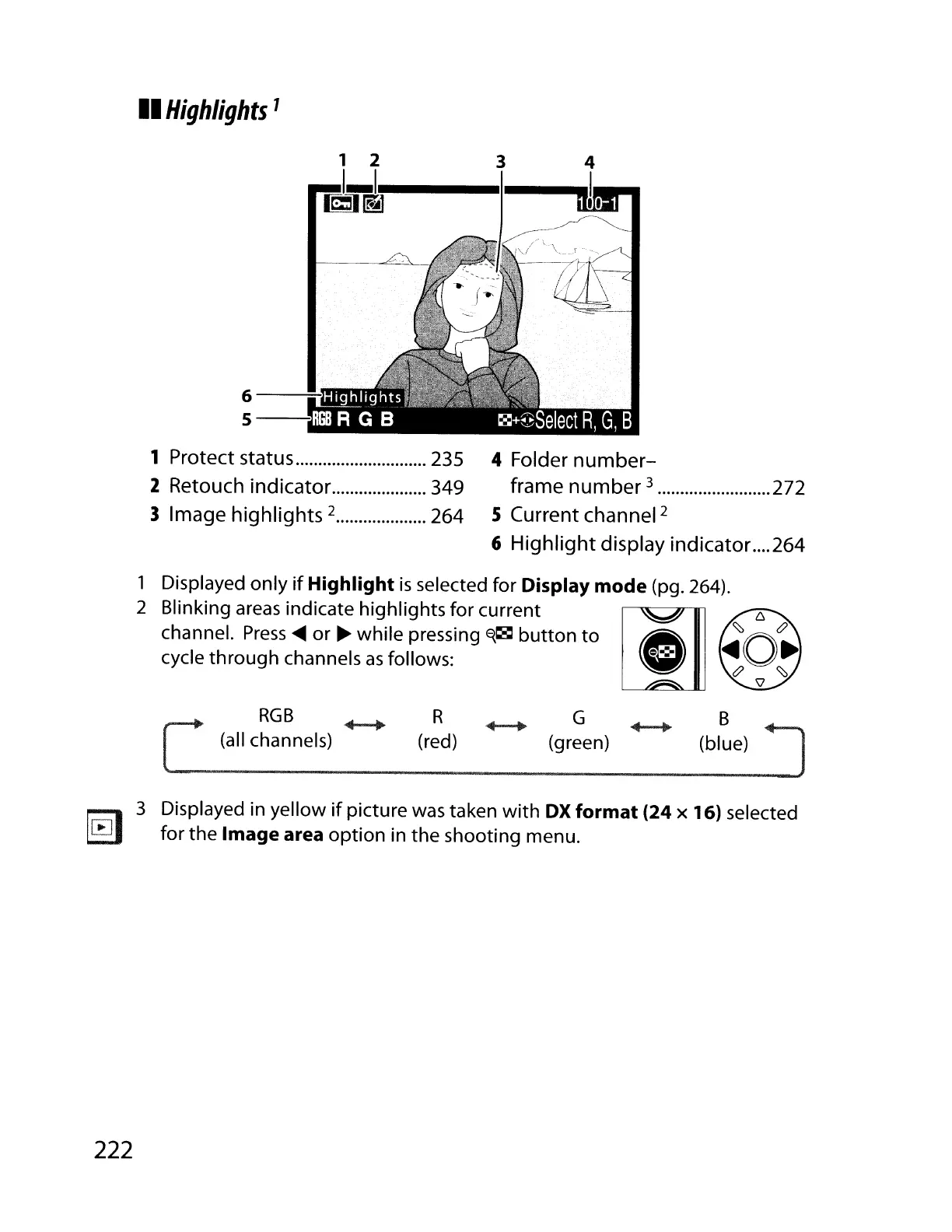
Highlights
1
3
1 2
I_I~_-I--'
m3~
6--:-
5---:1il
1 Protect status 235
2
Retouch
indicator
349
3
Image
highlights
2 264
4 Folder
number-
frame
number
3 272
5 Current channel
2
6
Highlight
display indicator.
...
264
1 Displayed only
if
Highlight
is
selected for
Display
mode
(pg. 264).
2 Blinking
areas
indicate highlights for current li]
c::,
channel.
Press
~
or
~
while pressing
~~
button
to
e:==:
~O.
cycle through channels
as
follows:
t?
~
\J
RGB
(all channels)
R
(red)
G
(green)
B
(blue)
1~1
3 Displayed in yellow
if
picture
was
taken with
OX
format
(24 x 16) selected
~
for the
Image
area option in the shooting menu.
222

Table of Contents

Other manuals for Nikon D700

Related product manuals