II
RGB
Histogram
1
4
--=----:::~~===-......,
6--W~~
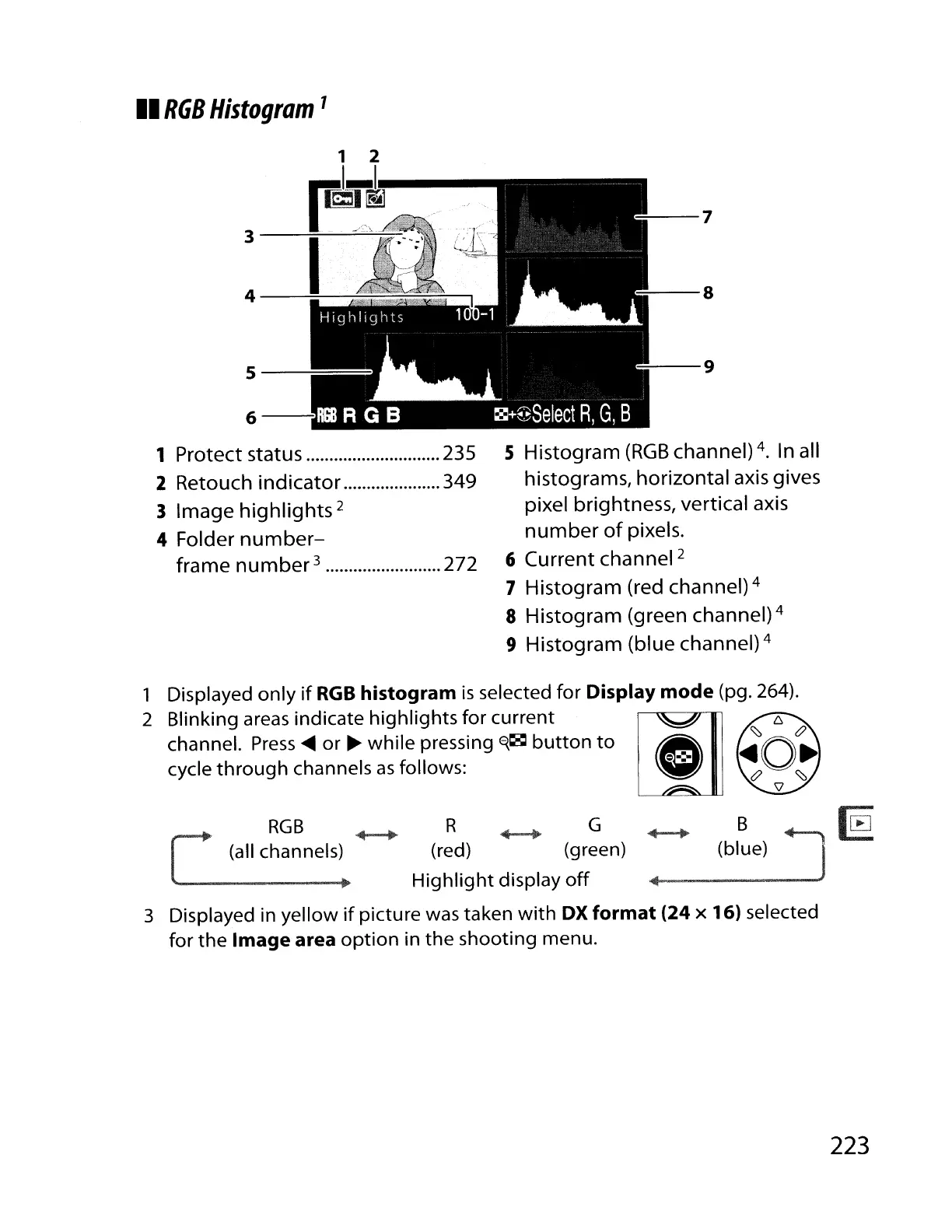
1 Protect status 235
2
Retouch
indicator
349
3 Image
highlights
2
4 Folder
number-
frame
number
3 272
--7
=---8
:---9
5 Histogram
(RGB
channel) 4. In all
histograms, horizontal axis gives
pixel brightness, vertical axis
number
of
pixels.
6 Current channel
2
7 Histogram (red channel) 4
8 Histogram (green channel) 4
9 Histogram (blue channel) 4
1 Displayed only
if
RGB
histogram
is
selected for Display
mode
(pg. 264).
2 Blinking
areas
indicate highlights for current
channel.
Press
....
or
~
while pressing
E{~
button to
cycle through channels
as
follows:
B
(blue)
RGB
(all channels)
R ......-. G
(red) (green)
Highlight display
off
....
-------
3 Displayed in yellow
if
picture
was
taken with
OX
format
(24
x 16) selected
for the
Image area option in the shooting menu.
223



 To Next Page