Follow the steps below to take photographs
in
commander mode.
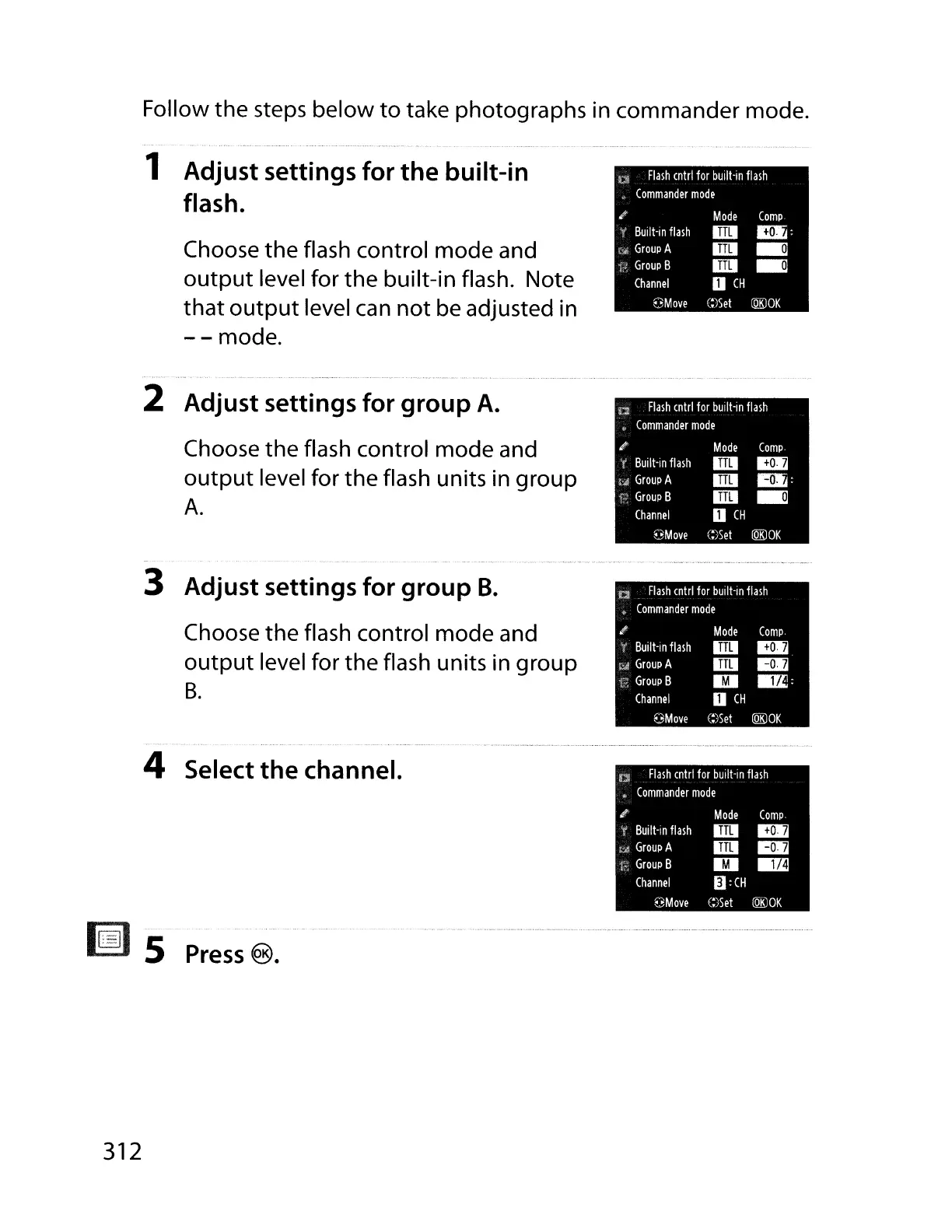
1 Adjust settings for
the
built-in
flash.
Choose
the
flash control
mode
and
output level for
the
built-in flash. Note
that
output
level can not be adjusted
in
--
mode.
Flash
enlrl
for
built-in
flash
*
Commander
mode
.I
Mode
Comp
Buill-in
flash
•
~:
Group
A
•
..
Group
B
•
..
Channel
U
CH
€)Move
C:)Sel
[QKlOK
Flash
enlrl
for
buill-in
flash
Commander
mode
Compo
II!Ir.l
D.j:
..
Flash
entrl
for
built-in
flash
Commander
mode
Compo
II!Ir.l
1m
M!;
2 Adjust settings for group
A.
Choose the flash control mode and
output level for the flash units
in
group
A.
3 Adjust settings for group
B.
Choose the flash control mode and
output level for the flash units
in
group
B.
Buill-in
flash
Fd
Group
A
Group
B
Channel
€3Move
Built-in
flash
Group
A
Group
B
Channel
eMove
Mode
•
•
•
U
CH
C:)Sel
[QKlOK
Mode
•
•
1m
U
CH
C:)Set
[QKlOK
4 Select
the
channel.
~
I.=J
5
Press
®.
312



 To Next Page