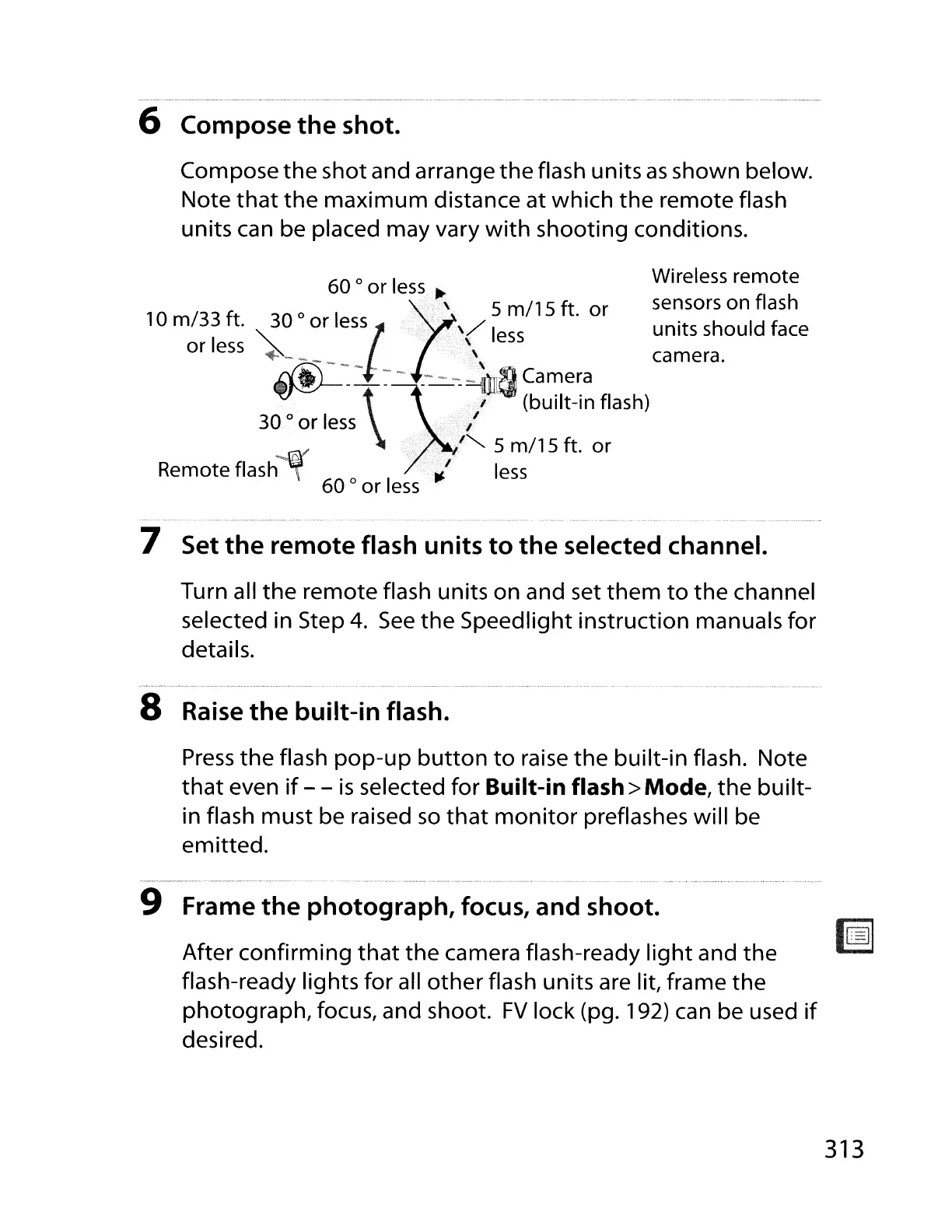
6 Compose the shot.
Compose
the
shot and arrange
the
flash units
as
shown below.
Note
that
the
maximum
distance at which
the
remote flash
units can be placed may vary
with
shooting conditions.
Wireless remote
60
0
or
less
...
'1
5
115
f
sensors on flash
10
m/33
ft. 30
0
or
less
\/
I m t.
or
I
""
I \
ess
units should face
or
ess
~_
,
~"
camera.
~--\~
-~~
~u~;~~
flash)
30
0
or
less
"
'''-.. 5
milS
ft. or
Remote
flash·~JI.'
less
60
0
or
less
7 Set the remote flash units to
the
selected channel.
Turn all
the
remote flash units on and set
them
to
the
channel
selected in Step
4.
See
the
Speedlight instruction manuals for
details.
8
Raise
the
built-in flash.
Press
the
flash
pop-up
button
to
raise
the
built-in flash. Note
that
even
if
- -
is
selected for Built-in flash> Mode,
the
built-
in flash must be raised
so
that
monitor
preflashes will be
emitted.
9 Frame
the
photograph, focus, and shoot.
After confirming
that
the
camera flash-ready
light
and
the
flash-ready lights for all
other
flash units are lit, frame
the
photograph, focus, and shoot.
FV
lock (pg. 192) can be used
if
desired.
313



 To Next Page