None
Shutter spd
~))@l!
& aperture
lock
II
FUNC.
Button+Dials
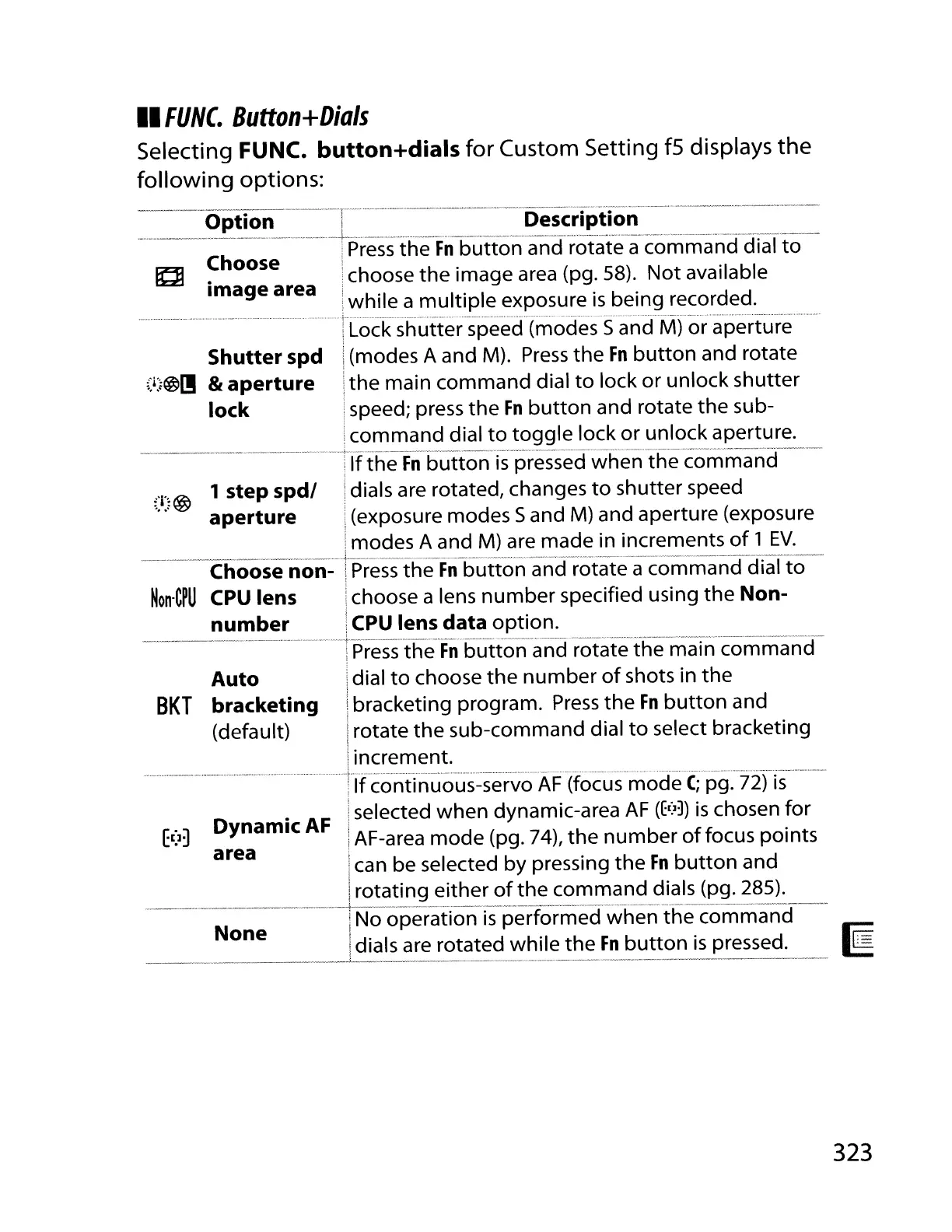
Selecting FUNC. button+dials
for
Custom Setting
fS
displays
the
following
options:
=~=~-
~p~~o~~-==-l_-_=~=_=
__
:-:=~=~
__
D~s~~!~~~~_ri'=~:_~=='=~=
Ch
i
Press
the
Fn
button
and rotate a command dial
to
~
. oose ichoose
the
image
area
(pg. 58).
Not
available
Image area
i
h·1
I·
I . b . d d
:w I e a mu tiP e exposure
IS
elng recor e .
-
-----'--.-.---
..
--
··········r
Lock-shutter-speecf(m-ocfes-Sa-ncfiV1)o-ra-pert"ure----
i(modes A and M).
Press
the
Fn
button
and rotate
i
the
main command dial
to
lock or unlock shutter
ispeed; press the
Fn
button
and rotate the sub-
icommand dial
to
toggle
lock or unlock aperture.
------------·--1
If
th-eFn-button
is
pressedwEen--the-com-ma-nd---
;:i:;@
1 step spdl idials are rotated, changes
to
shutter speed
aperture
i(exposure modes 5 and
M)
and aperture (exposure
imodes A and
M)
are made in increments
of
1
EV.
···--_·--·--Choose-non-
-n'-re·s's-a,eFn-butto'n--a-r;-cf"rotate-
a comman-ci"cfiaTto--
Non·CPU
CPU
lens ichoose a lens
number
specified using the Non-
number
I
CPU
lens data option.
--_.
-_._--_.
__
..
_--------+-::-----_
..
_
..
__
.
__
...
__
.-
..
__
.
__
...
_
...
---_
...
-----_._._-_.
__
...
_-----
i
Press
the
Fn
button
and rotate the main command
Auto
idial
to
choose
the
number
of
shots in the
i
BKT
bracketing ibracketing program.
Press
the
Fn
button
and
(default)
Irotate
the
sub-command dial
to
select bracketing
i.
iIncrement.
..
--
···········nfcontinuous-se-rvoAF"(focus
mode
C;.
pg:7ifis-·--
Iselected when dynamic-area
AF
(E(lJ)
is
chosen for
E(]~
Dynamic
AF
IAF-area mode (pg. 74),
the
number
offocus
points
area I
ican be selected by pressing
the
Fn
button
and
I
Irotating either
of
the command dials (pg. 285).
..
_.----+---_._------_._-_._---------------
---:----
INo operation
is
performed when
the
command
I
Idials are rotated while
the
Fn
button
is
pressed.
____
.. ..
_.1..
._
..
._._
... .
__
.
...
_._
•._. .
....
.
323



 To Next Page