Preview crop
Trim
.,,~mW,~N"_'·"_""·"·','·_'_'_·'M'·~'
'."',,,,,'",N""'~'~
_"~·_""',._,.'~""N"_"""~~~'_""~'~'""
••
,.'N.-N.,.-.-.-,m·~"".'~_""""",""'~·.·hU'-'''·.-'M",''_.·.,·,
....
""""
.•.
~,,,·~·
_·_·_n"~m"""'.'_""~'~~",,,,,_m·''''_'''_''''''''_'_''''~W'W'._~.,~,,~"~,.,·
•.
N""N,'·,W"V.'_·_'"·_·_""'Y_·"Y'_,~'"
"~"_"_"~"·"~'·"'_N"
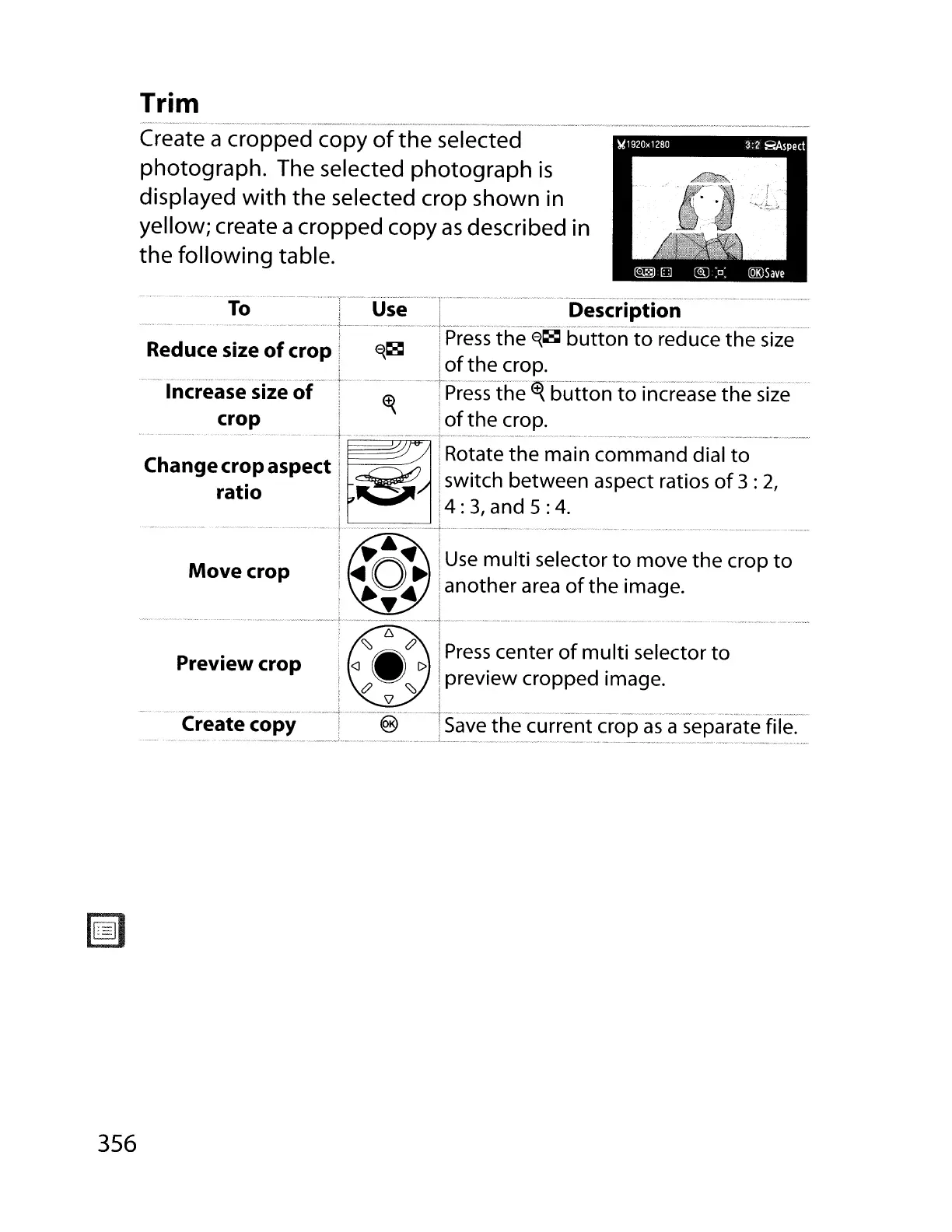
Create a cropped copy
of
the selected
photograph. The selected photograph
is
displayed
with
the selected crop shown in
yellow; create acropped copy
as
described in
the following table.
~.:~
...
:-
.....
-'"
.'~'"
.!~~"~~'~~~~~~["."
..
:~~!=~":.].~=~~=~~"'~-'''~''=-~=~:~!.scr!~~~~
..
__
.:.='.:.-··-=.
__
=.~--=:
R
d
.
f I
AIOl
I
Press
the
~~
button
to
reduce the
size
e uce size 0 crop!
':;'1CaI
I f
th
i 1
0
e crop.
Increase size
of
····r··
.....
~.
····
..
··Tpress--the~·button·toTnc-rease·the·size····
crop , i
of
the
crop.
_____
_r_'~
__
.,~
__
.,
__
v
--,-
H
_~_~~~_~~~~~
• _
Ch
i
~
:Rotate
the
main command dial
to
ange
crt~p
aspect:
'8
iswitch between aspect ratios
of
3 :
2,
ra
10
I '
I
;4:
3,
and 5 :
4.
...
..--
--
-
--
..
··l--·
..
······
..
······
..
_·;
..
·
..
·
..
···
_......
..-
..
__ - -
..
-
-._.....
-.-......
.
--
!
~
:
Move
crop !
~O"
i
Use
multi
selector
t~
move the crop
to
:
~.:
Ia
not
her a
rea
of
the Image.
..
- -
--
-
-....
. _
--.-
-:>
__
_-
..
-.-
_.--l.
_ _
-_
--
-
_...........
..•
_ - - _ - - -
: 6 :
!.
~.&
I
Press
center
of
multi
selector
to
,<J_l>!"
d"
! tJ
~
iprevIew croppe Image.
i
\l
I
....
_...
.
--
-.---
-----!-
--
-.-t.------
-
-.----
..
-
..
--
--.--...
..
--.-
-
..
---- .
Create copy i ® I
Save
the current crop
as
a separate file.
356



 To Next Page