EasyManua.ls Logo

Nikon D700 - Page 75

Nikon D700
533 pages
Print Icon
To Next Page IconTo Next Page
To Previous Page IconTo Previous Page
Loading...
Adjust Camera
Settin~
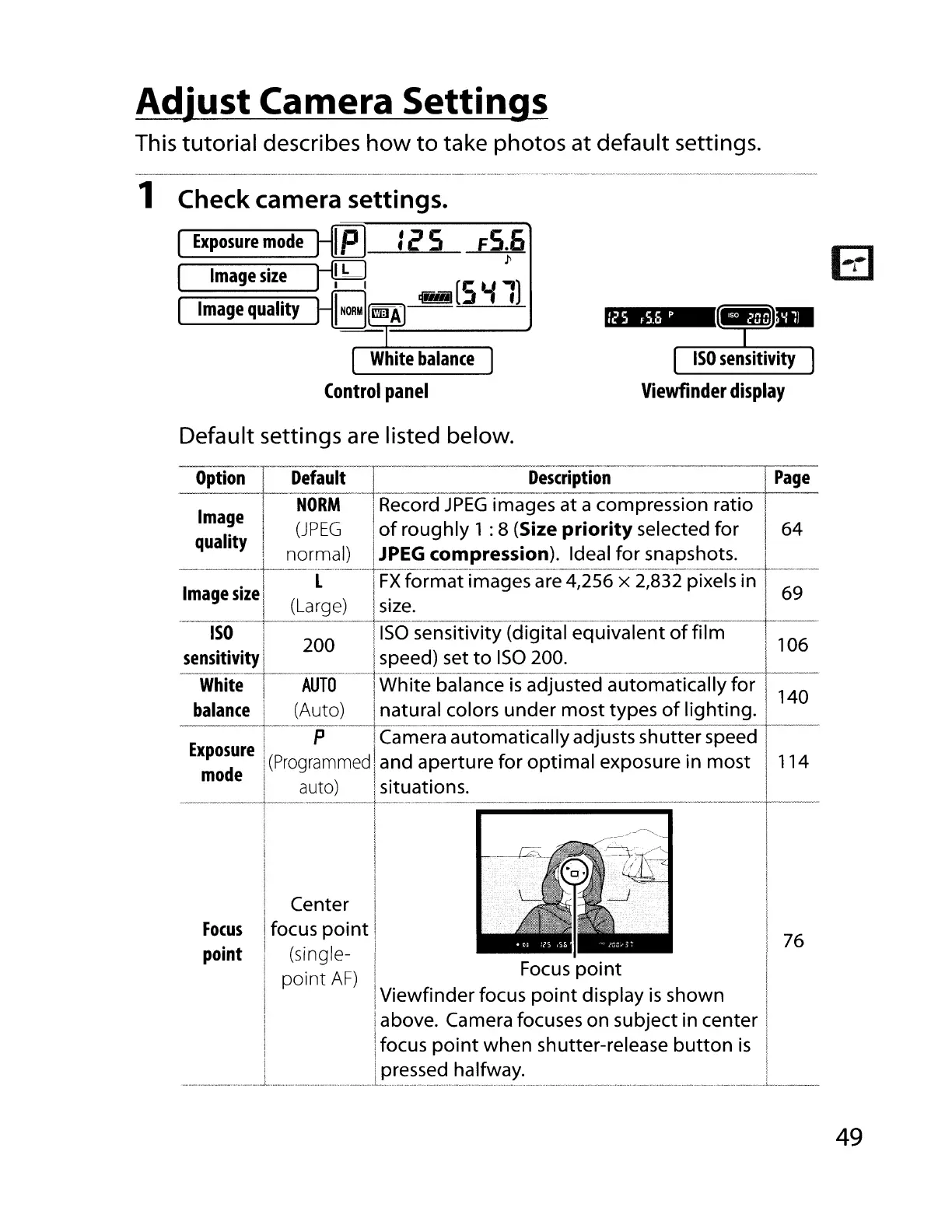
This tutorial describes
how
to
take
photos
at
default settings.
1 Check camera settings.
Exposure
mode
J-[E]
:2 5
FS.6
J---.ffLl
l'
Image
size
J
't5
[S
...,
")
Image
quality
l-8
rmJA
~
Default
settings
are listed below.
125
F5.6
p
ISO
sensitivity
Viewfinder display
I
__
..
_
..
_
__
~."_,_
..
__
,,_
-L.
,
•.......
_ _ _ _.
-~ptiOn-1'::-~eC:d-:~~:i::~o~;essjon
rat~·g·
_.mage
s~e
._~~arg~L_~~~:....
~_.
.
._
ISO
I 200 liSa sensitivity (digital
equivalent
of
film
106
~enS~~iV~!4--~~;d)
set
to
IS?
2~0.
. .
White
I
AUTO
I
White
balance
IS
adjusted
automatically
for
140
balance
L.\~uto~~~~~al
co~ors~~~er
most
types
of
lighting.
E I P ICamera
automatically
adjusts
shutter
speed
xposdure
I
(Programmed
Iand aperture
for
optimal
exposure in
most
114
mo
e I
)...
>
I
auto
1 situations. I
-----+----I·--·---·--.--~·
__
··_~-'--_··_·,·_-_·
..
_ +-
~.
I I
~
I
I I
.-/
I
I
i I
I Center I I
Focus
ifocus
point
I I
point
I,
(single- I .
I'
76
point
AF)
I Focus POint
I I
Viewfinder
focus
point
display
is
shown I
! above. Camera focuses on subject in center 1
focus
point
when
shutter-release
button
is
pressed halfway. I
..
L , , , , , , , _
~._
,,_
__
..
49

Table of Contents

Other manuals for Nikon D700

Related product manuals