EasyManua.ls Logo

Nikon D700 - Page 87

Nikon D700
533 pages
Print Icon
To Next Page IconTo Next Page
To Previous Page IconTo Previous Page
Loading...
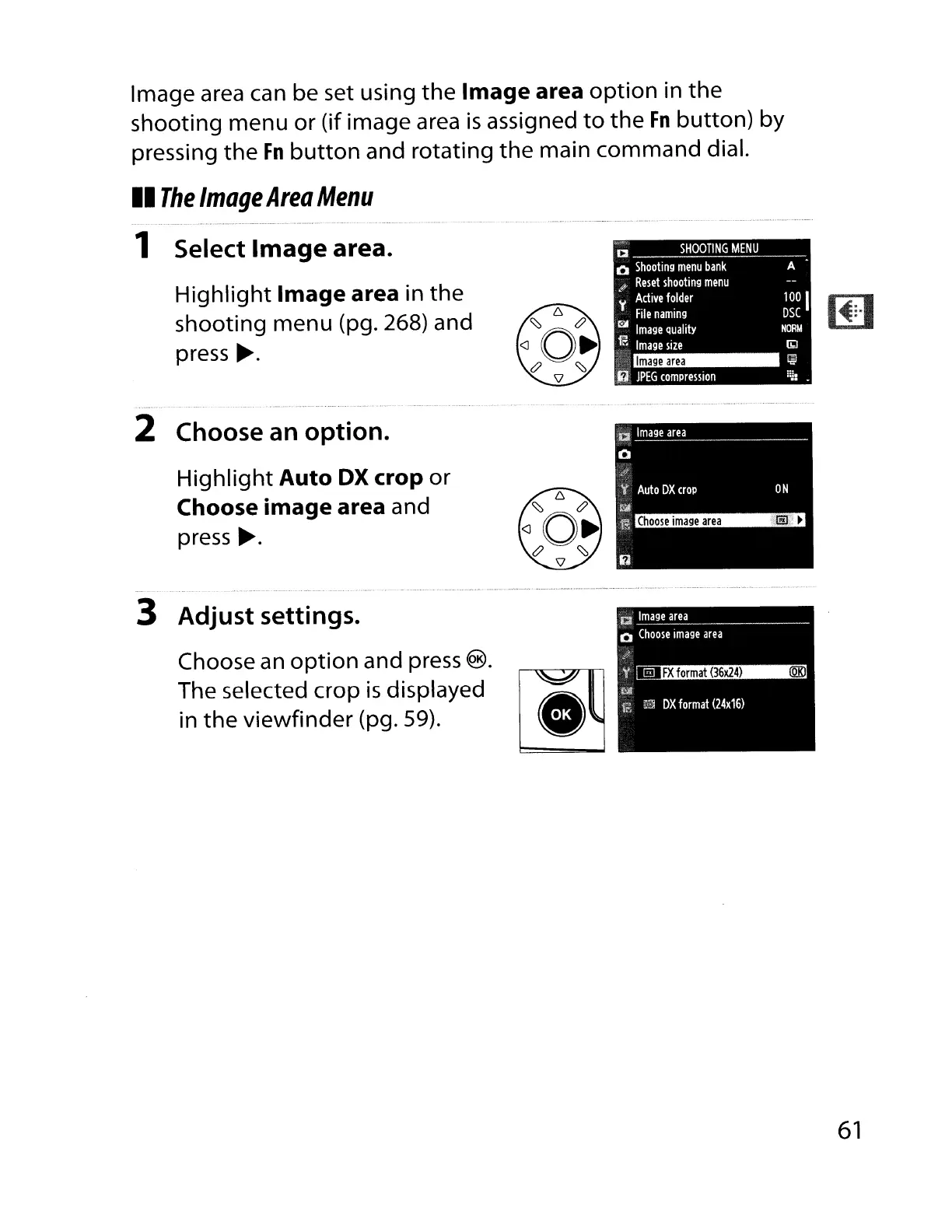
Image area can be set using
the
Image area
option
in the
shooting
menu
or
(if image area
is
assigned
to
the
Fn
button)
by
pressing
the
Fn
button
and rotating
the
main
command
dial.
II
The
Image
Area
Menu
1 Select
Image
area.
Highlight
Image area in
the
shooting menu (pg. 268) and
press
.-.
CI
SHOOTING
MENU
o
Shooting
menu
bank
$'
Reset
shooting
menu
y
Active
folder
File
naming
CiIl
Image
Quality
,~
Image
size
Image
area
ii,
JPEG
compression
A
100
I
DSC
NORM
(bJ
~
2 Choose an option.
Highlight
Auto
OX
crop
or
Choose image area and
press
.-.
3 Adjust settings.
Choose
an
option
and press
®.
The selected crop
is
displayed l
~..
~
in
the
viewfinder
(pg. 59).
61

Table of Contents

Other manuals for Nikon D700

Related product manuals