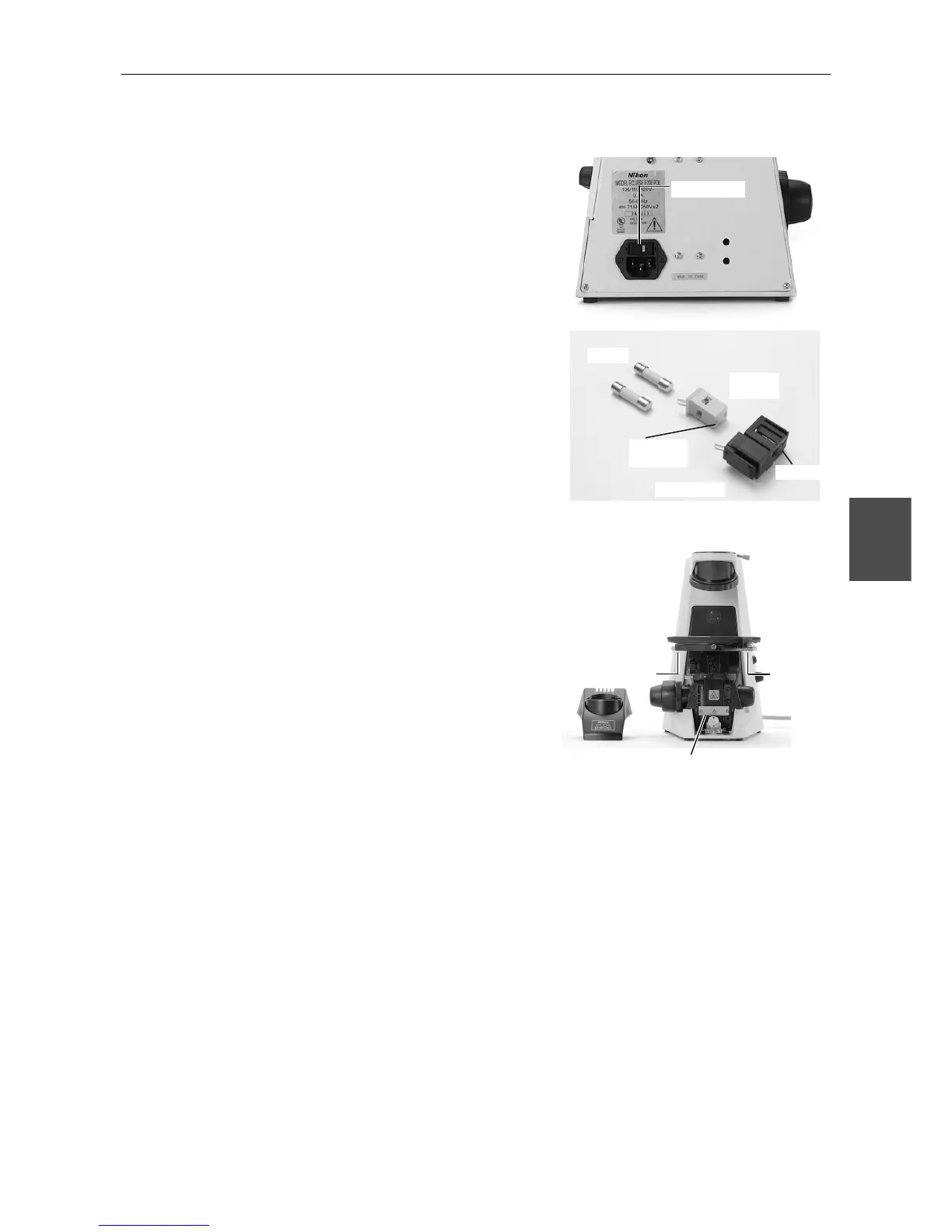
Changing the Voltage Setting
(1) Turn off the power switch (turn to {) and
unplug the power cord.
(2) Remove the fuse holder using the flatblade
precision screwdriver. (Use the tip of the
screwdriver to push the two lock plates
toward the center of the fuse holder. The fuse
folder pops out from the AC inlet.)
(3) Wear gloves and remove two fuses and the
voltage selector from the fuse holder.
(4) Attach the voltage selector to the fuse holder
so that the indication of the voltage provided
in your region appears in the window of the
fuse holder.
(5) Put the fuses and the fuse holder back in
place. Be sure to push both sides of the fuse
holder firmly till it clicks into place.
2
Removal of Shipping Clamps
• Stage:
Remove two bolts from the bottom of the stage.
• Focusing Mechanism:
Remove the field lens unit to expose a plate
retaining the vertical movement of the focusing
mechanism. The plate is fastened with 3 bolts.
Remove the bolts and the plate.
Fuse holder
Fuses
Voltage
selector
Voltage
indication
Fuse holder
Window
Shi










 To Next Page