VI Assembly
1 Assembly
38
7
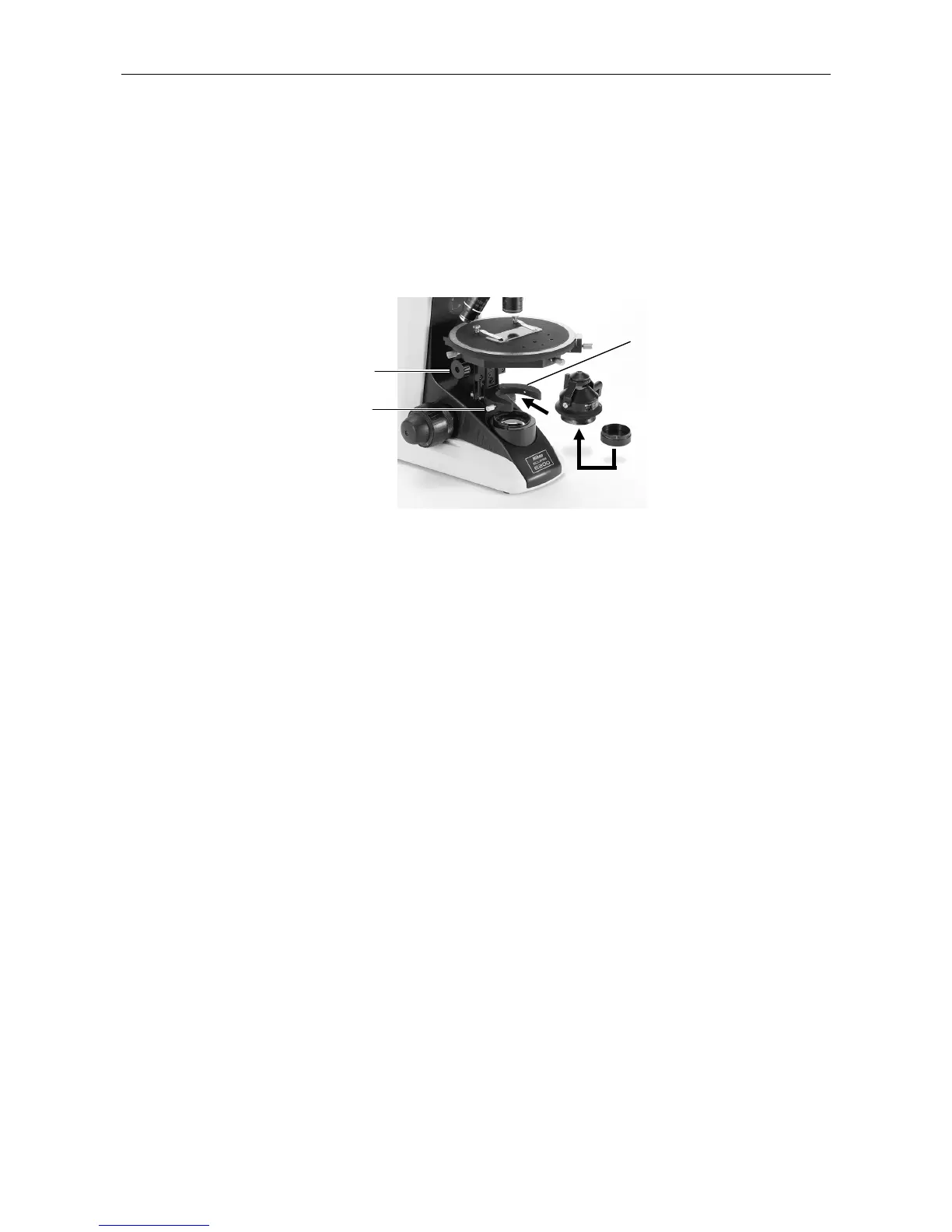
Attaching the Condenser
Lower the condenser holder to the limit using the condenser focus knob.
Insert the condenser to the condenser holder so that its nameplate faces forward. Fix the
condenser by tightening the condenser clamp screw at the left side.
Raise the condenser till the limit.
Insert the polarizer to the bottom of the condenser.
When observing the specimen, lower the condenser a little from its uppermost position so that
the diffuser image of the light source is not visible.
8
Connecting the Power Cord
Turn off the power switch of the microscope (turn to
{
). Connect one end (socket) of the
supplied power cord to the AC inlet on the rear of the microscope. Connect the other end (plug)
to an AC line receptacle with the ground conductor (earth conductor). Make sure that the power
cord is securely connected.
• Note that the microscope should be installed near the AC line receptacle and the AC line
receptacle should be placed within your reach.
• Use the power cord provided. The use of other cords may damage the instrument or cause a
fire hazard.
• If using an extension cord, use only a cord that includes a protective earth (PE) wire.
This completes the assembly of the microscope.
9
Other Accessories
For installation of other accessories such as the epi-illuminator and the photomicrographic
equipment, see the manual provided for each product.
Condenser focus knob
Condenser clam








 To Next Page