5 Menu Key
128 Nikon N Series/K Series Total Station Instruction Manual
Editing raw records
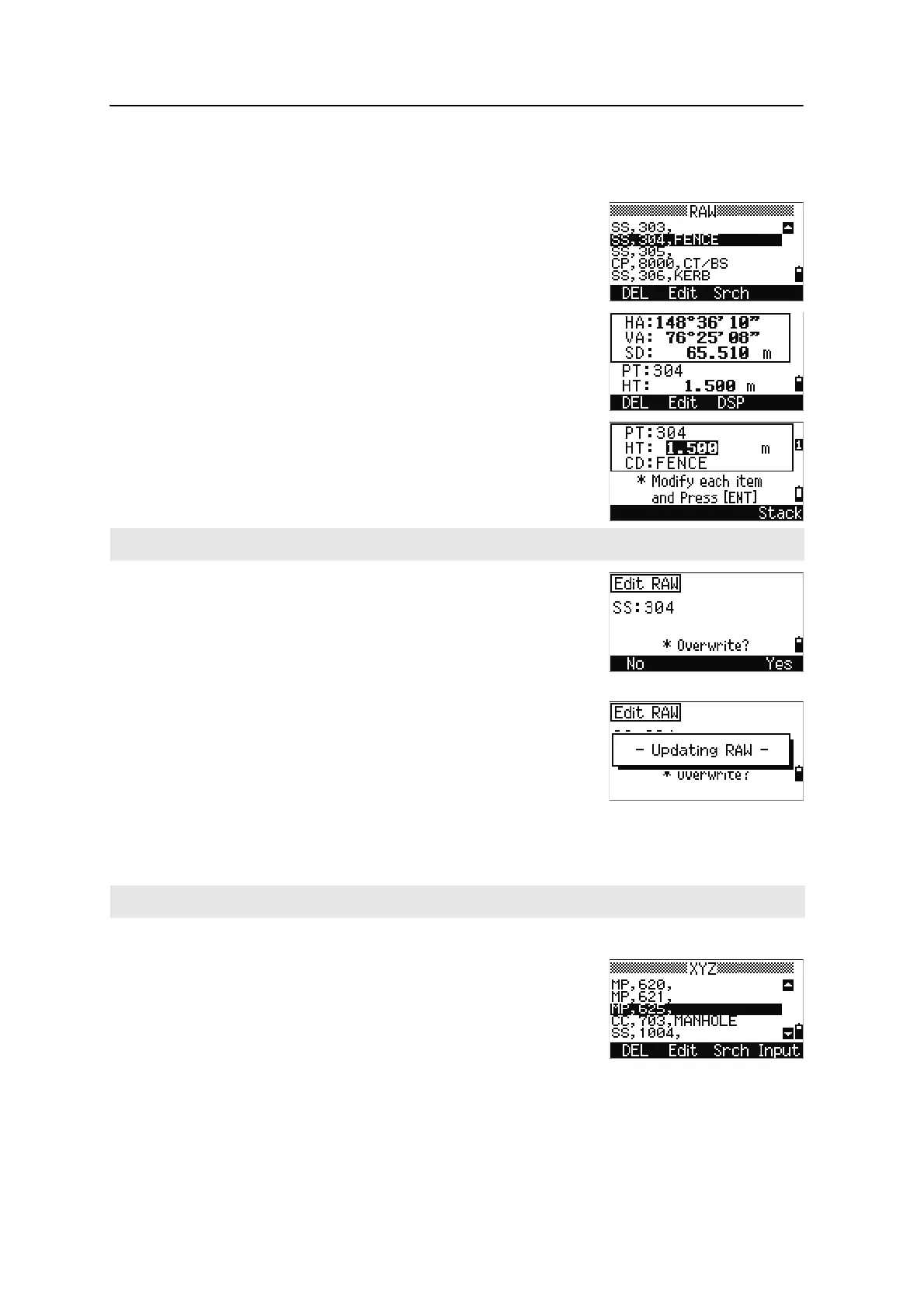
1. Do one of the following:
– In the RAW screen, highlight the record
that you want to edit. Then press the
Edit
softkey.
– In the detailed data screen, press the Edit
softkey.
2. Use
[^] or [v] to highlight a field. Then modify the
value in the selected field.
3. When you press
[ENT] on the last line of the edit
screen, a confirmation screen appears.
4. Do one of the following:
– To accept the changes and return to the data
view screen, press
[ENT] or the Yes softkey.
– To return to the edit screen, press [ESC] or
the
No softkey.
Editing coordinate records
You can edit PT, CD, and coordinate values in coordinate records.
1. Do one of the following:
– In the XYZ screen, use [^] or [v] to highlight
the record that you want to edit. Then press
the
Edit softkey.
When you change the HT of an SS, SO, or CP measurement record, its Z coordinate is recalculated.
You cannot edit the coordinate record for the current station.












 To Next Page