Nikon N Series/K Series Total Station Instruction Manual 63
Applications 4
When you press [ENT] in the AZ field, both HA and AZ are reset to the value you
have entered.
Determining station elevation
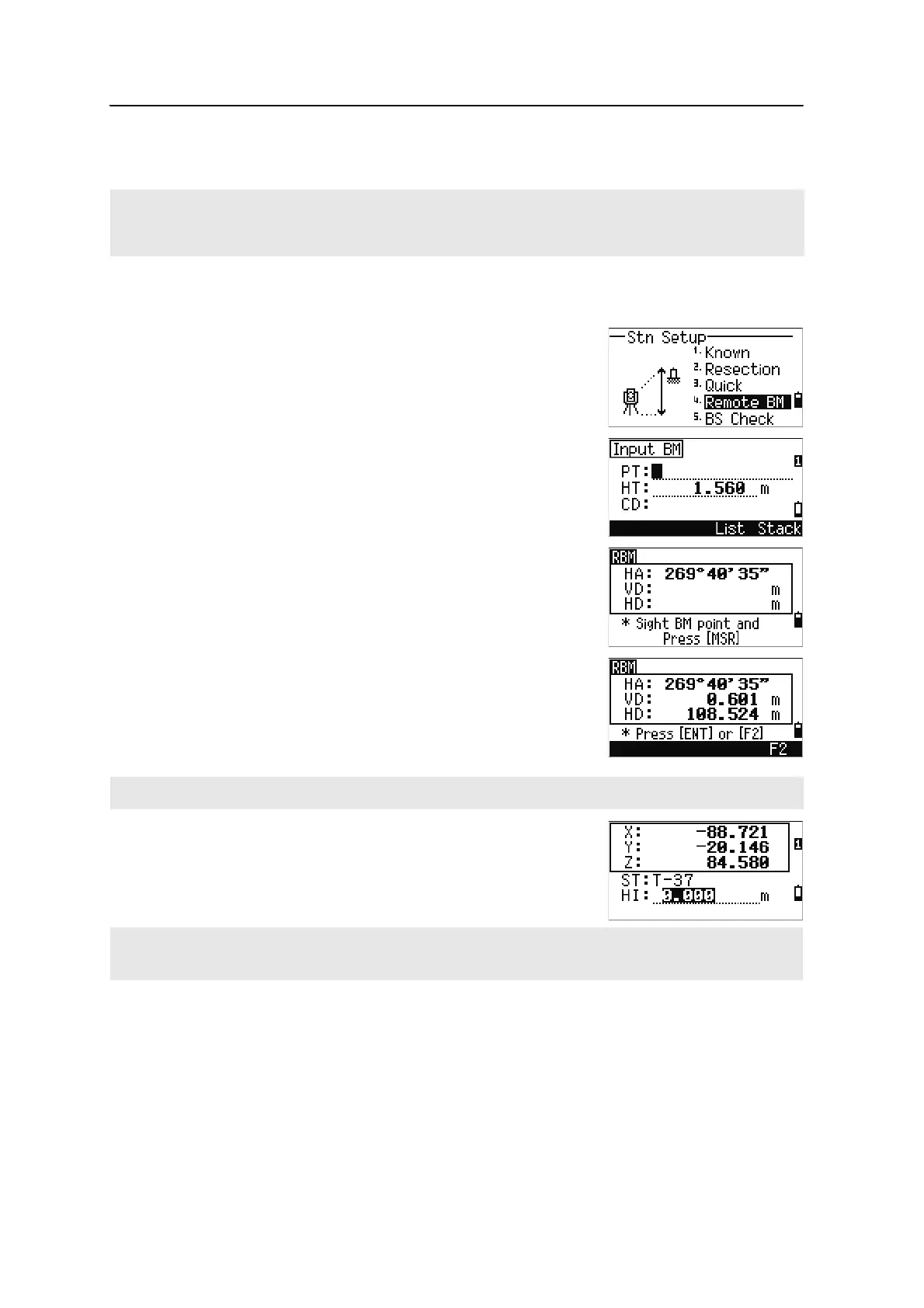
1. Press [4] or select Remote BM in the Stn Setup
menu.
2. Enter the BM point and press
[ENT]. When the
point is found, it appears briefly. The cursor then
moves to the HT field.
3. Enter the HT and press
[ENT].
4. Sight the BM point and press
[MSR1] or [MSR2].
5. To take an F1/F2 measurement, press the
F2
softkey or flip the telescope to Face-2 after a
distance measurement.
The updated station coordinates are displayed.
You can change the HI in this screen.
6. To record the updated STN, press
[ENT].
Even if both ST and BS are known points, this function does not calculate the backsight angle (AZ)
automatically. To calculate the AZ between two known points (ST and BS), use Station Setup >
Known. For more information, see Setting up a station with known coordinates or azimuth, page 56.
The F2 softkey is not available on the N 5" and K 5" single face model.
When the HI is changed, the Z coordinate is updated before the station is recorded.
You must complete a station setup before you use the Remote Benchmark function.












 To Next Page