Nikon N Series/K Series Total Station Instruction Manual 57
Applications 4
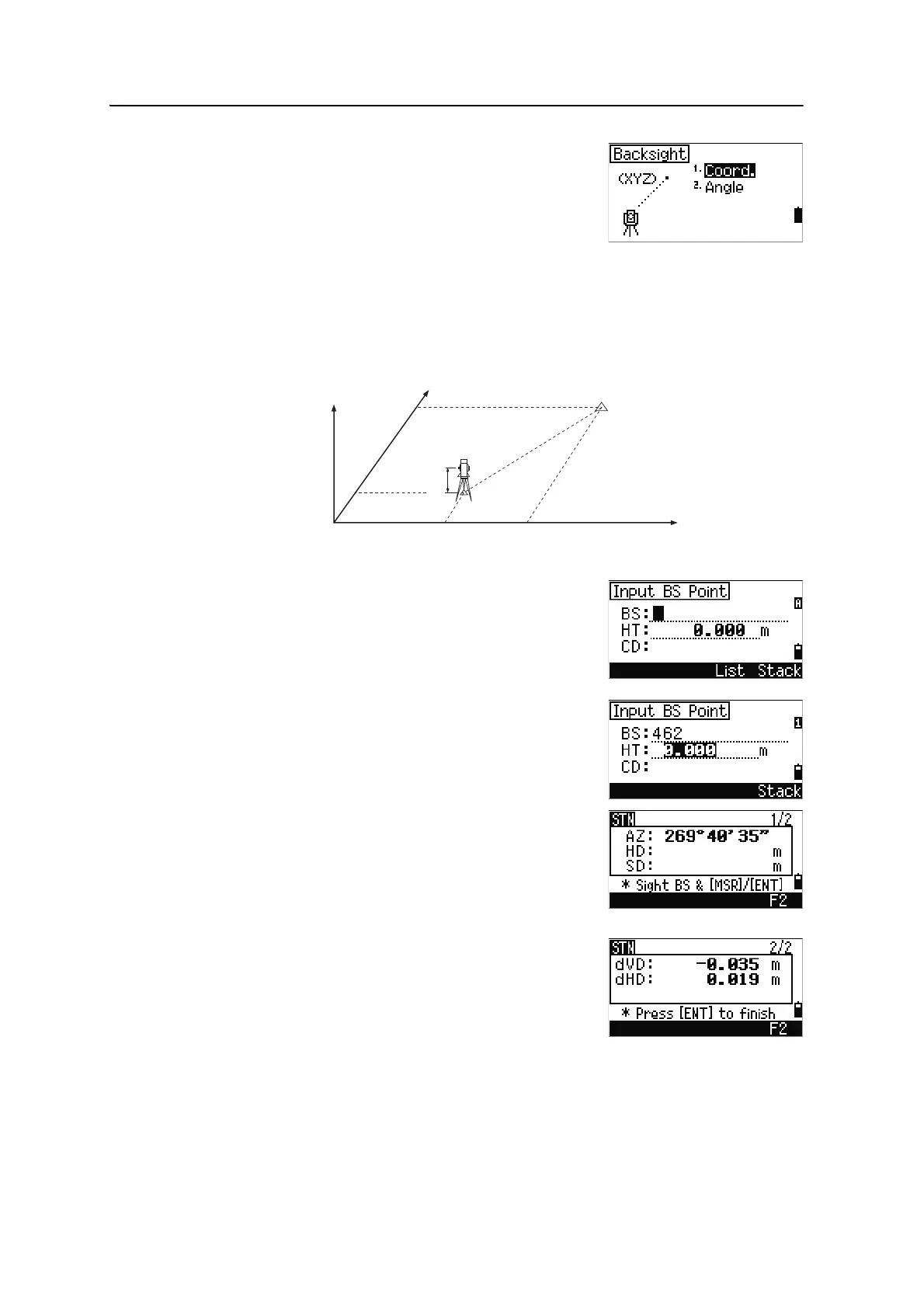
The Backsight screen appears.
4. Select an input method for defining the
backsight point.
– To sight the backsight by entering
coordinates, see below.
– To sight the backsight by entering the azimuth and angle, see page 58.
Sighting the backsight by entering coordinates
1. To enter coordinates for the backsight point
(BS), press
[1] or select Coord in the Backsight
screen.
2. Enter the point name. If the point exists in the
job, its coordinates are shown.
3. If you intend to take a distance measurement to
the BS, enter the height of target in the HT field.
4. Sight the BS on Face-1 (F1). Press
[ENT] to
complete the setup.
– To record a full shot (with HA, VA, and SD
values) to the BS, press
[MSR1] or [MSR2].
– If you are measuring to a known coordinate
BS, press
[DSP] to display a QA screen. The
QA screen shows the dHD and dVD values,
which indicate the difference between the
measured distance and the distance
calculated from the known coordinates.
5. To record the station, press
[ENT].
AZ Azimuth calculated by coordinates
Z
Y
X0
X
Xb
Y0 Yb
Backsight point
(Xb, Yb, Zb)
Station point
(Xi, Yi, Zi)
Instrument height











 To Next Page