EasyManua.ls Logo

Nikon N65 - Page 29

Nikon N65
116 pages
Print Icon
To Next Page IconTo Next Page
To Previous Page IconTo Previous Page
Loading...
••••••••••••••••••••••
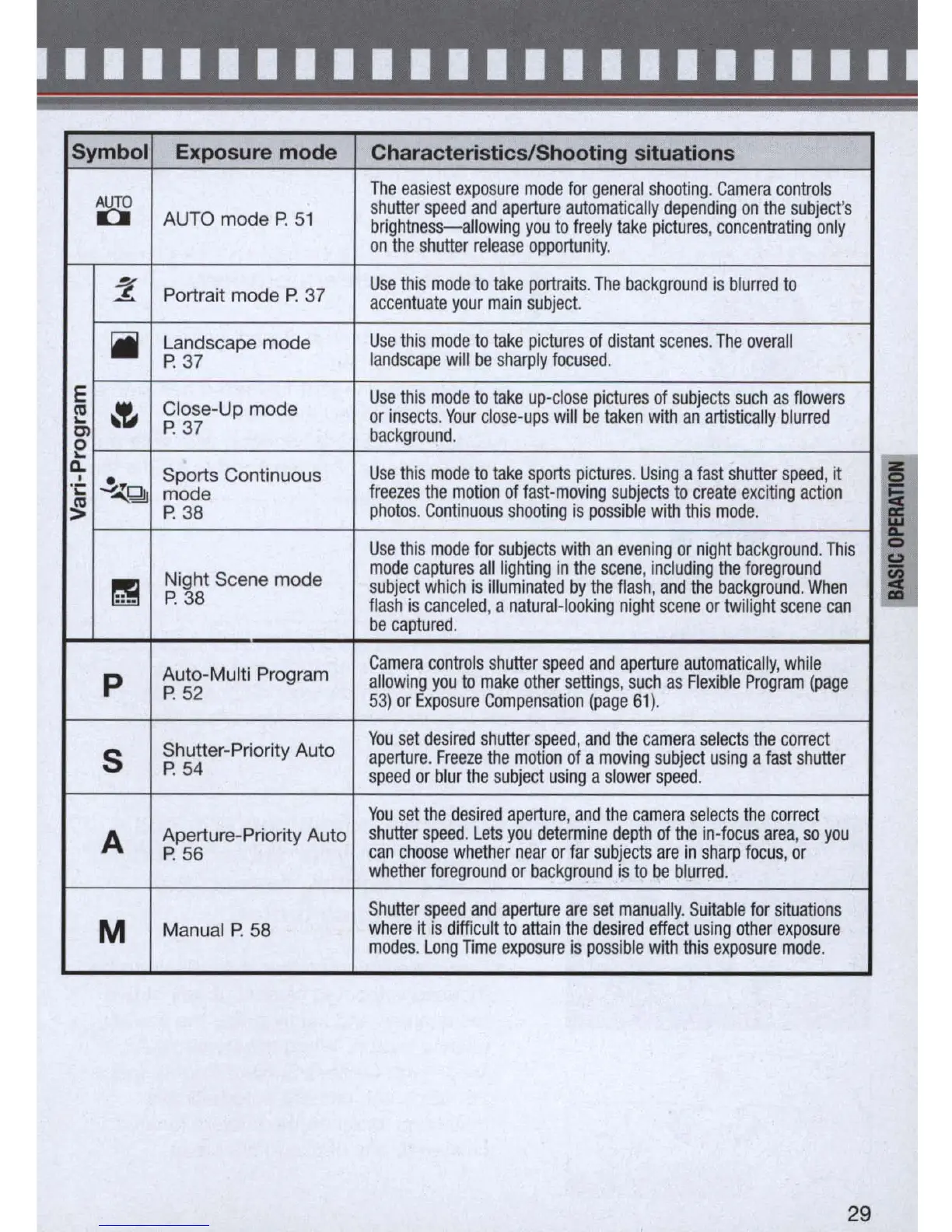
Symbol Exposure mode Characteristics/Shooting situations
g>
The
eas
ie
st ex
po
s
ure
mode
for
general
shooting
.
Camera
controls
AUTO
mode P.
51
shutt
er
speed
and
aperture
automat
i
cally
depend
i
ng
on
the
s
ubject
's
brightness-allowing
you
to
freely
take
pictures
,
concentrating
only
on
the
s
hutter
release
opportunity
.
~
Use
this
mode
to
take
portraits
.
The
background
is
blurred
to
..z
Portrait mode
P.
37
accentuate
your
main
s
ubject.
iI
Landscape mode
Use
this
mode
to
take
pictures
of
distant
scenes
.
The
overall
P.
37
landscape
will
be
s
harply
focused
.
E
~
Close-Up mode
Use
th
is
mode
to
ta
ke
up-close
pi
c
ture
s
of
subjects
such
as
flowers
(II
or
insects
.
Your
clo
se-
ups
will
be
taken
with
an
artistically
blurred
"-
P.
37
OJ
ba
c
kground
.
0
"-
~
~
~
Sports Continuous
Us
e
thi
s
mode
to
take
s
ports
pictures
.
Us
i
ng
a
fast
shutter
speed
,
it
.
;:
mode
fr
e
eze
s
the
motion
of
fast-moving
subjects
to
create
exciting
act
i
on
~
P
.3
8
photos
.
Continuous
shooting
is
possible
with
this
mode
.
Use
th
is
mode
for
subjects
with
an
evening
or
night
background
.
This
Night Scene mode
mode
captures
all
lighting
in
the
scene
,
including
the
foreground
!
~
subject
wh
i
ch
is
illuminated
by
the
flash
,
and
the
background.
When
P.
38
flash
is
canceled
, a
natural
-
looking
night
scene
or
twilight
scene
can
I
I
be
captured
.
Auto-Multi Program
Camera
controls
shutter
speed
and
aperture
au
tomatically
,
whi
le
p
allowing
you
to
make
other
settings
,
such
as
Flexible
Program
(page
P.
52
53)
or
Exposure
Compensation
(page
61)
.
Shutter-Priority Auto
You
set
desired
shutter
speed
,
and
the
camera
se
l
ects
the
correct
5
aperture
.
Freeze
the
motion
of
a
moving
subject
using
a
fast
shutter
P.
54
speed
or
blur
the
subject
using
a
slower
speed
.
You
set
the
desired
aperture
,
and
the
camera
selects
the
correct
A
Aperture-Priority Auto
shutter
speed
.
Lets
you
determine
depth
of
the
in
-
focus
area
,
so
you
P.
56
can
choose
whether
near
or
far
subjects
are
in
sharp
focus
,
or
whether
foreground
or
background
is
to
be
blurred
.
Shutter
speed
and
aperture
are
set
manually
.
Suitable
for
situations
M
Manual P.
58
where
it
is
difficult
to
attain
the
des
i
re
d
effect
usi
ng
other
expos
u
re
modes
.
Long
nme
exposure
is
possible
with
this
exposure
mode
.
29

Table of Contents

Related product manuals