••••••••••••••••••••••
-
--
--
-
•
In
Auto-Multi Program, Shutter-Priority Auto,
Aperture-Priority Auto
or
Manual exposure mode,
selected flash sync mode remains once it
is
set.
To
change the flash sync mode, rotate the Command
Dial
while pressing the 0 button to select another
flash sync mode.
•
In
8 (AUTO mode) or Vari-Program, turning the
power switch off or selecting another exposure
mode cancels the selected flash sync mode and
returns to its initial setting (table
on
page
86)
.
•
In
8 (AUTO mode) or Auto-Multi Program
exposure mode, the camera automatically controls
maximum available aperture according to the film
speed. See page 93.
• Continuous shooting cannot be used
in
flash
shooting even when
~
Q
(Sports Continuous mode)
is
selected.
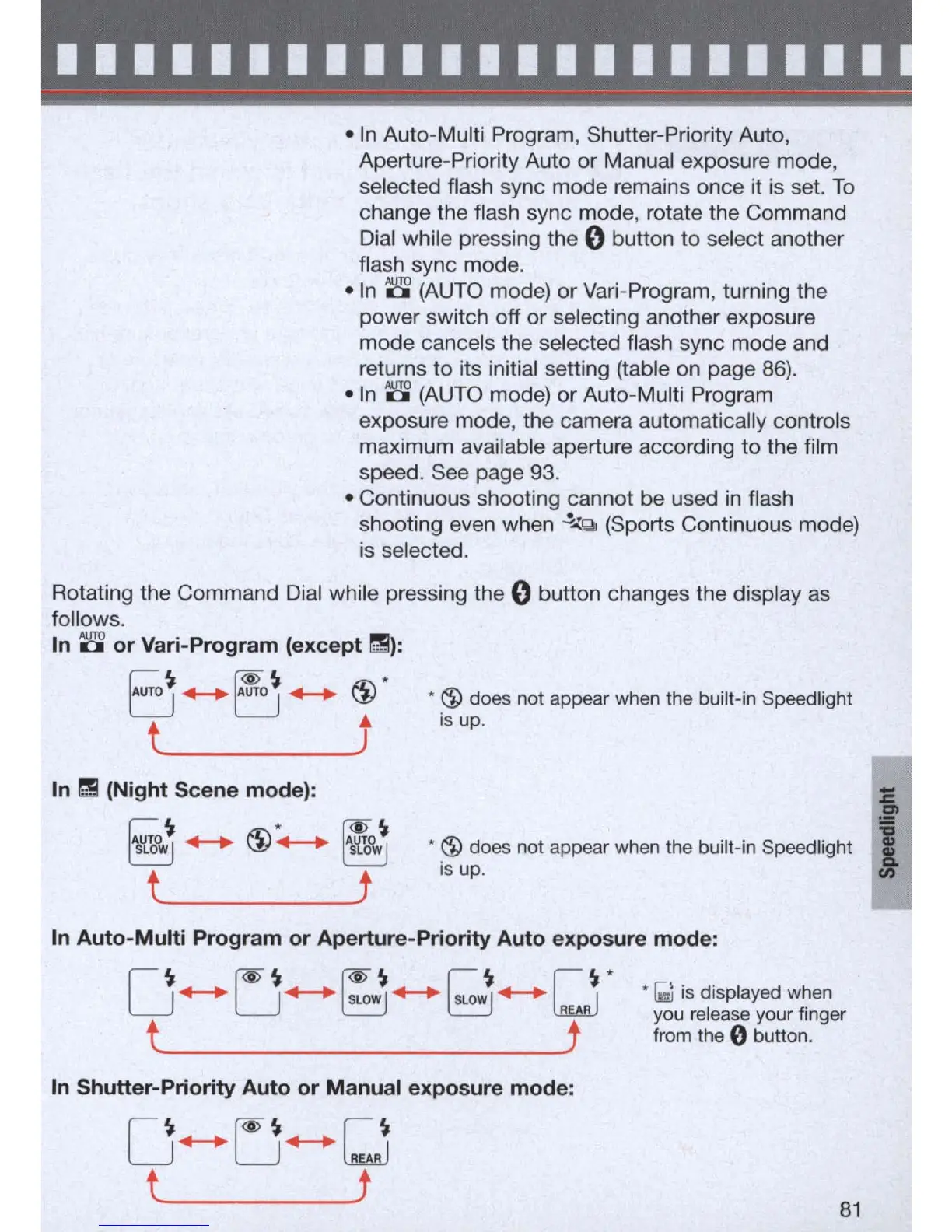
Rotating the Command
Dial
while pressing the 0 button changes the display
as
follows.
In
8
or
Vari-Program (except
~):
E~ ++ r~
++
@ *
..
t
__________
J
In
~
(Night Scene mode):
~o.,~
++
@:.-.
~o.,~
t
_____________
t
•
~
do
es
not appear when the built-in Speed light
is
up .
•
~
do
es
not appear when the built-in Speed light
is up.
In
Auto-Multi
Program
or
Aperture-Priority
Auto
exposure
mode:
O
f<i>
~
f<i>
~
I
~
I
~
*
++
U
+-+
~
++
~
++
l.a.wJ
t t
In
Shutter-Priority
Auto
or
Manual exposure
mode:
*
[;l
is displayed when
you release your finger
from the
0 button.
81
I



 To Next Page