110
1
Overview of close-up flash operation (using cords)
When used with cameras not compatible with CLS, close-up flash
operation is possible using the TTL Cord SC-30 (optional) to connect the
SU-800 and SB-R200.
• Close-up flash operation (using cords) is not possible with CLS-compatible cameras.
Notes on performing close-up flash operation (using cords)
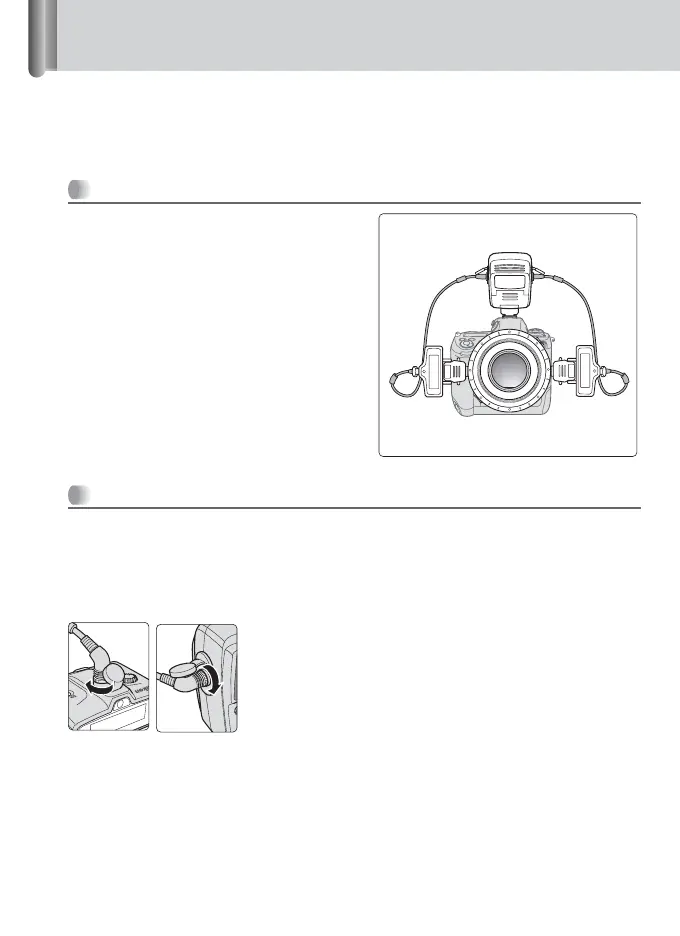
• As shown in the illustration, the SB-R200
connected to the right cord is assigned as
Group A, and the SB-R200 connected to the
left cord is assigned as Group B.
• When the SU-800 and SB-R200 are
connected using cords, operations of
[ON/Off] and Target light buttons on the
SB-R200 become ineffective. The settings of
the [GROUP] and [CHANNEL] select dials
become invalid.
• The SB-R200 turns on when the SU-800 is
turned on. The SB-R200 turns off when the
SU-800 is turned off.
Methods for setting up
1
Setting up the SU-800 and SB-R200.
Set up the SU-800 and SB-R200 in the same way as described in “Flash
operation
using the Nikon Close-up Speedlight Commander Kit R1C1”
(p. 28).
• The same set-up is applicable when using the Speedlight Stand AS-20.
2
Connect the flash units using cords.
Use the optional TTL Cord SC-30 to connect
between the TTL cord terminals of the SU-800 and
SB-R200.
Group B Group A
WIRELESS REMOT
E
SPEEDLIGHT
SB-R200







 To Next Page