28
Procedures for close-up flash operation
1
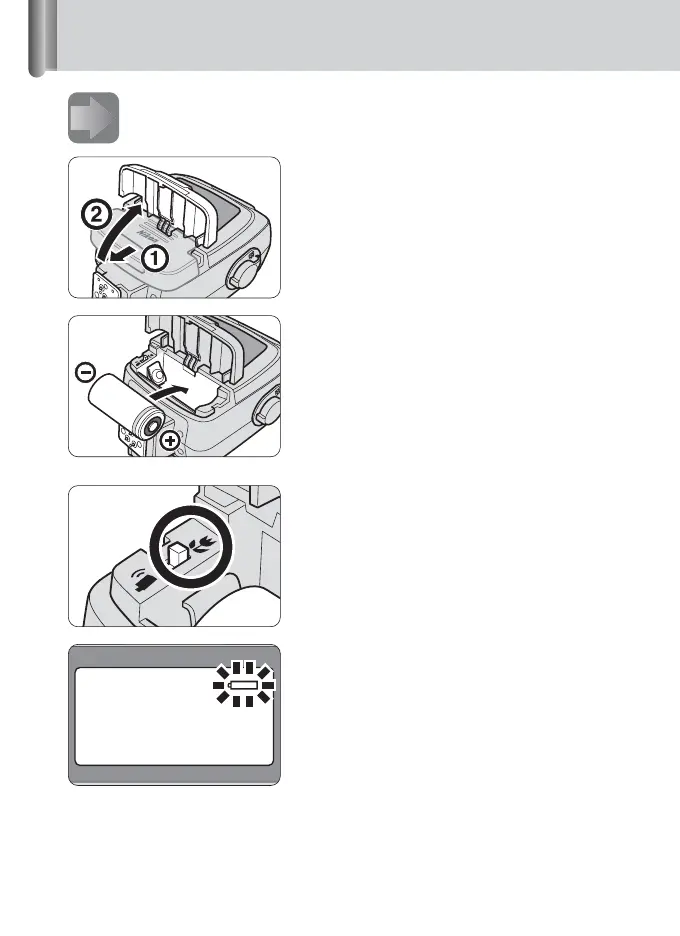
Installing batteries in the SU-800.
1
Slide open the battery chamber lid
in the direction of the arrow.
2
Install the battery, then close the
battery chamber lid by sliding it
back into place.
Use CR123A (3V) lithium batteries.
Confirming the close-up mode
setting
Make sure that the Commander/Close-up
select switch in the battery chamber is set
to “Close-up” position.
Replacing the battery
The Low Battery-power Indicator blinks
when the SU-800’s ready-light does not
come on within about 30 seconds of
turning on the power or after the flash has
fired.
• Replace the battery.
Battery
chamber







 To Next Page