38
Procedures for Commander flash operation
1
Setting Commander function on the SU-800.
The Commander function enables the SU-800 to act as a Commander unit to
trigger remote flash unit(s) without firing itself.
1
Install the battery in the SU-800 in the same way as No. 1 in
“Procedures for close-up flash operation.” (p. 28)
2
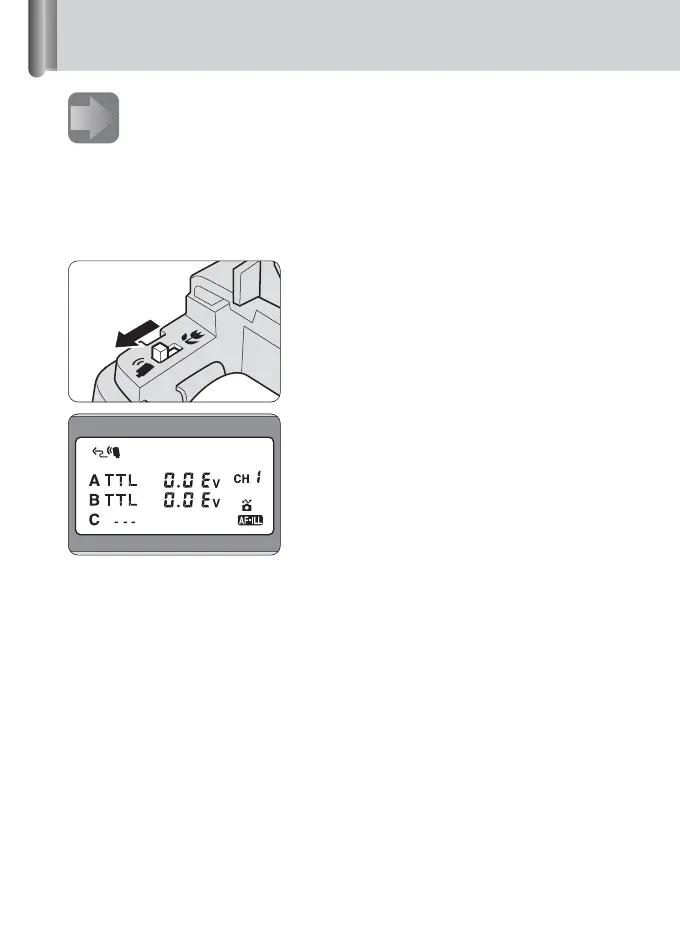
Set the Commander/Close-up select
switch on the SU-800 to
Commander function.
Use the Commander/Close-up select
switch to change the close-up function to
Commander function or vice versa.
3
Attach the SU-800 to the camera in the same way as No. 2 in
“Procedures for close-up flash operation.” (p. 29)
Battery
chamber
Display in Commander flash
operation







 To Next Page