33
Flash operation using the R1C1
5
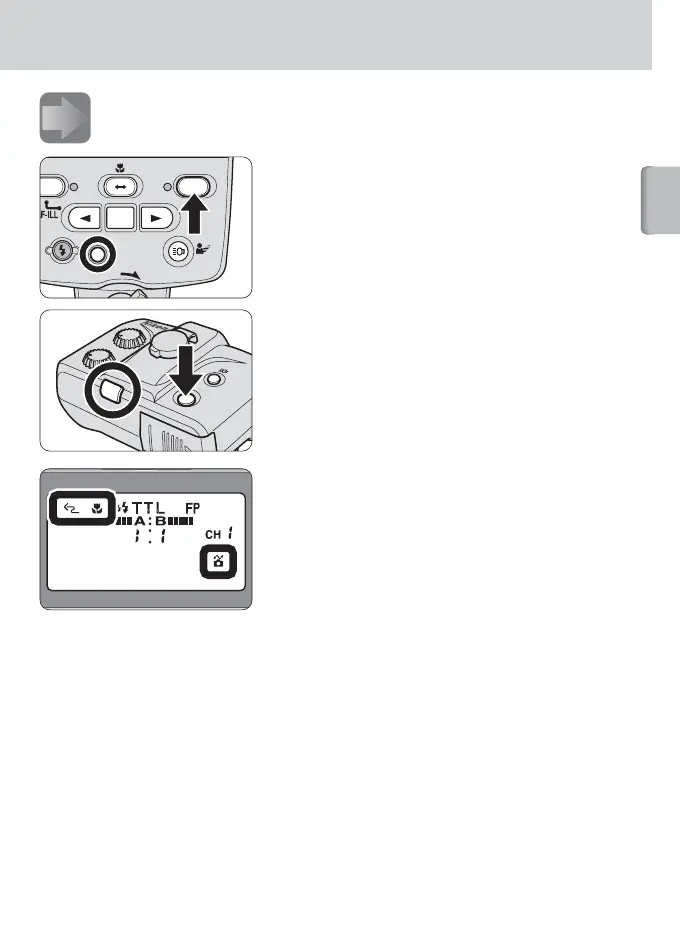
Turning on the camera, the SU-800 and SB-R200.
1
Press the [ON/OFF] buttons to turn
on the camera, the SU-800 and
SB-R200.
Ensure that the ready-light on the SU-800
comes on.
The ready-light on the SB-R200 lights up in
green when the power is on, then turns red
when the SB-R200 is fully recycled.
2
Check the indicators on the
SU-800’s LCD panel.
Confirm that Wireless flash, Close-up
mode and CLS-compatible camera
indicators are all displayed on the LCD
panel (p. 20).
O
N
/O
F
F
WIRELESS R
SPEEDLIGHT S







 To Next Page