2 Using the SU-800
56
4
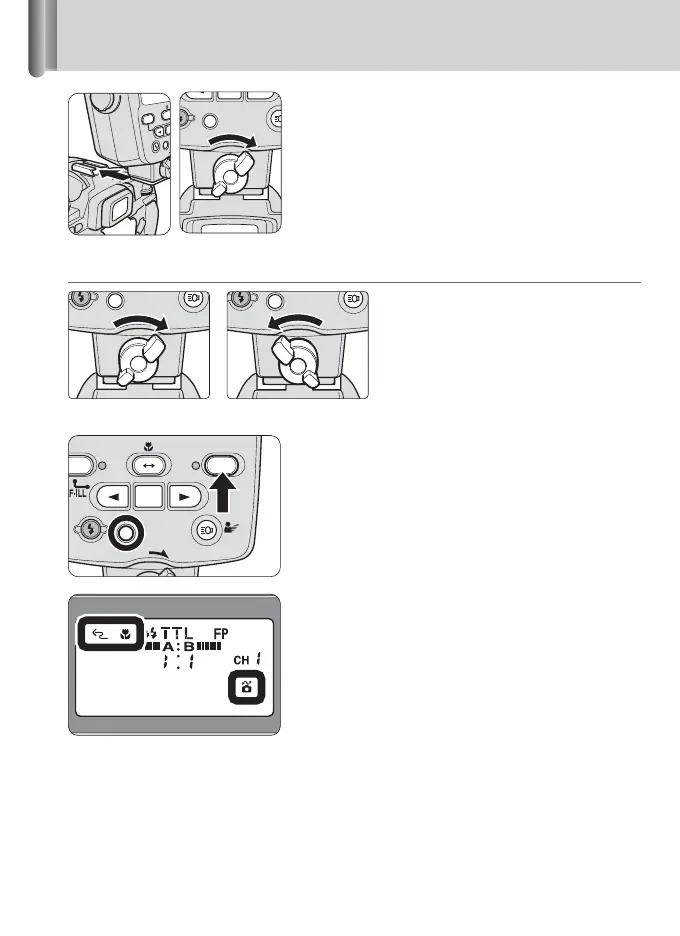
Rotate the Mounting Foot lock lever
to the left, slide the SU-800’s
Mounting Foot into the camera’s
accessory shoe and turn the lock
lever to the right.
Mounting Foot lock lever
To lock the SU-800 in place, turn the lock
lever clockwise approx. 90° until it stops.
To unlock, turn the lever
counterclockwise until it stops.
5
Press the [ON/OFF] buttons on the
camera and SU-800 to turn on the
power.
• Ensure that the ready-light on the SU-800
comes on.
6
Confirm the SU-800’s LCD panel.
Ensure that Wireless flash, Close-up mode
and CLS-compatible camera indicators
are correctly displayed.
Lock Unlock








 To Next Page